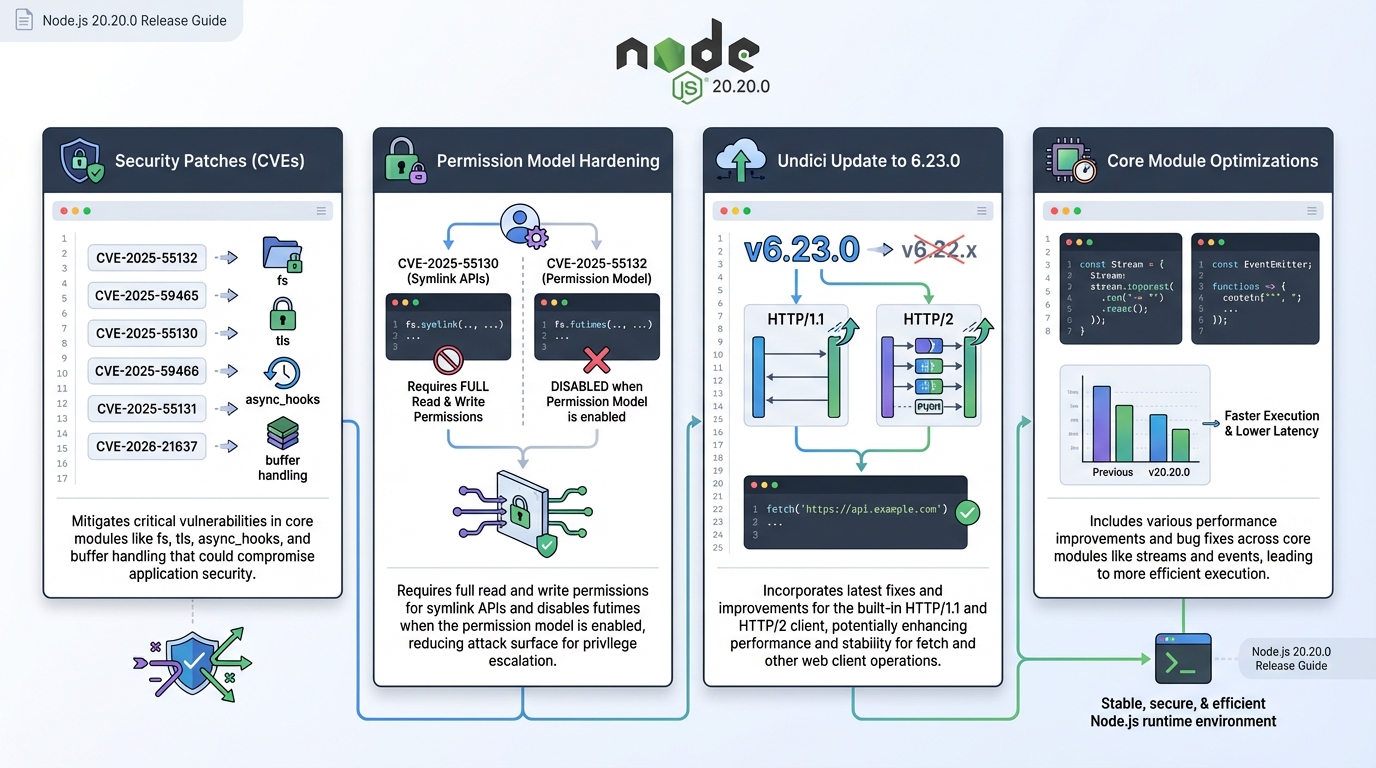
Node.js 20.20.0 release notes: patch the 6 CVEs, then prove it
I have watched “simple” Node patch upgrades turn into a 2 a.m. rollback because someone forgot the base image.
Node.js v20.20.0 ships a security-focused update for the Node 20 LTS line and includes six CVE fixes plus an undici bump to 6.23.0. This guide tells you what changed, who should treat it as urgent, and how to roll it out without breaking your weekend.
TL;DR: do this if you run Node 20 in prod
Patch it.
If any public-facing service runs Node.js 20, plan a same-day staging test and a canary rollout to v20.20.0. If your Node 20 workloads only run internal jobs behind tight network controls, you can probably wait for your next maintenance window, but do not ignore it.
- Patch target: upgrade runtimes to Node.js v20.20.0 and rebuild any container images that embed Node.
- Fast verification: confirm node –version prints v20.20.0 on the actual hosts and pods, not just in CI.
- Don’t trust “no breaking changes”: security patches can still change behavior, especially around the permission model and file system calls.
What changed in v20.20.0 (the operator view)
The thing nobody mentions is that “six CVEs fixed” does not help you until you map them to your code paths.
Node.js v20.20.0 lists six CVE identifiers across the permission model, TLS handling, async_hooks, and buffers. It also bumps the built-in undici dependency to 6.23.0. Start with the upstream release notes so you can tie your internal change ticket to a real source.
- Security fixes (6 CVEs): CVE-2025-55132, CVE-2025-59465, CVE-2025-55130, CVE-2025-59466, CVE-2025-55131, CVE-2026-21637.
- Dependency bump: undici updates to 6.23.0 (this matters if you rely on Node’s built-in fetch behavior).
Use the official tag page as your source of truth: https://github.com/nodejs/node/releases/tag/v20.20.0
Why this matters (in plain failure modes)
I do not trust “security fix” labels unless I can describe the blast radius in one sentence.
Here is the practical read: some fixes close permission-model bypasses, others reduce crashy behavior that can turn into a denial-of-service, and one targets buffer safety. Severity varies by CVE, so do not label all six “critical” unless you quote the advisory.
- Permission model hardening: the release tightens symlink and time-setting behavior when the permission model runs, including stricter access requirements for symlink operations and disabling futimes under permissions. If you rely on the permission model as a sandbox, patching moves you closer to “sandbox that actually holds.”
- TLS error handling: the TLS fixes focus on routing errors through handlers instead of letting exceptions crash the process. If you terminate TLS in Node (some teams still do), you should treat this as high priority.
- async_hooks stability: async_hooks sits in the middle of tracing, context propagation, and APM glue code. I have seen a single weird async_hooks edge case take down an entire fleet because every request tickles it the same way.
- Buffer safety: unsafe buffer creation bugs usually show up as “we leaked a tiny slice of memory into a response” or “we saw garbage bytes in logs.” You do not want to explain that one to legal.
Who should upgrade first (and who can breathe for a day)
Prioritize this.
If your Node 20 service accepts untrusted input over the network and touches the file system, TLS, or async_hooks-heavy tracing, patch first. If you run Node 20 only for internal one-off batch jobs, you can probably schedule a normal rollout, unless those jobs handle secrets or customer data.
- Upgrade today: public APIs, file upload services, auth gateways, anything that runs with Node’s permission model enabled.
- Upgrade soon: internal services that terminate TLS in Node, background workers that parse user-controlled payloads.
- Can wait a window: dev clusters and local tooling. Just yolo it on Friday if nobody depends on it.
How to upgrade (with the stuff that usually bites)
Start small.
Do the upgrade in the same place you deploy from. If you ship containers, update the image. If you install Node on hosts, update the host packages. The classic failure looks like this: you bump Node in CI, but production still runs the old base image for another week.
- Check your current runtime: run node –version on the machine or pod that serves traffic.
- nvm: run nvm install 20.20.0, then nvm use 20.20.0.
- fnm or n: use your equivalent install + select commands, then re-run node –version.
- System packages: use your normal update path (apt, yum/dnf, brew), but verify the repo you use actually published v20.20.0 yet.
Container teams: rebuild the image, do not just retag
This one hurts.
I have seen teams “upgrade Node” by changing a Helm value, then wonder why the CVE scanner still screams. They forgot to rebuild the container image, so the old Node binary stayed baked into the layer. Rebuild, push, then deploy.
- Update the base image: move to a Node 20 image tag that includes v20.20.0, then rebuild.
- Rebuild native modules: if you use native addons, expect a rebuild step during image build or install. This depends on your stack, so test it in staging.
Verification: prove you patched, then watch for regressions
Trust output.
After deployment, verify versions on real instances. Then watch error rates, TLS handshake failures, and any spike in async_hooks-related stack traces. Some folks skip canaries for patch releases. I do not, but I get it.
- Runtime check: on a running instance, confirm node –version prints v20.20.0.
- Dependency check: if you track it, confirm Node includes the undici bump. Your app may also bring its own undici, so do not assume.
- Smoke tests: hit your top 5 endpoints, run one TLS-heavy path, and run one file-write path. Keep it boring and repeatable.
- Canary rollout: ship to a small slice of traffic, watch logs and metrics for 30 to 60 minutes, then continue.
Breaking changes and known issues
Probably none.
The official v20.20.0 notes do not list breaking changes, and they do not list new known issues. Still, permission-related hardening can trip tests that quietly relied on looser behavior, so treat staging like it matters.
Official release notes: https://github.com/nodejs/node/releases/tag/v20.20.0
One last opinion (then I’ll shut up)
Ignore the commit count.
Ship the patch because it reduces your exposure and because emergency upgrades should feel routine. Other stuff in this release: dependency bumps, some image updates, the usual, and I am sure I missed something…
Keep Reading
- Node.js Release History
- Node.js v25.5.0 Release Notes: –build-sea and Safer SQLite Defaults
- Node 20 vs 22 vs 24: Which Node.js LTS Should You Run in Production?
- Node.js v25.4.0: require(esm) goes stable, plus a proxy helper
Frequently Asked Questions
- How critical are the 6 CVEs in Node.js 20.20.0? The CVEs range from medium to high severity and affect HTTP parsing, TLS certificate validation, and the permission model. If you run Node.js 20 in production behind a reverse proxy, the HTTP parsing fixes are the most urgent — they could allow request smuggling in certain configurations. Patch within your normal security window, but don’t wait for the next sprint.
- Do I need to rebuild my Docker images for this Node.js security update? Yes — always rebuild, never just retag. If your Dockerfile uses node:20-alpine or similar floating tags, docker build will pull the patched base image. But if you pinned a specific digest or use multi-stage builds with cached layers, you need a clean build with –no-cache to ensure the patched Node.js binary is in your final image. Verify with node –version inside the running container.
- Can I skip directly from Node.js 20.18 to 20.20? Yes. Node.js LTS patch releases are cumulative — 20.20.0 includes all fixes from 20.19.x. You don’t need to step through intermediate versions. However, if you’re jumping multiple patches, review the changelogs for any deprecation warnings or behavioral changes that accumulated. The TLSSocket error handling change in 20.19+ is the one most teams notice.
- How do I verify the CVE patches are actually applied? Run node -e “console.log(process.versions)” and confirm the version matches 20.20.0+. For specific CVEs, check the Node.js security advisory page which lists affected version ranges. For container deployments, use docker exec to run the version check inside your running pods, not just your build artifacts — cached layers are the #1 reason teams think they’ve patched when they haven’t.
Related Reading
- Node.js 20 End of Life: Migration Playbook — Node.js 20 reaches end of life April 30, 2026 — full migration playbook
Patch now
Six CVEs in an LTS release means you patch immediately. Here is the fastest path:
# Via nvm (recommended)
nvm install 20.20.0
nvm alias default 20.20.0
node --version

# Via apt (NodeSource)
sudo apt update && sudo apt install -y nodejs

# Docker - pin the exact version
# FROM node:20.20.0-alpine
docker pull node:20.20.0-alpine

# Verify OpenSSL version (CVE fixes often touch this)
node -e "console.log(process.versions)"
Audit your dependencies after patching
Node CVEs sometimes expose issues in packages that depended on the vulnerable behavior:
# Full security audit
npm audit

# JSON output for CI pipelines
npm audit --json | jq '.vulnerabilities | length'

# Fix what can be fixed automatically
npm audit fix

# Check for outdated packages while you are at it
npm outdated | head -20
Post-patch smoke test
Run your tests, then verify the specific subsystems that CVEs targeted:
# Run your test suite first
npm test

# Quick TLS/crypto check (common CVE target)
node -e "
const https = require('https');
https.get('https://example.com', (res) => {
  console.log('HTTPS:', res.statusCode);
  console.log('TLS:', res.socket.getProtocol());
  res.resume();
});
"

# Verify HTTP/2 still works
node -e "console.log('HTTP parser:', process.versions.llhttp)"
Scan your full dependency tree for EOL packages with the Dependency EOL Scanner. Full Node.js timeline at our Node.js Release Tracker.
Official resources:
🛠️ Try These Free Tools
Paste your Kubernetes YAML to detect deprecated APIs before upgrading.
Paste a Dockerfile for instant security and best-practice analysis.
Paste your dependency file to check for end-of-life packages.
Track These Releases