Node.js v25.5.0 Release Notes: –build-sea and Safer SQLite Defaults
I’ve watched “minor” Node upgrades break a Friday deploy. This one looks small, but it changes how you package apps and how SQLite behaves by default.
Node.js 25.5.0 shipped on January 26, 2026. The headline items are a new node –build-sea flow (backed by the LIEF library), an ignore filter for fs.watch, and SQLite defensive mode turned on by default in Node’s SQLite integration.
Should you upgrade now, or schedule it?
Upgrade now if you ship a desktop-style installer, a CLI, or anything you want as a single binary. Also upgrade now if you run SQLite in places you do not fully trust, like user-supplied files or plugin ecosystems.
Wait a sprint if your app depends on native addons you barely understand. I do not love upgrading Node runtimes blind when node-gyp sits in the dependency tree.
- Upgrade sooner: You want SEA builds, you rely on file watching, or you embed SQLite in customer machines.
- Upgrade carefully: You have Electron, native addons, or a pile of SQLite migration code that uses exotic PRAGMA settings.
- Probably safe to delay: You already pinned a stable Node in production, you do not use SQLite, and you do not ship binaries.
What actually changed in 25.5.0
Here’s the stuff you will notice during a real upgrade. Not the vanity list of commits.
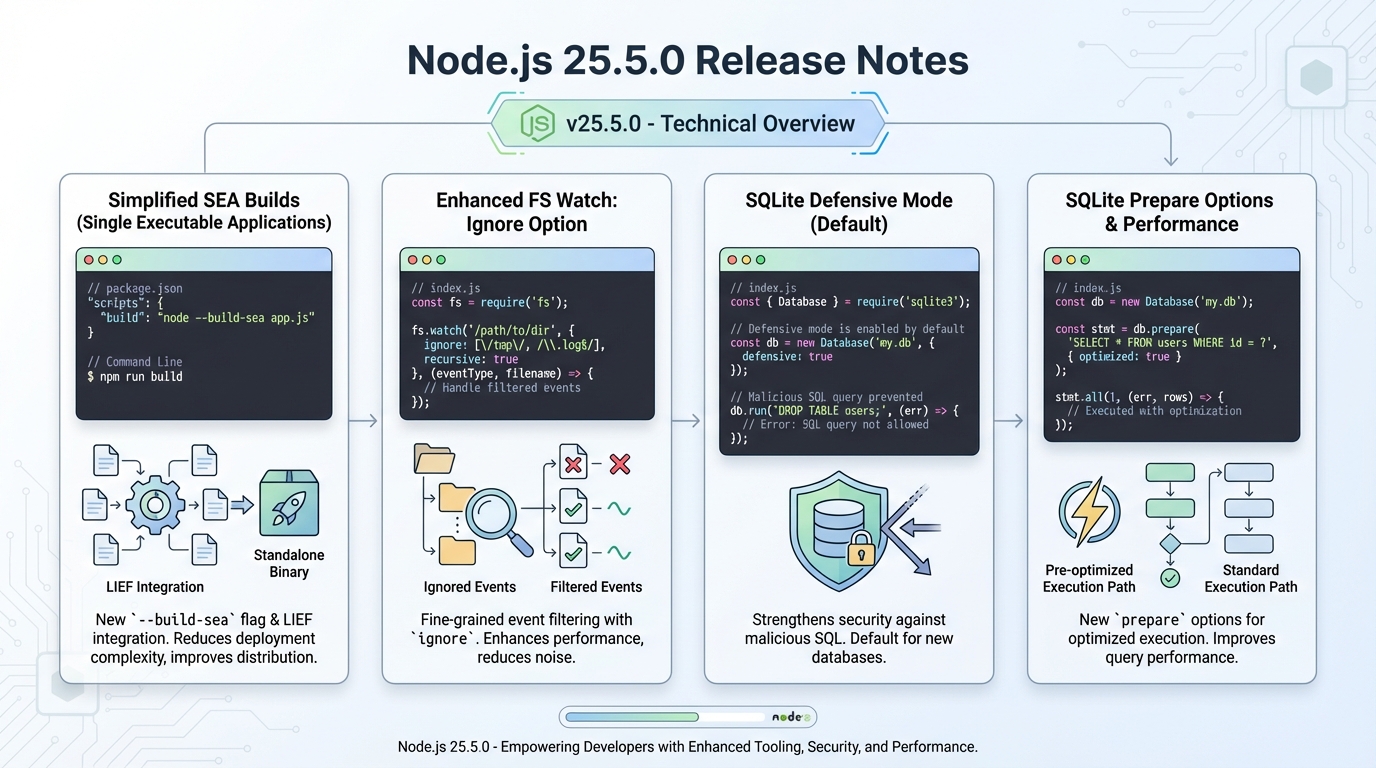
- SEA build flow in the Node binary: Node adds a –build-sea flag so you can generate a Single Executable Application straight from the Node binary, instead of stitching steps together with separate tooling.
- New core dependency (LIEF): Node now includes LIEF as a dependency to support the SEA build flow.
- fs.watch gets an ignore option: You can filter out specific paths or patterns so your watcher does not scream every time a log file rotates.
- SQLite defensive mode on by default: Node enables SQLite defensive mode by default in its SQLite support, which tightens what SQLite lets you do.
- SQLite statement prepare options: Node adds prepare options arguments so you can control how statements get prepared.
- Bug fixes you might actually hit: assert.deepStrictEqual handles mixed-type Sets and Maps correctly now, and cluster fixes a port reuse issue that can cause worker conflicts.
- Root certificate refresh: Node updates root certificates to NSS 3.119.
SEA: the new –build-sea flow (and the part nobody mentions)
SEA builds fail in the most annoying way. You think you shipped a single file, then your customer runs it on a fresh VM and it dies because your build process quietly assumed “a Node runtime exists somewhere.”
Node 25.5.0 cuts that risk by letting you build the SEA artifact directly with node –build-sea. You run one command, Node does the assembly work, and you get a more repeatable artifact.
- Copy-paste example: Run node –build-sea sea-config.json and keep the config file in your repo so CI and dev laptops produce the same output.
- CI reality check: Build the SEA on the same OS and CPU family you ship. Cross-building tends to “work” right up until the first user opens a ticket.
Ignore the GitHub commit count. It’s a vanity metric. Your users only care whether your release artifact starts in under a second.
fs.watch ignore: fewer event floods, fewer fake rebuilds
This bit me when we tailed logs into a watched directory. The watcher recompiled on every write, fans spun up, laptop battery died. Fun.
The new ignore option lets you drop noisy paths. That matters when your tooling reacts to watch events by rebuilding bundles, restarting servers, or running tests.
- Example: fs.watch(‘./dir’, { ignore: ‘*.log’ }, (event, filename) => { /* … */ }) filters out log churn.
- Edge case: File watching differs by platform. If you already fight Windows path casing or macOS fsevents quirks, test this on each OS you support.
SQLite defensive mode by default: good hardening, not a magic shield
SQLite “security” claims usually get sloppy. Defensive mode does not fix SQL injection in the way people mean it on incident calls.
Defensive mode mainly blocks or restricts SQLite features that can corrupt database files or do unsafe things if an attacker controls SQL text. You still need parameterized queries. You still need to treat user input like broken glass.
- What to test after upgrade: Run your migration suite and any code that sets unusual PRAGMAs. If something starts throwing errors, defensive mode probably triggered it.
- How to roll it out: For production, upgrade one service or one canary slice first, then watch error rates around database init and migrations.
SQLite prepare options: performance depends on your workload
Performance tuning through “new options” tends to disappoint. Most apps win more by fixing indexes than by tweaking statement preparation flags.
Still, prepare options help when you run the same statement shape thousands of times per minute, like a hot read endpoint with a small number of query templates.
- Practical advice: Benchmark with your schema and your data. Measure p95 latency, not just average throughput.
- Don’t overpromise: If someone tells you “this will be 20% faster,” ask for the script and the dataset size.
How I’d upgrade (without turning it into a weekend)
Take a snapshot. Seriously.
Then upgrade and run a tight test loop that hits the changed surfaces: SEA output, file watchers, and SQLite startup. For dev clusters, you can yolo it on Friday. For production, do not.
- Check current version: node –version
- Install with nvm: nvm install 25.5.0
- Smoke tests: Start the app, trigger your file watcher, run one SQLite migration, and run the test file that covers assert.deepStrictEqual with Sets and Maps.
Known issues
The official release notes do not list known issues for 25.5.0. That does not mean bugs do not exist. It only means nobody wrote them down.
Other stuff in this release: dependency bumps, some image updates, the usual.
Official release notes
Read the upstream notes before you ship: the GitHub release page includes the full list of changes and the linked PRs.
Keep Reading
- Node.js Release History
- Node 20 vs 22 vs 24: Which Node.js LTS Should You Run in Production?
- Node.js v25.4.0: require(esm) goes stable, plus a proxy helper
- Node.js v22.22.0 TLSSocket errors: why your app stops crashing (and why that scares me)
- Node.js 22.22.0 security release: what to patch and how to roll it out
Frequently Asked Questions
- What is –build-sea in Node.js 25.5.0? Single Executable Applications (SEA) let you bundle your Node.js app into a single binary that includes the Node.js runtime. The new –build-sea flag simplifies the build process — previously you needed a multi-step workflow with postject. Now it’s one command. Useful for CLI tools, edge deployments, and anywhere you can’t assume Node.js is installed.
- Should I use Node.js 25 in production? No. Node.js 25 is the Current (odd-numbered) release line, not LTS. It’s for testing new features and preparing for when these features land in Node.js 26 LTS (expected October 2026). Run it in development and CI to catch compatibility issues early, but keep production on Node.js 22 LTS or Node.js 24 LTS.
- What does SQLite defensive mode mean for Node.js? Node.js 25.5.0 enables SQLite’s defensive mode by default when using the built-in node:sqlite module. This prevents writing to shadow tables, disables certain PRAGMA commands, and blocks double-quoted string literals. It’s a hardening measure that reduces the attack surface if untrusted input reaches your SQL queries — but it’s not a substitute for parameterized queries.
- How does fs.watch ignore option reduce event noise? The new ignore option in fs.watch lets you filter out filesystem events by pattern (like ignoring node_modules or .git directories). Previously, watching a project directory would fire events for every file change including irrelevant ones, causing redundant rebuilds. Now you can reduce event floods at the OS level instead of filtering in JavaScript callbacks.
Working code examples
Here’s the actual code for each feature in Node.js 25.5.0:
// === SEA (Single Executable Application) ===
// Step 1: Create sea-config.json in your project root
{
  "main": "dist/cli.js",
  "output": "myapp-sea",
  "disableExperimentalSEAWarning": true,
  "useSnapshot": false,
  "useCodeCache": true,
  "assets": {
    "config.json": "config/default.json"
  }
}

// Step 2: Build the SEA
// Terminal:
// node --build-sea sea-config.json
// This produces a platform-specific binary you can distribute

// Step 3: Verify it runs standalone (no Node required):
// ./myapp-sea --version
// === fs.watch with ignore filter ===
import { watch } from 'node:fs';
// Before 25.5.0 — every .log file triggers your rebuild:
// watch('./src', { recursive: true }, (event, filename) => {
// rebuild(); // fires on EVERY file, including logs
// });
// After 25.5.0 — filter out noise:
const watcher = watch('./src', {
recursive: true,
ignore: /\.(log|tmp|swp)$/ // Ignore logs, temp files, vim swap
}, (event, filename) => {
console.log(`${event}: ${filename}`);
rebuild(); // Only fires for real source changes
});
// Clean up:
process.on('SIGINT', () => {
watcher.close();
process.exit(0);
});// === SQLite defensive mode (now ON by default) ===
import { DatabaseSync } from 'node:sqlite';
// Open a database — defensive mode is automatic in 25.5.0
const db = new DatabaseSync(':memory:');
// This works fine:
db.exec('CREATE TABLE users (id INTEGER PRIMARY KEY, name TEXT)');
const insert = db.prepare('INSERT INTO users (name) VALUES (?)');
insert.run('Alice');
// Defensive mode blocks dangerous PRAGMAs:
try {
db.exec('PRAGMA writable_schema = ON'); // BLOCKED by defensive mode
} catch (err) {
console.error('Blocked:', err.message);
// "Safety level may not be changed inside a transaction"
// or similar — defensive mode prevents schema corruption attacks
}
// If you NEED to disable it (migration scripts, etc):
// const db = new DatabaseSync('file.db', { defensiveMode: false });
// But seriously, leave it on unless you have a specific reason// === Statement prepare options (new in 25.5.0) ===
import { DatabaseSync } from 'node:sqlite';
const db = new DatabaseSync('app.db');
db.exec('CREATE TABLE IF NOT EXISTS hits (path TEXT, count INTEGER)');
// Prepare with options for frequently-used statements:
const upsert = db.prepare(
'INSERT INTO hits (path, count) VALUES (?, 1) ON CONFLICT(path) DO UPDATE SET count = count + 1',
{ persistent: true } // Keeps compiled statement in cache
);
// Hot path — runs thousands of times:
upsert.run('/api/health');
upsert.run('/api/users');
// Benchmark tip:
const start = performance.now();
for (let i = 0; i < 10000; i++) {
upsert.run(`/api/route-${i % 100}`);
}
console.log(`10K upserts: ${(performance.now() - start).toFixed(1)}ms`);Node.js 25.5.0 changelog: nodejs.org release notes. SEA documentation: Node.js SEA docs. SQLite defensive mode: SQLite DBCONFIG_DEFENSIVE. Track Node.js release health on the Node.js releases hub.
Related Reading
- Node 20 vs 22 vs 24: Which LTS to Run — The version decision for production Node.js
- Node.js 20 End of Life: Migration Playbook — EOL April 30, 2026
📦 Free tool: npm Package Health Checker — paste your package.json and instantly see which dependencies are deprecated, abandoned, or dangerously stale.
🛠️ Try These Free Tools
Paste your dependency file to check for end-of-life packages.
Plan your upgrade path with breaking change warnings and step-by-step guidance.
Paste your workflow YAML to audit action versions and pinning.
Track These Releases