Docker vs Kubernetes in Production (2026): Security-First Decision Rubric
No CVEs called out here, but your attack surface changes a lot depending on this choice. Patch this before your next standup.


Docker vs Kubernetes: Quick Comparison
| Factor | Docker Compose | Kubernetes |
|---|---|---|
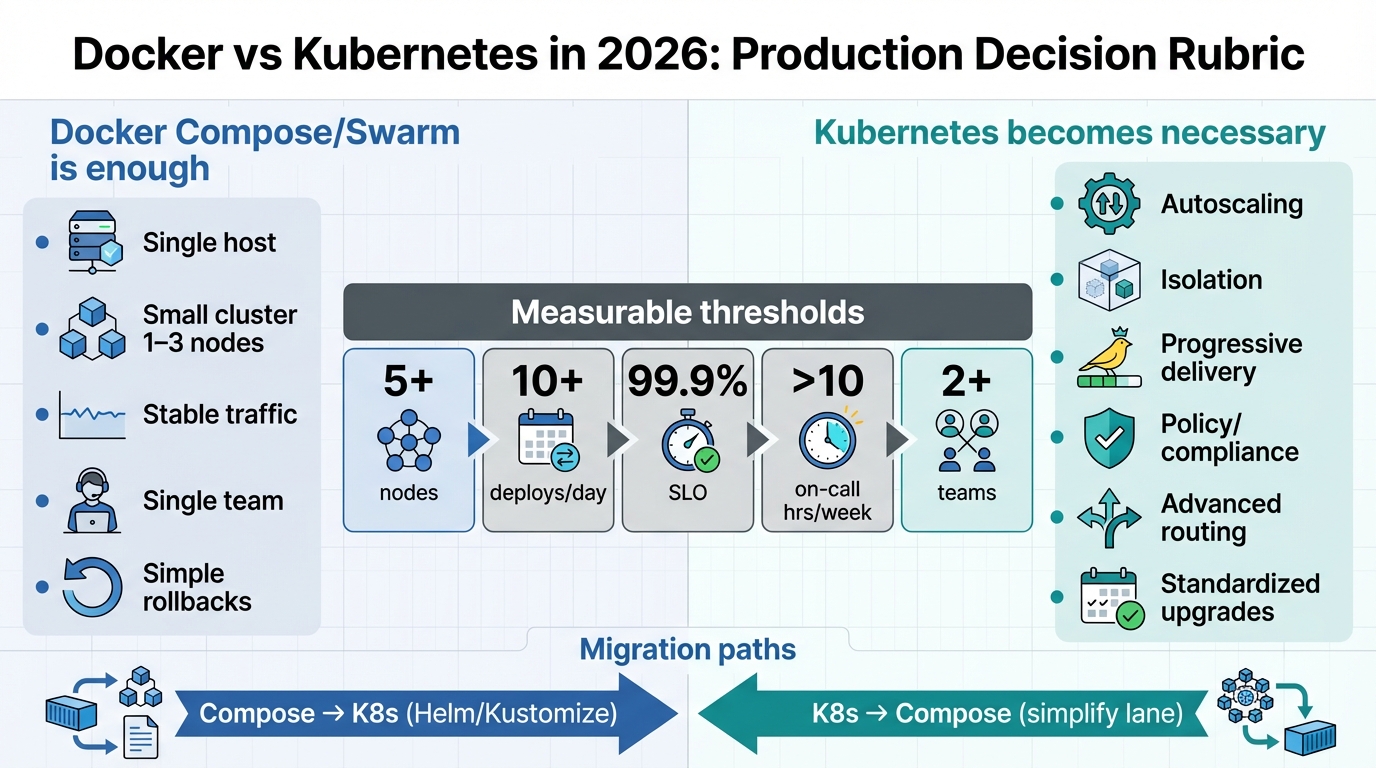
| Best for | 1-3 hosts, small teams | 5+ nodes, multiple teams |
| Setup complexity | Low (hours) | High (days-weeks) |
| Auto-scaling | Manual/Swarm | HPA + cluster autoscaler |
| Network policies | Host firewall | CNI NetworkPolicy |
| RBAC | All or nothing | Per-namespace |
| Rolling updates | Manual | Built-in + rollback |
| Version lifecycle | Continuous | ~14mo per minor |
| Ops team | 1 (part-time) | 2-3 or managed |
Security fixes and attack surface: what you actually inherit
I have watched teams “choose Kubernetes for scale” and then fail their next audit because nobody owned RBAC, admission policy, or log retention. The platform choice did not cause the failure. The missing controls did.
If you do not upgrade runtimes, you bank risk. That risk cashes out as a container escape on a Friday night, or as an incident report you cannot support because you did not keep audit logs.
- Docker Compose default risk: You concentrate trust on a small number of hosts. If an attacker lands on the node, they can usually reach everything on that node. Treat the host as the security boundary, patch the OS and Docker Engine on a schedule, and limit who can run docker commands.
- Kubernetes default risk: You add a control plane. You add kube-apiserver auth, kubelet exposure, RBAC sprawl, CNI policy gaps, and third-party controllers. If you do not lock this down, an attacker turns one compromised service account into lateral movement across namespaces.
- What happens if you do not upgrade: The advisory rarely waits for your change window. You accumulate known-vulnerable components (runtime, ingress controller, CNI, operators). Until we see a PoC, the real risk is hard to price, but the compliance risk stays obvious. “We planned to upgrade” does not pass an audit.
The advisory does not specify your environment. You own the blast radius. Reduce it first, then argue about orchestration features.
Breaking changes and lifecycle traps you should budget for
This bit me once. A team kept a cluster “stable” for a year, then hit an API removal during a rushed upgrade, and their deployment pipeline stopped cold.
So. Track lifecycle like you track TLS certs. Put dates on a calendar.
- Kubernetes support windows: Upstream only supports a small set of recent minors. If you run an unsupported cluster, you cannot credibly claim timely security patching. Your regulator will ask for evidence, not intentions.
- Ingress and edge churn: The ecosystem changes fast. If you pin everything on one ingress controller and it loses maintenance, you inherit a security patch gap with no clean migration path.
- Docker Engine and runtime changes: Docker Engine 29.x includes real behavior and dependency changes. Do not treat it as “just a patch.” Stage it, test it, and keep a rollback plan.
Decision rubric: choose the smaller blast radius you can actually operate
If you hit any Kubernetes threshold consistently, you already pay Kubernetes costs in human time. You just pay them during incidents, with worse tooling.
Keep this clinical. Count hosts, deploys, teams, and controls. Then decide.
- Choose Docker Compose when: You run 1 to 3 hosts, traffic stays predictable, and one on-call rotation owns the whole stack. You can rebuild a host fast, and you can prove restores.
- Choose Kubernetes when: You run 5+ nodes or frequent node churn, you deploy 10+ times/day across services, and multiple teams need hard isolation. You also need enforceable policy, not “we check in CI.”
- If you do not choose correctly: With Compose, you will bolt on homegrown schedulers and policy glue until it fails under stress. With Kubernetes, you will ship a large control plane with weak RBAC and no network policy, then you will spend weeks doing cleanup after a compromise.
When Docker Compose is enough: compliance-grade minimums
Compose works in production when you keep it intentionally small. Compose fails when people expect scheduler behavior and then learn, mid-incident, that “restart: unless-stopped” does not do placement, disruption budgets, or safe rollouts.
One rule. Prove restores.
- Rollback must be one command: Use immutable tags. Keep last-known-good tags. Do not deploy :latest, not even “temporarily.”
- Secrets stay out of git: Use Docker secrets or an external secret store. Rotate them. Audit access.
- Host rebuild under 60 minutes: If ransomware hits the node, you should rebuild from IaC, not hand-edit configs at 3 a.m.
When Kubernetes becomes necessary: map your incidents to controls
I do not recommend Kubernetes as a default. I recommend it when you need a control plane and you can staff it.
If you skip the controls, Kubernetes increases risk.
- Noisy neighbors and multi-team prod: Use namespaces, RBAC, quotas, and NetworkPolicy. If you do not, one compromised workload can probe east-west traffic and steal credentials.
- Compliance enforcement: Use admission policies and audit logs. If you keep policy only in CI, an on-call hotfix will bypass it the first time prod burns.
- Safer deploys: Use readiness checks, rolling updates, and disruption budgets. If you deploy “all at once,” your incident looks the same as Compose, just with more moving parts.
Migration paths: reduce unknowns before you move anything
Do not start by converting YAML. Start by making today boring: immutable images, health endpoints, metrics, and explicit dependencies.
Then migrate one service end-to-end. Not five services halfway.
- Compose to Kubernetes: Pick Helm or Kustomize and stick with it. Implement one stateless service with probes, resource limits, dashboards, alerts, and a rollback trigger based on 5xx and latency.
- Kubernetes to Compose: Downshift when you run fewer than 10 services, you do not need hard multi-team isolation, and cluster upgrades keep causing outages. If you do not downshift in that scenario, you will keep paying the “platform tax” while your app bugs stay unsolved.
Stateful services: PostgreSQL does not forgive optimism
Most migrations fail on state. Postgres turns “simple platform move” into a data-loss postmortem fast.
Prefer managed Postgres. Yes, even if you hate the bill.
- Safer default: Keep the database where it is. Move stateless services first. Test connection pooling, timeouts, and migrations under the new network path.
- If you self-host Postgres: Automate backups, store them offsite, and run a restore test monthly. If you cannot prove RPO/RTO, you do not have a backup plan. You have hope.
Some folks skip canaries for “platform” changes. I do not. Runtime upgrades change failure modes, and failures show up as security incidents when you lose logs or corrupt state.
Cost comparison: what Docker and Kubernetes actually cost to run
Teams undercount Kubernetes cost because they only count compute. Kubernetes cost includes the engineer who debugs etcd compaction, the admission webhook that breaks a Friday deploy, and the 20 hours spent migrating when upstream drops a beta API.
Here is a more honest breakdown.
- Docker Compose on a single VPS ($20-$100/month): You pay for the VM, a load balancer if you need TLS termination, and maybe a managed database. Total infrastructure cost for a small SaaS: $50-$200/month. The hidden cost is you. When the VM dies at 2 a.m., you are the orchestrator.
- Managed Kubernetes (EKS, GKE, AKS): Control plane fee ($70-$150/month on EKS, free on GKE Autopilot for small clusters), plus node compute, plus load balancer, plus persistent disks. Minimum viable production cluster: $200-$500/month for 2-3 nodes. The real cost is the engineer who keeps it running. Budget 20-40% of a senior engineer’s time for platform work in year one.
- Self-hosted Kubernetes: Do not do this unless you have a platform team. The compute savings disappear when you count the human time to manage etcd backups, cert rotation, and upgrade cycles. I have watched startups burn 3-6 months of eng time setting up k3s “to save money” and ship zero features.
Rule of thumb: if your monthly AWS bill is under $500, Kubernetes is probably not saving you money. It might be saving you from specific failure modes, but that is a different argument than cost.
Team size decision matrix
The best predictor of Kubernetes success is not traffic volume. It is whether you have someone who wakes up wanting to operate Kubernetes. If nobody on the team has that instinct, Compose will serve you better.
- Solo founder or 1-2 engineers: Docker Compose. Do not argue. You cannot afford the context-switching tax of a control plane. Use your time shipping features.
- 3-5 engineers, single product: Docker Compose unless you deploy 20+ times per day or run in multiple regions. If you feel the itch, try a managed Kubernetes cluster for one non-critical service first. Give it 3 months before migrating anything important.
- 5-15 engineers, multiple services: This is the inflection point. If teams step on each other during deploys, if you need hard resource isolation, or if compliance requires audit trails per service, Kubernetes starts earning its keep. Use a managed offering. Do not self-host.
- 15+ engineers or platform team exists: Kubernetes. You are already paying the coordination cost. Formalize it with a control plane, shared tooling, and golden paths. The platform team owns the cluster; product teams own their namespaces.
Monitoring and observability: you cannot secure what you cannot see
Both Docker and Kubernetes generate logs. Neither generates insight by default. The difference is how much telemetry plumbing you need to build.
- Docker Compose observability stack: Docker logs go to stdout. Ship them with Promtail or Fluent Bit to Loki or your SIEM. Add cAdvisor for container metrics, expose /metrics endpoints, scrape with Prometheus. Total setup: a few hours for a senior engineer. Works reliably because the surface area is small.
- Kubernetes observability stack: You get more telemetry for free (pod lifecycle events, resource usage per namespace, audit logs from the API server). But you also need to monitor the platform itself: etcd latency, API server request rates, kubelet health, and node conditions. Use the kube-prometheus-stack Helm chart as a baseline. Budget a full day to tune alerts so they do not page you for every evicted pod.
- The security gap: In both cases, most teams skip audit logging. In Docker, this means you cannot prove who ran which container or when. In Kubernetes, this means you cannot trace RBAC violations or detect token theft. Turn on audit logs before you need them. “We will add logging later” is how you end up in a breach report saying “unable to determine scope of compromise.”
What our version tracking data shows
We track release health across 300+ technologies via our badge service:
- K8s = 14% of all health checks, second only to Python. Docker sits at 1-2%.
- K8s users often check EOL versions (1.28, 1.29) still in production.
- Docker checks are rare because no hard EOL cutoffs. Teams stop checking.
Free tools: Dockerfile Linter | K8s Deprecation Checker | Stack Health
Bottom line
Choose Docker Compose when you can keep the system small and auditable. Patch the host, patch Docker Engine, lock down access, and practice restores.
Choose Kubernetes when you need isolation, policy enforcement, and progressive delivery, and you can operate the control plane without guessing. There’s probably a better way to score the trade-offs, but this rubric catches the failures I keep seeing…
Frequently Asked Questions
Should I use Docker or Kubernetes for production?
Docker Compose for 1-3 hosts. Kubernetes for 5+ nodes needing auto-scaling.
Can I use Docker without Kubernetes?
Yes. Docker Compose handles multi-container apps. Many run Docker alone.
Is Kubernetes overkill for small teams?
Often. Teams with fewer than 10 services find Docker Compose more practical.
What are the security differences?
K8s: NetworkPolicies, RBAC, Pod Security Standards. Docker: host-level security.
How do they scale differently?
Docker: simple replicas. K8s: HPA + cluster autoscaling. More powerful, more complex.
What does K8s EOL mean?
After ~14 months, no security patches. See K8s EOL schedule.
Side-by-side configs: Docker Compose vs Kubernetes deployment
Seeing the same app deployed both ways makes the complexity trade-off obvious. Here is a minimal web app with a database in each world.
Docker Compose (docker-compose.yml)
version: "3.9"
services:
  web:
    image: myapp:latest
    ports:
      - "8080:8080"
    environment:
      - DATABASE_URL=postgres://db:5432/app
    depends_on:
      - db
    restart: unless-stopped
    deploy:
      resources:
        limits:
          memory: 512M
          cpus: "0.5"
  db:
    image: postgres:16
    volumes:
      - pgdata:/var/lib/postgresql/data
    environment:
      - POSTGRES_DB=app
      - POSTGRES_PASSWORD_FILE=/run/secrets/db_pass
    secrets:
      - db_pass
volumes:
  pgdata:
secrets:
  db_pass:
    file: ./secrets/db_password.txt
Kubernetes Deployment + Service
apiVersion: apps/v1
kind: Deployment
metadata:
  name: web
spec:
  replicas: 3
  selector:
    matchLabels:
      app: web
  template:
    metadata:
      labels:
        app: web
    spec:
      containers:
        - name: web
          image: myapp:latest
          ports:
            - containerPort: 8080
          env:
            - name: DATABASE_URL
              valueFrom:
                secretKeyRef:
                  name: db-credentials
                  key: url
          resources:
            limits:
              memory: "512Mi"
              cpu: "500m"
            requests:
              memory: "256Mi"
              cpu: "250m"
          livenessProbe:
            httpGet:
              path: /healthz
              port: 8080
            initialDelaySeconds: 10
---
apiVersion: v1
kind: Service
metadata:
  name: web
spec:
  selector:
    app: web
  ports:
    - port: 80
      targetPort: 8080
Health check comparison
# Docker Compose: basic health check in compose file
# Add to the web service:
#   healthcheck:
#     test: ["CMD", "curl", "-f", "http://localhost:8080/healthz"]
#     interval: 30s
#     timeout: 5s
#     retries: 3

# Kubernetes: check pod health and restart counts
kubectl get pods -l app=web -o wide
kubectl describe pod web-abc123 | grep -A10 "Conditions"
Official references
- Docker Compose file reference – the full specification for
docker-compose.yml, including deploy constraints, secrets, and health checks. - Kubernetes Deployments documentation – how Deployments manage ReplicaSets, rolling updates, and rollback strategies.
- Moby project on GitHub – the open-source engine behind Docker, where runtime issues, CVEs, and release notes are tracked.
Keep Reading
- K8s Version Support & EOL Schedule
- Dockerfile Security Linter
- K8s Deprecation Checker
- Docker Compose Checker
Related Reading
🛠️ Try These Free Tools
Paste your Kubernetes YAML to detect deprecated APIs before upgrading.
Paste a Dockerfile for instant security and best-practice analysis.
Paste your docker-compose.yml to audit image versions and pinning.
Track These Releases