Firefox 148: Disable AI Features with the New Kill Switch
Block 2 hours for this one. Firefox 148 changes where AI features live, how they hide, and how they delete local models when you flip states.
Breaking changes (read this before you upgrade)
I have watched “optional” features come back after a routine browser update and turn into a week of tickets. This release tries to stop that, but it also adds new states and a couple of UI traps you need to test in a pilot.
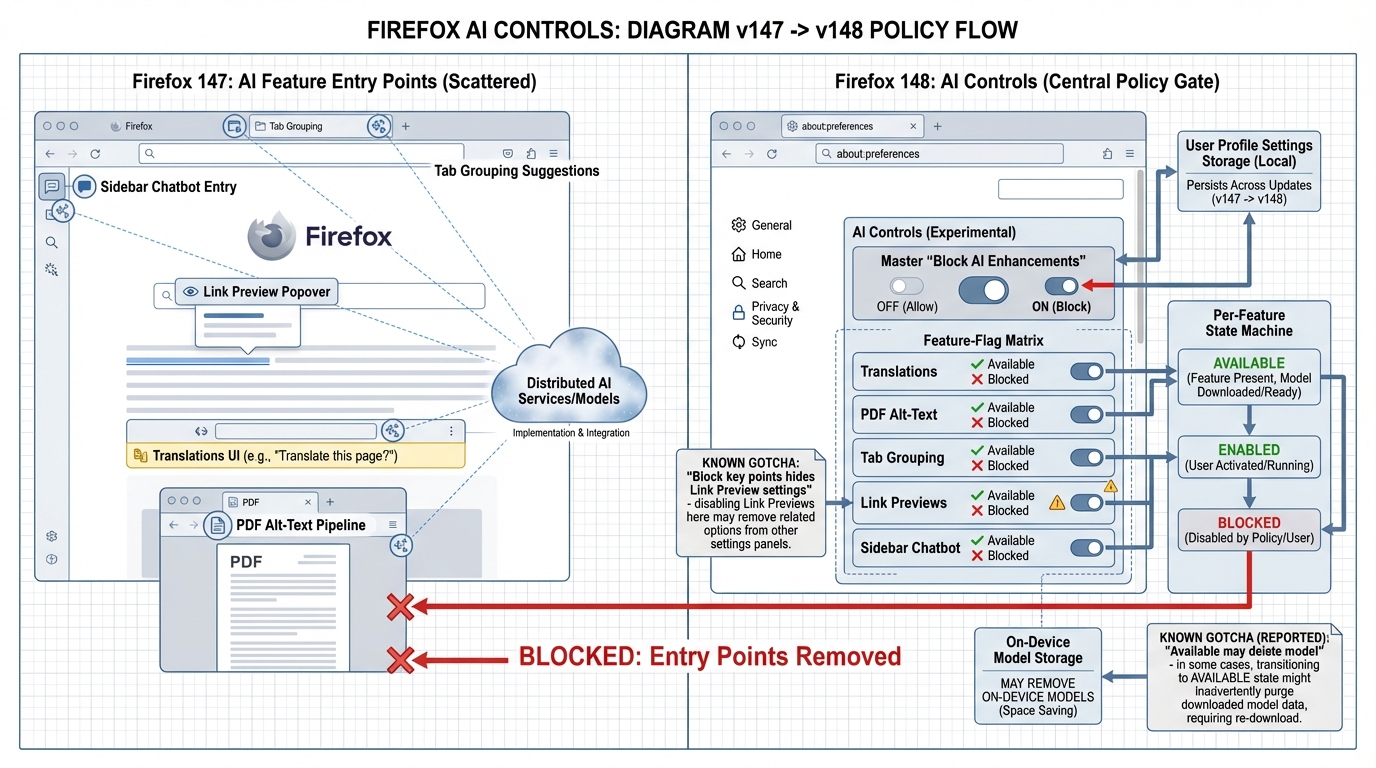
- New centralized AI controls in Settings: Firefox 148 adds an “AI controls” section in about:preferences (tracked in Bug 2006250). Plan for users to notice it, click it, and ask why they cannot enable things that policy blocks.
- Per-feature state machine you must understand: Each AI feature can sit in Available, Enabled, or Blocked. Treat this like a config migration, not a UI toggle, because state changes can affect on-disk model files.
- UI foot-gun in Link Previews: Blocking “Key points in Link Previews” can hide the rest of Link Preview settings (Bug 2013867). Your testers will report “Settings disappeared.” They probably did not lose config, but it looks like they did.
- Counterintuitive model deletion behavior: Reports say switching a feature to Available can delete downloaded models (Bug 2013838, RESOLVED WONTFIX). Assume disk churn until you prove otherwise in your environment.
If you run a managed Windows fleet with strict helpdesk SLAs, do not skip the pilot. If you only manage dev laptops, you can probably move faster, but still back up a profile first.
Migration steps (methodical checklist)
Do this in order. It keeps you out of the “we flipped the toggle and now disk usage changed on 4,000 endpoints” meeting.
1) Decide your target state
Pick one policy posture and write it down. “Block everything AI” works for some orgs, but others need Link Preview summaries or tab grouping suggestions for specific groups, so this depends on your setup.
- Default stance (recommended for production fleets): Set AI features to Blocked unless a business owner requests an exception.
- Exception stance (small group): Allow Enabled only for a named pilot group. Do not let “Available” mean “users can self-enable without a ticket” unless you want inconsistent behavior across machines.
2) Stage the rollout
Start with Firefox Nightly or Beta so you can see the AI controls UI before stable lands. Then run a canary, then a pilot, then broad rollout. Ignore the GitHub commit count. It is a vanity metric.
- Canary: 5 to 20 machines owned by IT. Break it here, on purpose.
- Pilot: 50 to 200 users across roles. Include at least one low-bandwidth user and one shared-device scenario if you have them.
- Broad rollout: Roll by department or ring. Freeze changes for 48 hours after each ring to let tickets surface.
3) Back up before you touch states
Back up at least one real user profile directory from each OS you support. This matters because model caches and feature state can change when you toggle from Blocked to Available, and the semantics confuse even careful testers.
- Minimum backup: Copy the whole Firefox profile directory for 3 pilot users before you test state flips.
- What to record: Profile directory size, list of large files, and the timestamp of the last browser start. Make it easy to prove “the upgrade did this.”
What’s new in Firefox 148 (the parts you will actually hear about)
So. The thing nobody mentions is that every new UI entry point creates a policy support ticket. Firefox 148 improves centralized control, but it also adds new surfaces users will click.
- Master “Block AI enhancements” control: Mozilla positions AI controls as a place to block current and future generative AI features, not just turn off one experiment (Bug 2006250). That is useful governance, assuming it persists the way the docs imply.
- “AI Window” switcher button: Firefox adds a new AI Window switching affordance (Bug 2006469). Expect at least one user to discover it on day one and ask why it does nothing under policy.
- Tab grouping suggestion change: Firefox switches the default tab grouping suggestion method to Logistic Regression (Bug 2005242). I like this direction because I prefer boring, debuggable behavior, but measure CPU anyway in your pilot.
What to test (acceptance tests and red flags)
Test like you expect it to break. You will sleep better.
UI and policy behavior
- Controls exist where you expect: Open about:preferences. Confirm the AI controls section appears on your chosen channel (Nightly, Beta, then stable).
- Blocked removes entry points: Set a feature to Blocked. Verify the related UI entry points disappear, not just gray out. If they do not, treat it as a policy drift risk.
- Link Preview settings “disappear” case: Block “Key points in Link Previews” and confirm whether the rest of Link Preview settings vanish (Bug 2013867). Write a helpdesk note now, not after the first panic ticket.
Disk churn and model lifecycle
- Model deletion on state flip: Flip a feature from Enabled to Available and check whether downloaded models get deleted (Bug 2013838). If you see deletions, decide whether you want that behavior during rollout or only during device reprovisioning.
- Bandwidth spikes: Watch for unexpected re-downloads after toggles. If your VPN saturates at 9 a.m., you will feel it fast.
I do not trust “known issues: none” from any project. Treat Beta findings as real until you prove they do not reproduce on stable.
Rollback plan (do this if the pilot goes sideways)
Keep rollback boring. Do not improvise in the middle of a ticket storm.
- Fast rollback (preferred): Revert the managed configuration back to your pre-148 posture. Aim to fix the policy first, not individual endpoints.
- Stop the rollout ring: Pause the next ring for 48 hours. Let the ticket queue settle, then decide whether you can ship a mitigation note or you need a full revert.
- Profile recovery: If model files or settings changes caused user-visible breakage, restore a known-good profile from your pilot backups, then re-test with a single controlled state change.
- Version pinning (last resort): If a blocker bug hits production workflows, pin Firefox to the previous approved version/channel until Mozilla ships a fix. This depends on your update tooling and compliance requirements.
Other stuff in this release: some UI wiring, some model behavior tweaks, the usual. Does anyone actually read these changelogs line by line?
Frequently Asked Questions
- How do I disable AI features in Firefox 148? Open about:config, search for “browser.ml”, and set browser.ml.enable to false. This is the kill switch that disables all machine learning and AI-related features in Firefox, including AI-powered suggestions and any future ML integrations. For enterprise deployments, you can enforce this via Group Policy or autoconfig files to prevent users from re-enabling it.
- What AI features does Firefox 148 include? Firefox 148 integrates on-device AI capabilities for features like smart tab suggestions, text summarization, and enhanced search suggestions. These use local ML models — your data doesn’t leave the browser. However, the models consume additional memory and CPU. The browser.ml.enable preference controls the entire AI subsystem at once rather than individual features.
- Does Firefox 148 send data to Mozilla for AI features? No. Firefox’s AI features run entirely on-device using local machine learning models. Unlike Chrome’s cloud-based AI features, Firefox downloads the models once and runs inference locally. No browsing data, text content, or usage patterns are sent to Mozilla’s servers for AI processing. This is a deliberate privacy-first design choice.
- Should I upgrade to Firefox 148 or wait? Upgrade if you’re on 147 or earlier — the security fixes alone justify it. If you’re concerned about the AI features, upgrade and immediately set browser.ml.enable to false. The AI features are opt-in by default in most configurations, but enterprise admins should proactively disable them via policy if AI tooling isn’t approved for your environment.
Related Reading
- Firefox 148 Location.ancestorOrigins — The iframe SSO change to watch
- Fix Firefox Virtual Desktop Behavior — Two about:config prefs that fix it
- Chrome Third-Party Cookies: What Breaks — The privacy change affecting every web app
- How to Add Version Health Badges — Track release health in your README
Disable AI features right now
If you want AI features off before Firefox 148 even lands, these about:config flags work today:
# Open about:config in Firefox and set these:
# Core AI chatbot integration
browser.ml.chat.enabled = false
browser.ml.chat.sidebar = false

# AI-powered suggestions
browser.urlbar.quicksuggest.enabled = false
browser.urlbar.suggest.quicksuggest.sponsored = false

# Telemetry that feeds AI models
toolkit.telemetry.pioneer-new-studies-available = false
datareporting.healthreport.uploadEnabled = false

# Firefox Suggest (server-side AI recommendations)
browser.urlbar.suggest.quicksuggest.nonsponsored = false
Enterprise deployment
For fleet management, use Mozilla’s policy engine instead of manually changing about:config on every machine:
{
  "policies": {
    "DisableFirefoxStudies": true,
    "DisableTelemetry": true,
    "UserMessaging": {
      "FeatureRecommendations": false,
      "UrlbarInterventions": false,
      "SkipOnboarding": true
    },
    "Preferences": {
      "browser.ml.chat.enabled": {
        "Value": false,
        "Status": "locked"
      },
      "browser.ml.chat.sidebar": {
        "Value": false,
        "Status": "locked"
      }
    }
  }
}
Save this as policies.json in your Firefox distribution directory (/etc/firefox/policies/ on Linux, Contents/Resources/ on macOS).
Verify the kill switch works
After applying the settings, confirm AI features are actually disabled:
# Check policy application
# Open about:policies in Firefox - should show your policies as "Active"

# Verify about:config values
# Open about:config, filter for "browser.ml" - all should be false

# Check sidebar
# Right-click sidebar area - AI chat option should be gone

# For automated verification in CI/testing:
# Use Selenium or Playwright
from playwright.sync_api import sync_playwright
with sync_playwright() as p:
    browser = p.firefox.launch(
        firefox_user_prefs={
            "browser.ml.chat.enabled": False,
            "browser.ml.chat.sidebar": False,
        }
    )
    page = browser.new_page()
    page.goto("about:config")
    # Verify settings applied
Check your browser security configuration with the Security Header Analyzer. See how your tech stack compares with the Stack Health Scorecard.
Official resources:
🛠️ Try These Free Tools
Plan your upgrade path with breaking change warnings and step-by-step guidance.
Paste your workflow YAML to audit action versions and pinning.
Compare EKS, GKE, and AKS monthly costs side by side.
Track These Releases