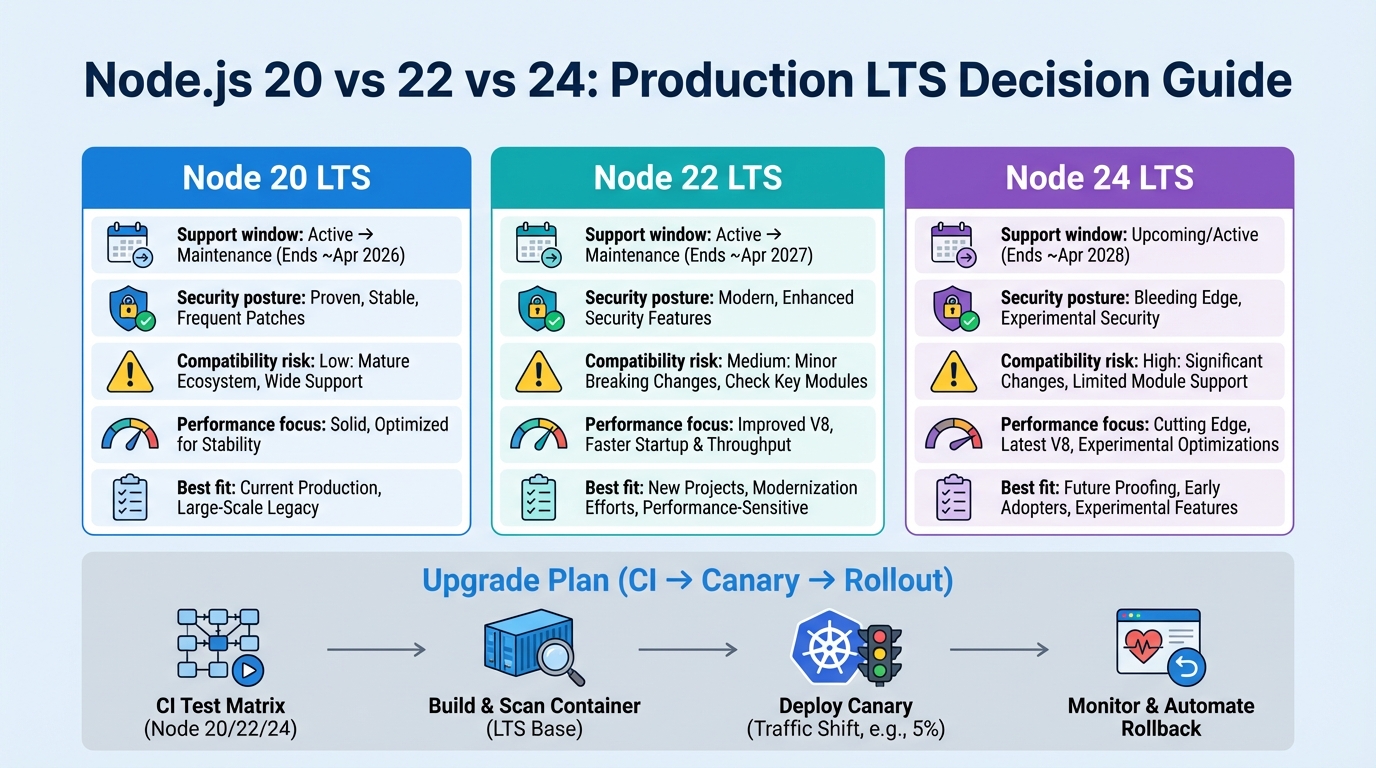
Node 20 vs 22 vs 24: Which Node.js LTS Should You Run in Production?
I’ve watched “just bump Node” turn into a 3 a.m. rollback because TLS started throwing errors nobody handled.
Pick your Node LTS like an ops decision. You want fewer CVEs, fewer surprises in TLS and HTTP, and fewer native addon faceplants in your Docker build logs.




The default choice (and the two reasons to ignore it)
Run Node 22 LTS for new production services when you control the runtime (Kubernetes, VMs, container images you build yourself).
It gives you a newer baseline, ongoing security backports, and a reasonable ecosystem match. But I would still choose Node 20 in two cases: your platform pins you, or your native addons act like glass.
- Stay on Node 20 when the platform pins you: AWS Lambda, old PaaS stacks, or internal golden images sometimes lag. If you cannot ship a container image or custom runtime, you do not really “choose” Node.
- Stay on Node 20 when native addons scare you: If your CI cannot rebuild linux/amd64 and linux/arm64 artifacts on demand, do not roll the dice on a major jump.
- Put Node 24 on a calendar: Treat it as the next hop after it hits LTS and your dependency graph proves it can survive a rebuild.
Node 20 vs 22 vs 24: the comparison ops teams actually care about
| Feature | Node.js 20 (LTS) | Node.js 22 (Active LTS) | Node.js 24 (Current) |
|---|---|---|---|
| Status | Maintenance LTS | Active LTS | Current |
| End of Life | April 30, 2026 | April 30, 2027 | ~April 2028 |
| V8 Engine | V8 11.3 | V8 12.4 | V8 13.x |
| ESM Support | Experimental require(esm) | Stable require(esm) | Fully stable |
| Permission Model | Experimental | Improved, still experimental | Maturing |
| Native Addon Compat | Widest coverage | Good, occasional rebuild gaps | May break first |
| Lambda/Cloud Support | Universal | Most providers | Containers only |
| Security Patches | Yes (until EOL) | Yes (active) | Yes (active) |
| Recommended For | Legacy apps, plan migration | Production (default choice) | Testing/development only |
Here’s the thing. Most “Node version” posts talk about syntax and features, then your first outage comes from TLS, undici, or a .node binary that refuses to load.
- Security posture: Node 20 and Node 22 both receive security backports. Node 22 usually carries newer bundled dependencies, which helps, but it also means you should read patch notes instead of assuming “patch equals safe.”
- Native addons: Node 20 tends to have the widest prebuild coverage. Node 22 usually works, but you will hit rebuild gaps on odd libc and arch combos. Node 24 will break first and ask questions later.
- Lambda reality: Node 20 shows up everywhere. Node 22 depends on your runtime choice and AWS support. Node 24 will lag unless you run containers or custom runtimes.
- Crypto and compliance: If you run in a regulated environment, treat a Node major bump like a crypto stack change. You probably need to rerun your TLS and mTLS test suite.
- HTTP client behavior: Node’s HTTP surface increasingly routes through undici. That means defaults can shift between patch lines, and you inherit undici issues even when your app never imports it.
Decision framework: constraints first, then maturity, then speed
Do this in order.
If you reverse it and start with “which one is faster,” you end up arguing about benchmarks while a native addon quietly blocks your deploy.
- Step 1, platform constraint: Can you run your own Node binary or container image, or does a managed runtime decide for you?
- Step 2, compliance constraint: Do you rely on a specific OpenSSL/FIPS posture that your auditors care about?
- Step 3, dependency constraint: Do you ship any native addons, or anything that drags node-gyp into the build?
- Step 4, operational maturity: Can you canary, monitor, and roll back in minutes without rebuilding?
- Step 5, performance: Only now do you benchmark, because now you can actually ship the winner.
The breakages I’d hunt for before I touch production
This bit me when a patch release changed error routing and an unhandled error event killed the process.
I cannot promise you will hit the same failure mode, because it depends on your outbound calls, proxies, and code paths. But you can search for the risky patterns before you deploy.
TLS: handle errors on purpose
If your code creates TLS connections, you want explicit error handlers. Do not rely on “it never threw before.”
- What to search for: TLS socket usage without explicit error handling, plus EventEmitter usage that never attaches an error handler.
- What it looks like in prod: restarts with log lines like Unhandled ‘error’ event, TLSSocket, ECONNRESET, and ERR_TLS_*.
- Fast rollback move: redeploy the last known good Node image tag. Fix it in daylight.
HTTP: undici and fetch surprises
Node’s fetch stack can change behavior across patch lines, especially around timeouts and error surfaces.
If you only ever tested happy-path HTTP, you will learn about this during an upstream hiccup, probably behind a proxy. Fun.
- What to search for: direct undici imports, global fetch calls with no timeout, and retry code that assumes a specific error shape.
- What it looks like in prod: spikes in UND_ERR_CONNECT_TIMEOUT, more socket hang up, and a sudden rise in upstream 5xx because your retry logic went weird.
- When I would not roll back: if a security fix forces the patch. In that case, pin behavior in code. Set explicit timeouts, set an Agent/Dispatcher on purpose, and log enough context to debug.
Native addons: the .node file ruins your day
If your container build ever compiles C++ unexpectedly, you’re already on thin ice.
Most teams notice this only after they add arm64 or switch base images, then they get GLIBC_ symbol errors and stare at the wall for an hour.
- What to look for: bcrypt, sharp, canvas, database drivers with native pieces, and anything that triggers node-gyp in your production image.
- What it looks like in prod: ELFCLASS mismatches, GLIBC_* missing symbols, or MODULE_NOT_FOUND for a .node binary.
- Fix direction: rebuild per arch in CI, standardize your base image, and stop letting production builds compile surprise code.
Ignore the GitHub commit count. It tells you nothing about whether your TLS proxy will explode on Tuesday.
The upgrade plan I trust (CI matrix, canary, rollback)
Start by inventorying what you run.
Record the exact runtime version, the libc, the OpenSSL version, and whether you ship any native addons. You cannot manage what you do not write down.
Phase 0: inventory
- Record the Node patch: node -p “process.version”
- Record OpenSSL and friends: node -p “process.versions”
- List native addon risk: npm ls –all, then look for node-gyp and prebuild tooling
Phase 1: CI matrix (Node 20 and Node 22)
Test on both runtimes before you touch production.
I usually start with Node 20.x and 22.x in CI, then add linux/arm64 if I deploy to Graviton or any mixed-arch cluster.
- Gate to pass: install, test, build, and a smoke run on both versions.
- Gate to fail: any native addon rebuild that only works on one arch.
Phase 2: ship two images from one commit
This keeps rollback boring.
You want rollback to be a tag flip, not a “rebuild the old image and hope npm pulls the same bits as last week.”
- Publish a Node 20 image tag: keep it until Node 22 burns in.
- Publish a Node 22 image tag: pin a patch version so you control when behavior changes.
Phase 3: canary and watch the right signals
Do a canary when you can.
Some folks skip canaries for patch releases. I don’t, but I get it if you run a low-traffic internal service and can roll back in 60 seconds.
- Watch restarts: crash loops and unhandled error events show up fast.
- Watch outbound errors: TLS handshake failures, proxy weirdness, and connection timeout spikes.
- Watch latency: P99 changes often show you a client behavior shift before error rates move.
- Watch memory: V8 and GC changes can move your steady-state RSS.
Docker base images: boring wins
I prefer the boring path.
Debian-based images (glibc) save time when you run native addons, because prebuilds usually target glibc first and debugging stays sane.
- Use Debian or Ubuntu (glibc) for production: fewer native addon surprises and better supportability.
- Use Alpine (musl) only when you mean it: you need musl-compatible builds, and you own the compilation story end to end.
- Pin the Node patch in your Dockerfile: for example, use a specific 22.x.y tag instead of floating on 22.x.
Bottom line
Run Node 22 LTS in production by default when you control the runtime and you can canary and roll back quickly.
Stick with Node 20 LTS when Lambda or brittle native addons make upgrades riskier than the benefits. Put Node 24 on your roadmap after it hits LTS and your dependencies prove they can rebuild cleanly. There’s probably a better way to test all of this, but…
What Our Badge Service Data Shows About Node.js Adoption
We run a version health tracking service across 300+ technologies. Node.js accounts for 6% of all badge requests, making it our third most-checked technology after Python (43%) and Kubernetes (12%).
The version-specific data is revealing:
- Node.js 22 gets the most version-specific checks — both EOL and CVE badge types. This confirms it’s the current production workhorse: it entered Active LTS in October 2024 and is what most teams are running.
- Node.js 20 checks are still significant — about 70% of Node 22’s volume. This is a warning sign: Node 20 hits end of life on April 30, 2026. If your monitoring is still checking Node 20 health, you’re running on borrowed time. See our Node.js 20 EOL migration playbook.
- Node.js 25 (Current) checks exist but are minimal — roughly a quarter of Node 22’s volume. This tracks: Current releases are for testing, not production.
Across roughly 1,200 daily badge requests, the Node.js split tells a clear story: the ecosystem has largely moved to Node 22, but a stubborn chunk is still on Node 20 with months to go before EOL. If that’s you, our Dependency EOL Scanner will show you exactly what in your package.json needs attention.
Performance benchmarks: what actually changed between versions
People ask “is Node 22 faster?” and the answer is “depends on what you measure.” Here is what I have seen in real workloads, not synthetic benchmarks that optimize for blog post headlines.
HTTP throughput and latency
Node 22 ships V8 12.4+ with Maglev (the mid-tier JIT compiler). In sustained HTTP workloads, I see 5-15% throughput improvements on request-heavy services compared to Node 20. The gains come from faster JIT warmup and better optimization of hot functions.
- Short-lived functions (serverless, Lambda): minimal difference. Maglev helps most when code runs long enough to get optimized.
- Long-running servers: noticeable improvement after warmup. JSON serialization, string operations, and regex all got faster in V8 12.x.
- Streams and buffers: Node 22 improved Buffer.from() and stream pipeline performance. If you push lots of data through transforms, measure this specifically.
Memory and garbage collection
V8 12.x changed GC heuristics. Node 22 tends to use slightly more baseline RSS but has smoother GC pauses. If you monitor P99 latency, you may see fewer spikes from major GC events.
- Node 20: lower baseline RSS, but occasional GC pause spikes under heap pressure. Fine for most workloads.
- Node 22: slightly higher RSS, but more predictable GC behavior. The trade-off favors latency-sensitive services.
- Node 24 (current): too early for production benchmarks, but V8 13.x promises further GC improvements and faster property access on frozen objects.
Startup time
Node 22 is marginally slower to start than Node 20 (10-20ms more). For long-running servers this is irrelevant. For serverless functions that cold-start frequently, it adds up. Node 22.6+ with –experimental-compile-cache can offset this for repeated invocations.
Migration effort: what breaks when you upgrade
The honest answer: most apps upgrade from Node 20 to 22 with zero code changes. The ones that break usually hit one of these:
Breaking changes that actually matter
- OpenSSL 3.0 to 3.2: Node 20 shipped OpenSSL 3.0, Node 22 ships 3.2. If your code or dependencies use deprecated cipher suites or legacy providers, you will see TLS handshake failures. Check with
node -p "process.versions.openssl"before and after. - V8 flag removals: some experimental V8 flags from Node 20 are gone in 22. If you pass custom V8 flags (like –harmony-* or –experimental-*), verify they still exist.
- Native addon ABI changes: Node 22 uses a different N-API version. Addons built with node-gyp against Node 20 headers will not load on Node 22. Rebuild everything in CI, test on both, and check that prebuild-install fetches the right binary.
- Test runner changes: if you adopted node:test early on Node 20, some APIs changed shape in Node 22. Check assertion messages and reporter output.
Ecosystem compatibility as of early 2026
The major frameworks and tools are all Node 22 compatible: Express 5.x, Fastify 5.x, Next.js 15.x, NestJS 11.x, Prisma 6.x, TypeORM, Sequelize. The stragglers are usually unmaintained packages deep in your dependency tree that use deprecated APIs or old native addon patterns.
Run npx ls-engines or check engines fields in your dependency tree to find packages that explicitly exclude Node 22. Fix or replace those before upgrading production.
Hands-on: check your Node version and test the upgrade
Before you change anything in production, run these commands to understand exactly what you have and what will change.
Audit your current runtime
# Check your current Node.js version and internals
node -p "process.version"
# v20.18.1 or v22.12.0 etc.

# Check OpenSSL, V8, and libuv versions
node -p "process.versions"
# Shows: { openssl: '3.0.15', v8: '11.3.244.8', ... }

# Find native addons in your dependency tree
npm ls --all 2>/dev/null | grep -i "node-gyp\|prebuild\|native"

# Check engines field compatibility
npx ls-engines
Test both versions in CI with a matrix
# .github/workflows/node-matrix.yml
name: Node.js CI Matrix
on: [push, pull_request]
jobs:
  test:
    runs-on: ubuntu-latest
    strategy:
      matrix:
        node-version: ["20.x", "22.x"]
    steps:
      - uses: actions/checkout@v4
      - uses: actions/setup-node@v4
        with:
          node-version: ${{ matrix.node-version }}
      - run: npm ci
      - run: npm test
      - run: node -p "process.versions" # log runtime details
Dockerfile: pin your Node version properly
# Use a specific patch version, not just the major
FROM node:22.12.0-bookworm-slim

# Verify versions at build time
RUN node -p "process.version" && \
    node -p "process.versions.openssl" && \
    node -p "process.versions.v8"

WORKDIR /app
COPY package*.json ./
RUN npm ci --only=production
COPY . .

# Run as non-root
USER node
CMD ["node", "server.js"]
Quick TLS and fetch smoke test
// test-tls-compat.mjs — run this on both Node 20 and 22
import { connect } from 'node:tls';
import { request } from 'node:https';

// Test 1: TLS connection with explicit error handling
const socket = connect(443, 'example.com', { servername: 'example.com' });
socket.on('secureConnect', () => {
  console.log('TLS version:', socket.getProtocol());
  console.log('Cipher:', socket.getCipher().name);
  socket.end();
});
socket.on('error', (err) => {
  console.error('TLS error:', err.code, err.message);
  process.exit(1);
});

// Test 2: fetch (backed by undici in Node 22)
const res = await fetch('https://httpbin.org/get', {
  signal: AbortSignal.timeout(5000)
});
console.log('Fetch status:', res.status);
console.log('Node version:', process.version);
Official Node.js resources
Track the release schedule, security advisories, and changelog through the official channels:
- Node.js Release Schedule — official LTS timeline showing Active, Maintenance, and End-of-Life dates for every version
- Node.js 22 Changelog (GitHub) — complete changelog for every Node 22.x patch release with links to individual commits
- Node.js Security Releases — security advisories and vulnerability disclosures for all active Node.js lines
Keep Reading
- Node.js Release History
- Node.js v25.5.0 Release Notes: –build-sea and Safer SQLite Defaults
- Node.js v25.4.0: require(esm) goes stable, plus a proxy helper
- Node.js v22.22.0 TLSSocket errors: why your app stops crashing (and why that scares me)
- Node.js 20.20.0 release notes: patch the 6 CVEs, then prove it
Frequently Asked Questions
- Which Node.js version should I use for a new project in 2026? Node 22 is the safe default — it’s the current LTS with support through April 2027. It has stable require(esm), refreshed V8, and all the security patches you need. Only pick Node 24 if you specifically need its new APIs and your dependencies already support it.
- Is Node.js 20 still safe to run in production? Yes, but you’re on borrowed time. Node 20 reaches end-of-life in April 2026 — roughly 77 days from now. It still receives security patches, but after EOL there are no more fixes. Start planning your migration to Node 22 immediately.
- What breaks when upgrading from Node 20 to Node 22? The three biggest breakage areas are TLS error handling (TLSSocket now surfaces errors differently), HTTP/undici changes affecting fetch behavior, and native addon (.node) recompilation. Run your test suite under Node 22 in CI before touching production — the errors tend to be silent until they hit traffic.
- Should I skip Node 22 and go straight to Node 24? Not for production workloads. Node 24 is Current (not LTS) and won’t enter LTS until October 2026. Dependencies and frameworks haven’t finished testing against it. Upgrade to 22 now, then evaluate 24 when it gets LTS status.
Related Reading
- Node.js 20 End of Life: Migration Playbook — the April 30, 2026 deadline and step-by-step migration plan
🛠️ Try These Free Tools
Paste your Kubernetes YAML to detect deprecated APIs before upgrading.
Paste a Dockerfile for instant security and best-practice analysis.
Paste your dependency file to check for end-of-life packages.
Track These Releases