VS Code 1.109.0 Release Notes: Claude Agents, Integrated Browser, and the Stuff People Actually Mention
Reddit’s already arguing about this one.
The consensus seems to be “yeah, upgrade,” mostly because 1.109 tightens Copilot Chat and adds an integrated browser preview, but Linux folks keep side-eyeing the Snap packaging situation.
Community take: what people are saying this week
I’ve watched teams treat VS Code updates like Chrome updates. They just happen, until they don’t.
On the k8s and devtools Slacks, the vibe around 1.109 feels practical: frontend folks like the in-editor browser, AI-heavy teams like having Claude in the mix, and ops-minded people immediately ask “where do the keys go?”
- Most teams are upgrading for Copilot Chat and agents: The chatter I see centers on “agent sessions feel less sticky now” and “streaming feels snappier,” not on big editor changes.
- Linux users keep bringing up Snap disk usage: Some teams report deleted files piling up in a snap-local Trash folder and eating disk. Others say “just use .deb and move on.” Either way, do not write “no known issues.”
- Frontend devs like the integrated browser preview: As one SRE put it, “anything that kills the alt-tab loop is worth trying,” but they still keep Chrome open for real debugging.
So. If you run VS Code via Snap on Linux, read the community reports before you hit update.
If you install via .deb/.rpm or you sit on macOS/Windows, you probably won’t notice drama. You’ll just notice new toys.
Official changelog recap (what 1.109.0 actually ships)
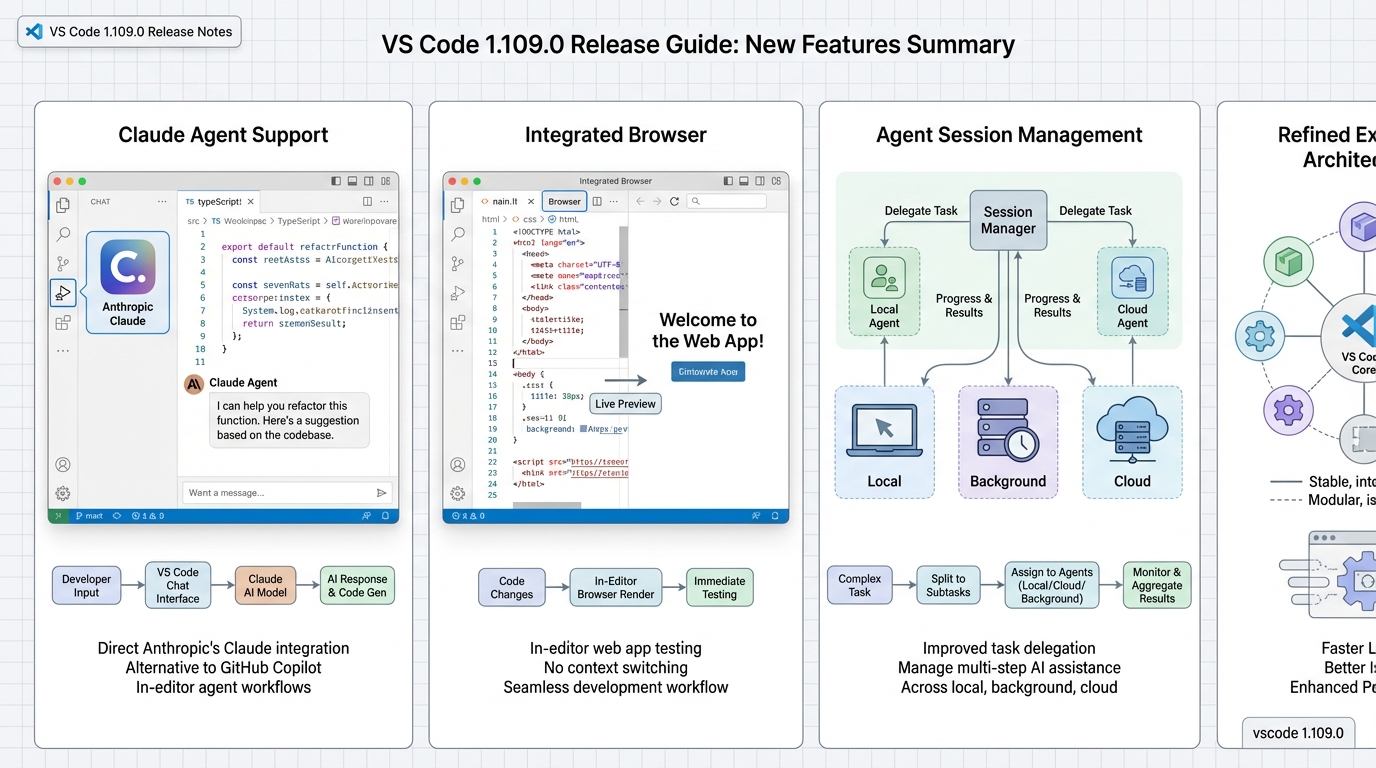
The official notes call out three big buckets: chat improvements, multi-agent workflows, and the new integrated browser preview.
They also sneak in a couple operational changes people miss until their terminal stops working on an old Windows VM.
- Claude Agent support (Preview): VS Code adds Claude agent support through Anthropic integration in Copilot Chat. Expect “preview” sharp edges, and expect your security team to ask where the Anthropic API key lives.
- Integrated browser (Preview): VS Code can open a browser inside the workbench with DevTools. You can test localhost flows and keep it in a tab next to your code.
- Chat UX changes: The notes mention faster streaming and better reasoning display. You feel this as “less waiting for the full blob,” not as magic correctness.
Two more official bits matter for upgrades, even if they don’t sound exciting.
VS Code deprecates the old Copilot extension in favor of Copilot Chat, and VS Code also removes winpty support, which can hit older Windows installs.
Claude Agents in VS Code: what actually changes in your workflow
This is the headline feature and it deserves more than a bullet point. Here’s what you’re actually getting.
Claude integration in VS Code 1.109 means you can select Claude models (Sonnet, Opus) as your chat provider inside Copilot Chat. Previously, Copilot was locked to OpenAI models. Now you pick your model in the chat panel dropdown — no extension swapping, no separate window.
The practical impact depends on what you do with chat:
- Code review prompts: Claude tends to catch more architectural issues and explain trade-offs in more depth than GPT-4 in my experience. If you use chat for “review this PR diff,” Claude is worth trying here.
- Multi-file refactoring: The agent mode lets Claude make edits across multiple files in one session. This is where “agent” actually means something — it proposes changes, you approve them, and it moves to the next file without losing context.
- Test generation: Claude’s test output tends to be less boilerplate-heavy. If your previous experience with Copilot test generation was “it writes tests that test the mock, not the behavior,” Claude does better here in most cases.
The setup is straightforward but the security implications aren’t trivial:
// settings.json — add your Anthropic API key
{
  "github.copilot.chat.models": ["claude-sonnet-4-20250514"],
  "anthropic.apiKey": "sk-ant-..."  // or use env var
}
Security note that matters: Your API key lives in settings.json by default. If you sync settings across machines (which most people do), that key syncs too. Use an environment variable instead (ANTHROPIC_API_KEY) or configure it per-workspace in .vscode/settings.json and add that file to .gitignore. Do not commit API keys. This sounds obvious until you realize VS Code Settings Sync makes it non-obvious.
Also worth knowing: Claude in VS Code sends your code context to Anthropic’s API. If you work on proprietary code, check your org’s data handling policy before enabling this. The context window includes the active file, selected text, and referenced files — it’s not sending your entire workspace, but it’s sending more than people usually realize.
Integrated browser: killing the alt-tab loop (mostly)
The integrated browser preview lets you open a Chromium-based browser tab inside VS Code, complete with DevTools. You get this via the Command Palette (Ctrl+Shift+P → “Simple Browser: Show”) or by clicking a URL in the terminal.
What it actually does well:
- Localhost testing without leaving the editor: If you’re running a dev server on
localhost:3000, you can preview it in a VS Code tab. CSS changes, component renders, API responses — all visible without switching windows. - DevTools in the same pane: The embedded browser includes a basic DevTools panel. Network tab, console, elements inspector. Good enough for “why is this API call failing?” checks.
- Side-by-side layout: Split your editor left, browser right. Edit a React component, see it render immediately. This is genuinely useful for UI work.
What it doesn’t replace:
- Chrome DevTools for serious debugging: The embedded DevTools are a subset. No Performance tab, no Lighthouse, no Application panel for service workers. For real performance work, you still need a full browser.
- Cross-browser testing: It’s Chromium only. If you need to test Firefox or Safari rendering, this doesn’t help.
- Auth flows involving redirects: OAuth redirects, SSO flows, anything that bounces you through multiple domains — the embedded browser handles these unpredictably. Test auth flows in a real browser.
The practical verdict: great for fast feedback loops on UI changes, not a replacement for your actual browser. Think of it as a better Live Server, not a better Chrome.
What’s changing under the hood (the stuff that breaks things)
Two deprecations in 1.109 that create real tickets if you miss them:
Old Copilot extension deprecated: If your org installed the standalone “GitHub Copilot” extension separately from “GitHub Copilot Chat,” the standalone one is now deprecated. It still works in 1.109 but expect it to stop working in a future release. The migration path is to use Copilot Chat for everything. If you manage a fleet, check which extension ID your deployment scripts install — github.copilot (old) vs github.copilot-chat (current).
winpty removed: VS Code drops winpty terminal support, which was the fallback for terminals on older Windows systems. If you run VS Code on Windows Server 2016 or earlier, or on any machine where ConPTY isn’t available, your integrated terminal breaks silently. The fix is to use a Windows version that supports ConPTY (Windows 10 1809+), but “upgrade Windows” isn’t always an option in enterprise environments.
1.108 vs 1.109: what actually changed between versions
If you’re on 1.108 and wondering whether to jump, here’s what the delta looks like:
- 1.108 → 1.109 gains: Claude agent support, integrated browser preview, faster chat streaming, multi-agent session management, Copilot extension consolidation.
- 1.108 → 1.109 losses: winpty terminal support (Windows), standalone Copilot extension (deprecated, still functional).
- Stability: 1.108.2 was a recovery build (see our 1.108.2 analysis), which means 1.108 had bumps. 1.109.0 ships without a recovery build so far — that’s a good sign but not a guarantee.
If you skipped 1.108 entirely (waited on 1.107), you’re getting two releases of accumulated changes. Read our 1.108 analysis too.
My synthesis: who should upgrade now, who should test first
Upgrade if you use chat daily.
I do not think “feature release, upgrade immediately” is always smart, but 1.109 lands in the category where most teams won’t regret it, unless you sit on a brittle packaging path or an old Windows baseline.
- Upgrade now if you live in Copilot Chat: If your day includes “ask for a refactor,” “write tests,” and “explain this stacktrace,” you’ll notice the streaming and session workflow tweaks.
- Test first if you manage a fleet image: If you bake VS Code into a golden image, test the Copilot extension deprecation behavior. Extensions disappearing during an update creates fun tickets.
- Be paranoid on Linux Snap: If your devs install from Snap, you should probably prefer .deb/.rpm for now, or at least warn people to check disk usage and Trash behavior after updating.
- Hold on Windows Server 2016 or earlier: The winpty removal means your terminal may break. Test before rolling out.
Ignore the GitHub commit count. It’s a vanity metric. I care about “does my terminal still work,” and “did my extensions behave.”
How to upgrade (and what I check right after)
Keep it boring.
Restart VS Code when it prompts you, then do a quick smoke test before you trust it with an incident.
- Confirm the version: Open Help, then About, and verify you see 1.109.0.
- Smoke test the terminal: Open a terminal, run
node -vorpython --version, and make sure the shell actually starts. On Windows, check that ConPTY is working. - Smoke test chat: Ask Copilot Chat to explain a small function. Watch streaming. If it lags or stalls, you’ll notice immediately.
- Check extensions: Open the Extensions panel and verify no extensions are disabled or showing errors. Pay special attention to the Copilot extension status.
- Try Claude if enabled: Switch the model picker to Claude, send a prompt, confirm it responds. Check that your API key isn’t visible in Settings Sync.
Quick usage examples (the stuff people will try first)
People won’t read a long guide before clicking buttons.
They’ll try the browser tab, then they’ll try Claude, then they’ll ask why auth or keys feel weird.
- Try the integrated browser preview: Open a local web app, then open it in the integrated browser. Use DevTools to check network calls, especially auth redirects, because embedded browsers love to surprise you.
- Try Claude in chat (if your org allows it): Add your Anthropic key per your org policy, then select a Claude model for review-style prompts. Keep an eye on what context you share. “Paste the whole repo” turns into a compliance conversation fast.
- Run two agent sessions on purpose: Put one agent on “write tests,” another on “document behavior,” then see if session switching feels sane. This is where the update pays off if you actually work that way.
Known issues (official vs community)
The official notes do not list a known-issues section.
The community still reports issues, especially around VS Code on Linux via Snap and disk usage related to Trash behavior. If you hit that, switch install methods and move on with your life.
Additional issues worth watching:
- Claude rate limiting: If you’re on a free Anthropic tier, you’ll hit rate limits fast when using Claude as your primary chat model. The error messages in VS Code aren’t always clear about this — it looks like a timeout, not a rate limit.
- Settings Sync + API keys: As mentioned above, API keys in settings.json sync across machines. If you’re on a shared machine or syncing to a personal device, audit what’s in your synced settings.
- Extension conflicts: If you have both the old Copilot extension and Copilot Chat installed, some users report duplicate suggestions or chat panel confusion. Uninstall the old one explicitly.
There’s probably a better way to test this, but…
Quick setup commands for 1.109 features
Here are the commands and configurations to get the new features working right after upgrade.
Enable the integrated browser preview
# Open the integrated browser from the command palette
# Ctrl+Shift+P (or Cmd+Shift+P on macOS)
# Type: "Simple Browser: Show"

# Or open a URL directly from terminal output
# Click any localhost URL in the integrated terminal

# Start your dev server and preview side-by-side
npm run dev
# Then Ctrl+Shift+P > Simple Browser: Show > http://localhost:3000
Configure Claude as your chat model
// .vscode/settings.json — workspace-level config (add to .gitignore)
{
  "github.copilot.chat.models": [
    "claude-sonnet-4-20250514",
    "claude-opus-4-20250514"
  ],
  "chat.agent.enabled": true,
  "chat.agent.maxRequests": 30
}

// Set API key via environment variable (do NOT put in settings.json)
// export ANTHROPIC_API_KEY="sk-ant-..."
Verify your upgrade and extensions
# Check your VS Code version from terminal
code --version
# Expected: 1.109.0 or later

# List installed extensions and check for conflicts
code --list-extensions | grep -i copilot
# You should see: github.copilot-chat
# If you also see: github.copilot (old) — uninstall it:
code --uninstall-extension github.copilot

# Check extension status for errors
code --list-extensions --show-versions | grep -E "copilot|claude"
Official documentation and resources
Track the official changelogs and report issues through these channels:
- VS Code 1.109 Official Release Notes — the full changelog from Microsoft with every feature, fix, and deprecation
- VS Code 1.109 Milestone on GitHub — all issues and PRs that shipped in this release, useful for tracking specific bug fixes
- VS Code Copilot Documentation — official setup guide for Copilot Chat, agent mode, and model selection including Claude
Related Reading
- VS Code 1.108.2 recovery build
- VS Code 1.108.0 upgrade plan
- Version health badges for all your tools
🛠️ Try These Free Tools
Paste your Kubernetes YAML to detect deprecated APIs before upgrading.
Plan your upgrade path with breaking change warnings and step-by-step guidance.
Paste your Terraform lock file to check provider versions.
Track These Releases