Chrome third-party cookies: what breaks, what to ship, how to test
Third-party cookies don’t fail all at once. They fail one iframe login at a time, usually in production.
I’ve watched teams treat this like a “Chrome change” and then get paged by checkout loops inside a payment iframe. The fix rarely sits in one header. You end up redesigning how state moves across top-level pages, iframes, and identity providers.
What “third-party cookies deprecated” means in practice
Here’s the situation I plan for. A user blocks third-party cookies, or they browse in Incognito, or Chrome tightens tracking protections again. Your iframe loads, your requests go out, and the Cookie header shows up empty.
So. Treat “deprecated” as “unreliable.” If your flow needs a cookie in a third-party context, you need a plan for when it does not arrive.
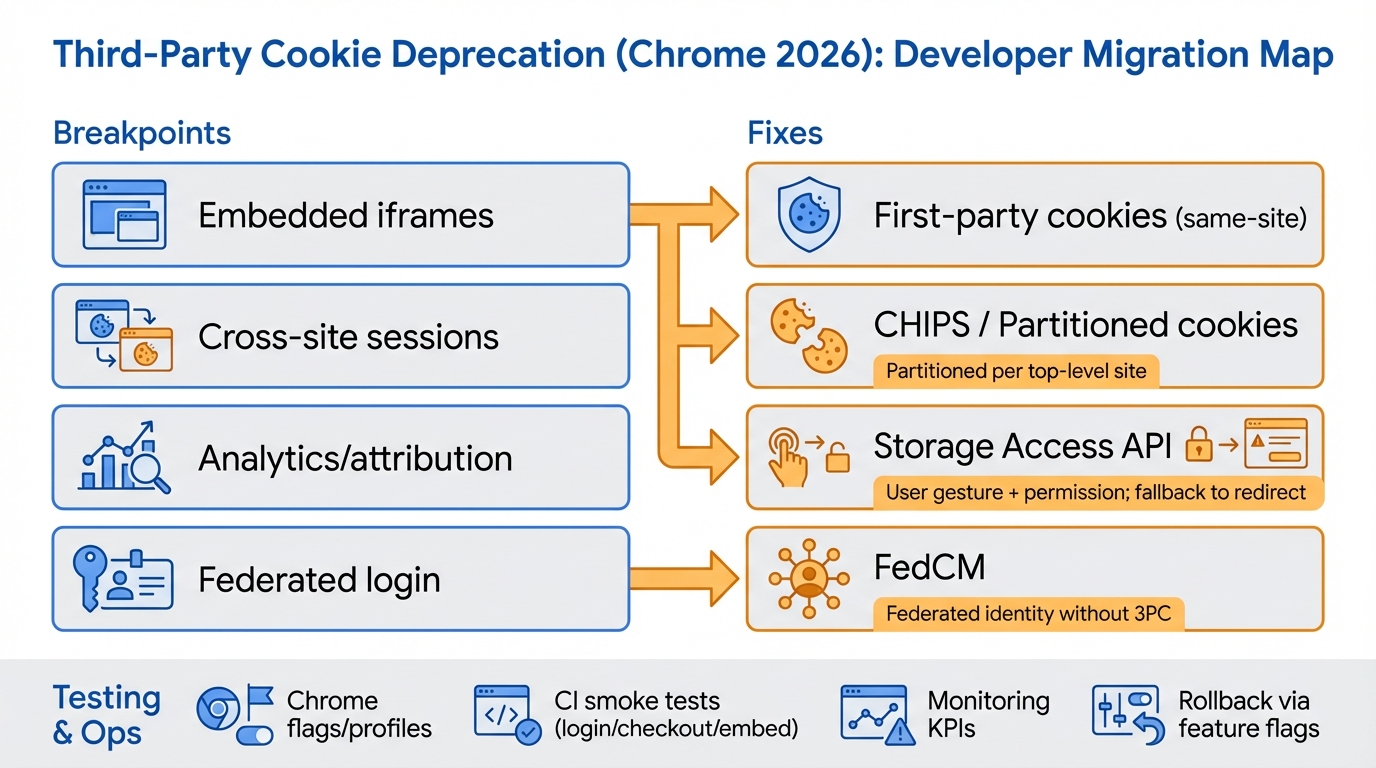
- Iframe sessions go blank: embedded apps load “logged out,” forget preferences, or bounce between login endpoints until the user gives up.
- Embedded checkout gets weird: payment widgets lose state between steps, then support tickets start with screenshots of spinning loaders.
- Federated login breaks in hidden frames: IdPs that leaned on third-party cookies for silent checks start re-prompting or failing.
- Analytics identity fragments: client-side third parties stop seeing a stable cross-site identifier, so attribution shifts and dedupe drifts.
I don’t trust “Known issues: none” from any browser change. Assume your most profitable flow sits on a cookie you forgot existed.
Step 1: find your breakpoints (use cases + DevTools checks)
This bit me when we “only” had one vendor iframe. That one iframe used the same cookie for auth, preferences, and rate limits, and we did not discover that until it broke.
Start by inventorying every place you depend on cross-site state. You want a list you can argue about in a meeting.
Use case A: embedded iframes (widgets, chat, BI, payments)
Look at the iframe origin as a third party, not when you open it top-level in a tab. Those are different worlds.
- Application → Cookies: inspect cookies for the iframe origin while the iframe runs on a customer domain. Compare it to a top-level load of the same origin.
- Network → request headers: open a request to the iframe origin and confirm whether Cookie appears. If it’s missing, you already reproduced the break.
- Issues panel: track cookie warnings like failing tests. They often show the exact reason Chrome rejected a cookie.
Use case B: cross-site session cookies (SSO across registrable domains)
If you set SameSite=None; Secure on an auth cookie, you probably did it for a reason. That reason often equals “this will break first.”
- Audit Domain scoping: find cookies with a wider Domain than they need. Tighten it unless you have a real cross-site requirement.
- Find auth cookies with SameSite=None: tag them as “third-party dependent” until proven otherwise.
Use case C: analytics and attribution
Some folks try to “keep tracking the old way.” I don’t. It turns into a whack-a-mole game with privacy risk.
- Network filter by vendor domain: inspect Set-Cookie on analytics responses and mark which cookies get set in third-party contexts.
- Run with third-party cookies blocked: compare session counts, attribution, and dedupe outcomes. Expect them to change.
Use case D: federated login in embedded contexts
If an IdP flow runs in an iframe, assume it breaks when third-party cookies disappear. Fix it on purpose.
- Re-run login with third-party cookies blocked: watch for missing cookies on IdP requests and repeated “start login” responses.
- Inventory the IdP dependency: note which provider, which endpoints, and whether they support FedCM yet.
Inventory output (what to produce)
Make a table. Ship it to your team.
- Flow name: “Embedded checkout,” “Partner portal embed,” “SSO to subsidiary,” “Support chat.”
- Top-level origin + embedded origin: the pair matters later when you debug partitioned behavior.
- Cookie details: name, domain, purpose, lifetime, SameSite, Secure, HttpOnly.
- Third-party required: yes or no, plus why.
- Impact: revenue blocker, user annoyance, or “only breaks for admins.”
Step 2: pick the smallest fix that actually works
There’s no single replacement for third-party cookies. Anyone selling you “the one trick” probably sells slide decks.
Pick the fix based on the shape of the state you need. “State in an iframe for this top-level site” differs from “one login shared across every customer domain.”
- Per-site embedded session state: use CHIPS (partitioned cookies). It keeps the widget working per top-level site, but it will not give you global identity across customer domains.
- Truly shared login across sites: use a top-level redirect login plus token handoff, or use FedCM if you’re doing federated identity and your IdP supports it.
- Legacy embed that must access old cookies: use Storage Access API, but treat it as a gated fallback that needs a click. Do not build a silent flow around it.
- Analytics identity across sites: move to first-party collection and server-side forwarding. Losing passive cross-site tracking is the point.
Stuff I wouldn’t bet a migration on
Do not ship these as your “plan.” They will waste your quarter.
- User-agent sniffing: staged rollouts and user settings make this a liar’s tool.
- “Just use localStorage in the iframe”: third-party storage faces similar restrictions. Storage Access API exists because this problem repeats.
- Enterprise exceptions as a strategy: treat grace periods and allowlists as a time buffer, not an architecture.
- Fingerprinting: platforms and policies keep cracking down, and customers hate explaining it to their legal team.
Step 3: implementation notes (first-party, CHIPS, Storage Access API, FedCM)
I’ll say the quiet part. CHIPS looks easy, then you debug partitions for weeks.
It still helps, in the right spot. You just need to choose it with eyes open.
Option 1: go first-party when you control the top-level site
If you own the top-level origin, stop doing third-party tricks. Set a first-party session cookie and keep it boring.
- Use Secure: only send session cookies over HTTPS.
- Use HttpOnly: keep session cookies out of JavaScript in most cases.
- Use SameSite=Lax for typical sessions: it avoids a pile of cross-site surprises while keeping common login flows working.
Example header you can start from:
Set-Cookie: session=…; Path=/; Secure; HttpOnly; SameSite=Lax
Option 2: CHIPS for embedded, per-top-level sessions
CHIPS gives you cookies that work in an embedded context, but the browser partitions them by top-level site. That means a user can log into your widget on customer-a.com and still look logged out on customer-b.com.
That behavior surprises support teams. It also surprises engineers who only tested on one host.
- When it fits: “logged into this widget on this customer domain” counts as success.
- When it fails: you need one shared identity across all embeds. CHIPS intentionally will not do that.
Cookie header pattern (check current Chrome docs before shipping):
Set-Cookie: widget_session=…; Path=/; Secure; HttpOnly; SameSite=None; Partitioned
Option 3: Storage Access API as a click-to-continue escape hatch
Storage Access API works when a user clicks and grants access. If you need a silent flow, this usually won’t save you.
Here’s the thing nobody mentions. Your denial rate becomes a product metric, not a browser detail.
- Design the UX: show a clear “Continue” button that triggers requestStorageAccess, then fall back to a top-level redirect if it fails.
- Instrument it: log grant vs deny, and tag events with top-level origin plus iframe origin so you can spot patterns.
Option 4: FedCM for federated identity
If your “Sign in with X” flow relied on third-party cookies, FedCM gives you a browser-supported path. It still takes work. Your IdP has to support it, and you’ll touch both client and server code.
- Plan for integration work: endpoints, configuration, and UX changes.
- Keep a fallback path: a top-level redirect login still acts as the most reliable cross-browser escape route in most cases.
Other stuff in this release: dependency bumps, some image updates, the usual.
Step 4: test like you mean it (local, CI, monitoring, rollback)
If you only test with your own cookies enabled, you’re testing the happy fantasy. Test the broken world.
Make third-party-cookie blocking reproducible on every laptop and in CI. Then you can debug it before customers do.
Local testing
- Manual toggle: block third-party cookies in Chrome settings using a dedicated browser profile.
- DevTools proof: confirm Cookie headers disappear where you expect, and confirm partitioned cookies show up as partitioned when you use CHIPS.
CI smoke tests (the money flows)
Write a tiny suite. Run it often.
- Login: top-level login plus any embedded auth component.
- Checkout: embedded payment frame, post-payment redirect, confirmation page.
- Embedded widget: load, write a preference, reload, confirm it persists in the expected partition.
- Federated login: account selection and token exchange completion.
Monitoring and rollback
You can’t roll back Chrome. You can roll back your code.
- Alert on outcomes: login success rate, redirect loop rate, iframe load errors, checkout drop-off.
- Tag embed context: log top-level origin and iframe origin together. Otherwise partition bugs look random.
- Feature flags: gate CHIPS headers, the Storage Access “click to continue” UI, and FedCM vs legacy paths.
Cutover checklist
Print this. Then do it.
- Inventory complete: every cross-site cookie has an owner and a decision.
- CHIPS shipped where it fits: embedded per-site sessions work and your support team understands partitions.
- Storage Access fallback works: user-gesture UX exists and redirect fallback works when access gets denied.
- FedCM path validated: you tested with your real IdP, not a demo.
- Analytics plan updated: dashboards reflect the new world, and stakeholders agreed on what changes.
- CI runs in the blocked world: smoke tests run on Stable and one “breaks next” channel.
- Rollback switches exist: you can change behavior without a redeploy.
Bottom line
Do not treat this like compliance work. Treat it like a state redesign across embeds, login, and measurement.
Use first-party storage when you own the top-level site, use CHIPS when per-site embedded state counts as success, use Storage Access API as a click-to-continue fallback, and use FedCM for federated identity when your IdP supports it. Then keep testing with third-party cookies blocked, because that’s when the real bugs show up, and there’s probably a better way to test this, but…
Code examples: migrating cookies to the post-third-party world
The theory is one thing; here is what the headers and JavaScript actually look like when you ship each fix.
CHIPS: setting a Partitioned cookie
Set-Cookie: __Host-session=abc123;
  Secure;
  Path=/;
  SameSite=None;
  HttpOnly;
  Partitioned
The Partitioned attribute tells the browser to key this cookie by the top-level site. The embed gets a separate cookie jar per parent, so tracking across sites becomes impossible while the widget still works.
Storage Access API: requesting unpartitioned access
// Inside your cross-site iframe
async function requestCookieAccess() {
  const hasAccess = await document.hasStorageAccess();
  if (!hasAccess) {
    try {
      await document.requestStorageAccess();
      // Reload the iframe to pick up unpartitioned cookies
      location.reload();
    } catch (err) {
      console.warn("Storage access denied:", err);
      // Fall back to redirect-based login
      showLoginLink();
    }
  }
}

// Gate behind a user gesture (click handler)
document.getElementById("login-btn")
  .addEventListener("click", requestCookieAccess);
Related Websites Sets: JSON declaration
{
  "primary": "https://example.com",
  "associatedSites": [
    "https://app.example.com",
    "https://cdn.example.com"
  ],
  "serviceSites": [
    "https://login.example.com"
  ]
}
Submit this to the Related Website Sets list on GitHub so Chrome treats these origins as first-party for Storage Access API auto-grants.
DevTools: testing third-party cookie blocking locally
# Launch Chrome with third-party cookies blocked
google-chrome \
  --enable-features=TrackingProtection3pcd \
  --test-third-party-cookie-phaseout \
  --user-data-dir=/tmp/chrome-3p-test
Official references
- Chrome third-party cookie phase-out guide – Google’s canonical timeline, testing instructions, and migration checklist.
- Storage Access API on MDN – cross-browser reference for
document.requestStorageAccess(), including Safari and Firefox behaviour differences. - CHIPS (Cookies Having Independent Partitioned State) – how the Partitioned cookie attribute works, browser support, and implementation guide.
Keep Reading
- Chrome Release History
- Chrome Geolocation Changes (2025–2026): Keep Location Working in Production
- Chrome 144 breaks two habits: JS geolocation prompts and Topics
- Chrome 143.0.7499.40 update: the CVEs, what to do, how to verify
- Chrome 144 ships Temporal. Here’s how to use it without breaking prod.
Frequently Asked Questions
- When are Chrome third-party cookies actually going away? Chrome is deprecating third-party cookies with a phased rollout — 1% of users lost cookies in Q1 2024, with broader rollout continuing through 2025-2026. The timeline has slipped multiple times. Regardless of the exact date, you should treat your site as broken-without-cookies now and test with cookies disabled in DevTools.
- How do I test if my site breaks without third-party cookies? Open Chrome DevTools, go to Application → Cookies, and enable “Block third-party cookies” under Settings → Privacy. Then walk through every user flow: login, embedded widgets, payment iframes, analytics, chat widgets, and SSO redirects. Anything that sets cookies from a different domain than the top-level page will fail silently.
- What replaces third-party cookies for embedded iframes and widgets? CHIPS (Cookies Having Independent Partitioned State) is the primary replacement. Add the Partitioned attribute to your Set-Cookie header and the cookie becomes available only within the context of the embedding site. For cross-site SSO, use the Storage Access API. For federated login, FedCM is Chrome’s prescribed path.
- Do I need to change anything if I only use first-party cookies? No. First-party cookies (set by the domain in the URL bar) are unaffected. The deprecation only hits cookies set by third-party domains — embedded scripts, iframes, CDN domains, and cross-site API calls. If your authentication, session, and analytics all run on your own domain, you’re already fine.
Related Reading
- Chrome 144 Ships Temporal — The new date/time API landing in browsers
- Chrome Geolocation Changes (2025-2026) — Keep location features working
- CHIPS: The New Superpower for Embedded Widgets — Partitioned cookies for third-party embeds
- How to Add Version Health Badges — Track release health in your README
🛠️ Try These Free Tools
Paste your dependency file to check for end-of-life packages.
Plan your upgrade path with breaking change warnings and step-by-step guidance.
Paste your Terraform lock file to check provider versions.
Track These Releases