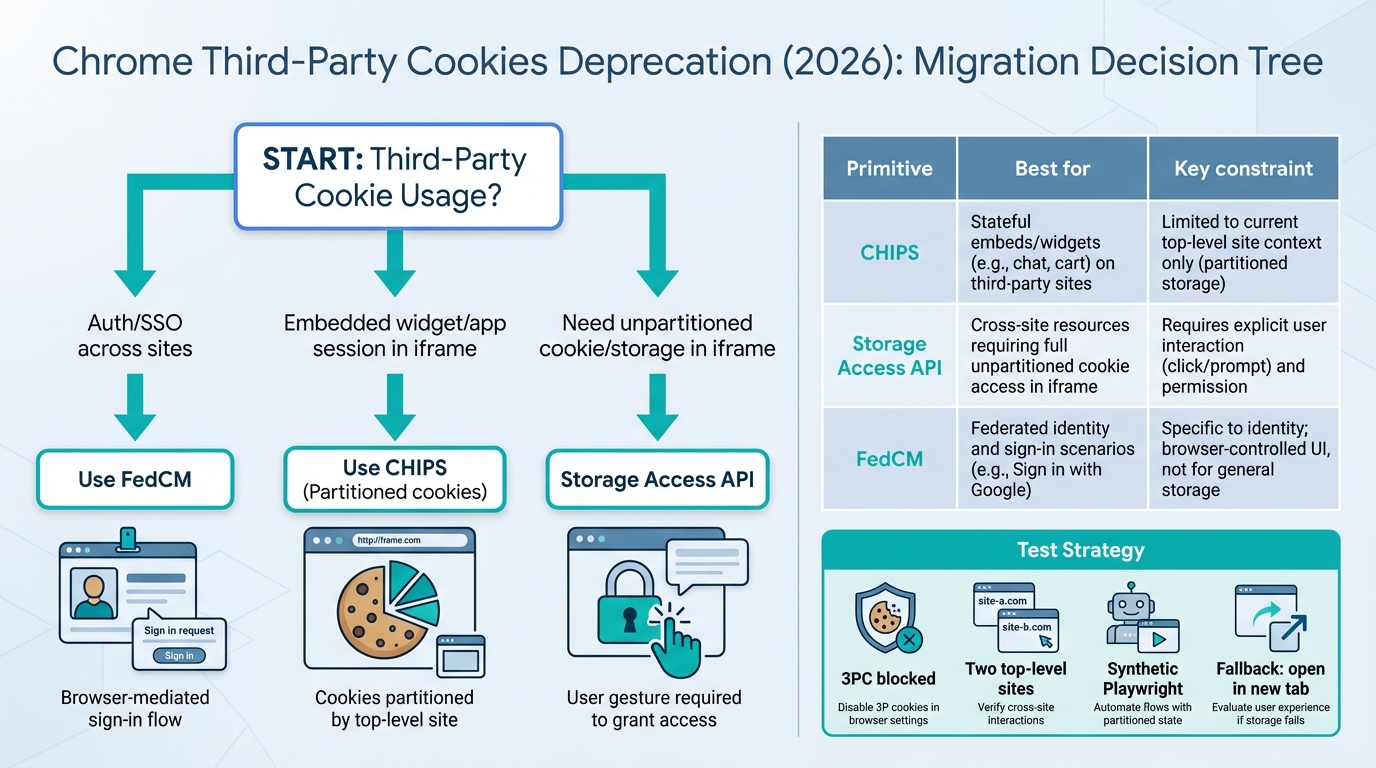
CHIPS is the new superpower for embedded widgets!
If your iframe widget “forgets” users in Chrome, you’re already living in the third‑party‑cookie future. The fun part is you now have real tools, CHIPS, Storage Access API, and FedCM, and they map cleanly to three jobs: embedded session, unpartitioned storage, and identity.
Highlights you can try in staging this week
I’ve watched teams burn days tweaking SameSite=None; Secure and wondering why nothing changes. Chrome can still accept the cookie, then quietly refuse to send it in a third‑party context. That’s why this migration feels spooky. It is not your code “randomly breaking.”
Three moves cover most apps. Early signs look good if you start with the least fancy option and add UX only when you must.
- Embedded widget session in an iframe: Start with CHIPS. You get a stable session inside the iframe, but you accept “one session per top‑level site.” Remember when we tried to share one cookie across every customer domain? Now you just stop doing that.
- SSO and silent reauth in an iframe: Treat FedCM as the new primary path in Chrome, then keep top‑level redirects as the boring, dependable fallback. I have not stress-tested your IdP setup, but this pattern holds up across a lot of real deployments.
- Unpartitioned access inside an iframe: Reach for the Storage Access API only if partitioning breaks a hard requirement, because you will pay a UX price (a click, a prompt, an “Open in new tab” escape hatch).
I don’t trust “Known issues: none” from any browser rollout. Assume cohort-by-cohort breakage and instrument it like an ops incident.
What actually breaks when third‑party cookies stop behaving
This bit me first with embedded support widgets. The widget loads, the UI looks fine, then every API call returns 401 because the browser never sent the session cookie, so the user sees a login loop that feels like a haunted house.
Third‑party cookies show up anywhere the “current site” and the cookie’s site do not match, like an iframe, a script include, an image pixel, or fetch/XHR to a different site. When Chrome blocks third‑party cookies for a user cohort, it stops sending or setting those cookies by default, even if you historically did everything “right” with SameSite=None; Secure.
The decision tree (pick the primitive, not the nostalgia)
So. Start from the property you need, not the mechanism you wish still worked. Most migrations get stuck because someone asks “how do we keep our cookie” and nobody says “what are we trying to preserve.”
- If you need login across sites: Use FedCM where available, keep top‑level redirects as the compatibility path.
- If you need a session for embedded UI: Use CHIPS and embrace per‑top‑level‑site sessions.
- If you truly need unpartitioned storage in an iframe: Use Storage Access API, design the UX, and build fallbacks for denial.
Some folks try to use Storage Access API to “bring back” cross-site tracking. I get why. I still think it’s a trap. The API aims to make passive tracking annoying, and you end up shipping a consent-and-prompt mess that users hate and support cannot debug.
Deep dive: CHIPS, and why it feels nicer than it sounds
CHIPS gives you third‑party cookies, but partitioned by the top‑level site. That sounds like a limitation. In practice, it turns your embedded widget into something predictable again: one cookie jar per customer site, clean isolation, fewer weird collisions.
On the wire, you want a cookie like this for an embedded widget session:
Set-Cookie: widget_session=…; Path=/; HttpOnly; Secure; SameSite=None; Partitioned
- Design shift: Your backend must stop assuming “one global session per user across every embed.” Store enough context to debug. Capture the embed origin, the top‑level site, and the customer account id, because “works on customer A, fails on customer B” becomes a daily question.
- Identity shift: If you need the embedding site’s user identity, do an explicit handoff. Do not try to smuggle identity via shared cookies across embeds.
Deep dive: Storage Access API (good, but make peace with the UX)
I’ve seen Storage Access API succeed when a product team accepts a small, intentional friction moment. You render a limited widget state, the user clicks “Continue,” and you ask for access. When it fails, you do not argue with the browser. You give the user a clean escape hatch.
Inside the iframe, you check and then request:
- Check: call document.hasStorageAccess() and treat “false” as a normal state, not an error.
- Request (on click): call document.requestStorageAccess() from a user gesture handler, then reload or re-bootstrap the widget if granted.
- Fallback: show “Open in a new tab to continue,” and complete login in top-level context.
Do not ship Storage Access API without metrics. When a browser prompt fails for 2% of users, your support team will feel all of it.
Deep dive: FedCM for SSO (goodbye hidden iframe refresh)
Remember the old pattern where an invisible iframe quietly hit the IdP, refreshed tokens, and nobody saw anything? FedCM pushes that interaction into a browser-mediated flow, which sounds annoying until you realize it makes the failure modes legible and the privacy story cleaner.
On the RP side, you request a credential through the browser, then you exchange the result server-side for your own first-party session cookie. Keep it boring. Keep it observable.
- Primary path: try FedCM where available in your target Chrome versions.
- Compatibility path: fall back to top-level OAuth redirects when FedCM is unavailable, misconfigured, or the user cancels.
Implementation patterns (React/TypeScript + Node.js) that hold up
The thing nobody mentions is cookie libraries lag new attributes. You can do everything “correctly” in Express and still fail to append Partitioned unless you control the raw header.
Here’s the pattern I like for CHIPS: set the cookie with your framework, then patch the Set-Cookie header if the library cannot emit Partitioned. Pair it with a simple iframe bootstrap check that calls /me with credentials: ‘include’ and treats a 401 as “cookie did not ride along,” not “user logged out.”
- Iframe bootstrap rule: attempt cookie-backed /me, then attempt session creation, then fall back to a host-assisted bootstrap (token exchange or top-level open).
- Host-to-iframe identity handoff: use postMessage with strict event.origin checks, explicit targetOrigin, and schema validation. Use short-lived, single-use tokens. If you cannot do that, do not do this.
Other stuff in this release of reality: dependency bumps, browser flags churn, and a weird week where Chrome Canary breaks your synthetic suite for no reason, the usual.
Testing and monitoring (this is the part that saves weekends)
Cookie deprecations fail like a slow leak. You will see 0.7% auth failures, then someone on support says “it’s only happening in Chrome,” and suddenly you’re screen-sharing with a customer at 9 p.m. on a Tuesday.
Run a small matrix in staging and in CI with Playwright:
- 3PC blocked profile: verify iframe sessions, SSO, and fallbacks when cookies do not send.
- Partition isolation check: embed the same iframe on two different top-level test domains and confirm you get two different sessions with CHIPS.
- Storage Access denied path: test “no gesture” and “gesture” flows, then validate your “Open in new tab” escape works.
- FedCM success and cancel: test both, then confirm you fall back to redirects without a broken UI loop.
Alert on rate-of-change, not raw counts. Rollouts create steps, not smooth ramps.
Migration notes (do this last, after you can see it working)
Worth trying in staging. Do not wing it in production on Friday, unless your definition of “fun” includes incident bridges.
- Phase 0: inventory every cookie and every third-party context (iframes, silent auth iframes, cross-site APIs). Assign an owner per flow.
- Phase 1: move embedded widget sessions to CHIPS. Update the server session model for per-top-level-site sessions.
- Phase 2: add Storage Access API only where you can justify the UX and you have a denial fallback.
- Phase 3: implement FedCM for federated login, keep top-level redirects as the fallback.
- Rollout: canary behind a feature flag and watch 401/403 rates from iframe APIs, FedCM error buckets, and user-reported login loops.
If you do all that, you get something nicer than the old world. Your auth stops depending on invisible browser behavior, your embeds become deterministic per site, and your support team stops guessing. Anyway.
CHIPS implementation (working code)
Here’s the server-side and client-side code for each approach:
// Express.js — setting a CHIPS partitioned cookie
app.get('/widget/init', (req, res) => {
  // Set a partitioned cookie for embedded widget session
  res.setHeader('Set-Cookie', [
    'widget_session=' + generateSessionId() + '; ' +
    'Path=/; ' +
    'HttpOnly; ' +
    'Secure; ' +
    'SameSite=None; ' +
    'Partitioned; ' +   // This is the CHIPS attribute
    'Max-Age=86400'
  ].join(''));

  res.json({ status: 'session_created' });
});

// Note: Many cookie libraries don't support "Partitioned" yet.
// If yours doesn't, set the header manually like above.
// Client-side — iframe bootstrap with CHIPS fallback
async function initWidget() {
// Step 1: Try cookie-backed auth
const res = await fetch('https://widget.example.com/api/me', {
credentials: 'include' // Sends partitioned cookie if set
});
if (res.ok) {
const user = await res.json();
renderWidget(user);
return;
}
// Step 2: Cookie didn't ride along — create new session
if (res.status === 401) {
const init = await fetch('https://widget.example.com/widget/init', {
credentials: 'include'
});
if (init.ok) {
renderWidget(await init.json());
return;
}
}
// Step 3: Fallback — open in new tab
renderFallback('Open widget in new tab');
}// Storage Access API — when you need unpartitioned cookies
async function requestStorageAccess() {
// Check current access
const hasAccess = await document.hasStorageAccess();
if (hasAccess) {
console.log('Already have storage access');
return true;
}
// Must be called from a user gesture (click handler)
try {
await document.requestStorageAccess();
console.log('Storage access granted');
// Reload widget state with unpartitioned cookies
window.location.reload();
return true;
} catch (err) {
console.log('Storage access denied:', err);
// Show "Open in new tab" fallback
showEscapeHatch();
return false;
}
}
// Attach to a visible button — NOT called automatically
document.getElementById('continue-btn')
.addEventListener('click', requestStorageAccess);// Playwright test — verify CHIPS works in CI
// tests/chips.spec.ts
import { test, expect } from '@playwright/test';
test('CHIPS partitioned cookie isolates per top-level site', async ({ browser }) => {
// Site A embeds widget
const ctxA = await browser.newContext();
const pageA = await ctxA.newPage();
await pageA.goto('https://site-a.test/embed');
const frameA = pageA.frameLocator('iframe');
await expect(frameA.locator('#widget-status')).toHaveText('authenticated');
// Site B embeds same widget — should get DIFFERENT session
const ctxB = await browser.newContext();
const pageB = await ctxB.newPage();
await pageB.goto('https://site-b.test/embed');
const frameB = pageB.frameLocator('iframe');
// Should NOT be authenticated (different partition)
await expect(frameB.locator('#widget-status')).toHaveText('anonymous');
});For the full Chrome CHIPS spec, see the Chrome CHIPS documentation. Storage Access API details are on MDN. FedCM implementation guide: Chrome FedCM docs. Track Chrome’s privacy changes on the Chrome releases hub.
Related Reading
- Chrome Third-Party Cookies: What Breaks — The privacy change affecting every web app
- Chrome 144 Ships Temporal — The new date/time API landing in browsers
- How to Add Version Health Badges — Track release health in your README
🛠️ Try These Free Tools
Paste your dependency file to check for end-of-life packages.
Plan your upgrade path with breaking change warnings and step-by-step guidance.
Compare EKS, GKE, and AKS monthly costs side by side.
Track These Releases