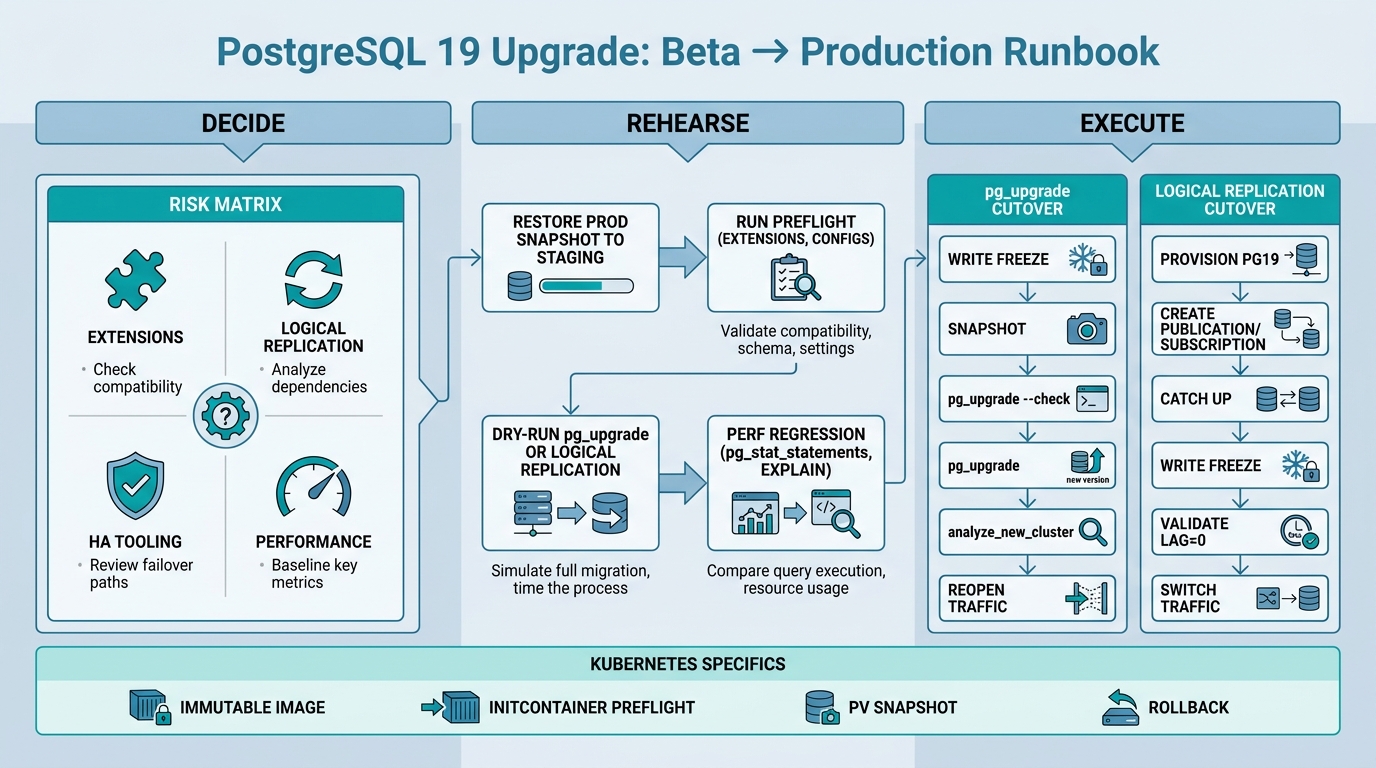
Upgrading to PostgreSQL 19 from a beta is not a routine “apt-get upgrade.” You’re validating a moving target: catalog changes can still land, extension ABI compatibility is fragile, and your HA/replication stack is usually where surprises hide.
This guide is a production-grade PostgreSQL 19 upgrade decision and execution checklist: who should run 19 now vs wait, how to rehearse the upgrade end-to-end, what pg_upgrade gets wrong in real life, and how to run it safely on Docker/Kubernetes with rollback plans.
Contents
- Decision rubric: run 19 beta now or wait for 19.1
- Breaking-change categories that bite during major upgrades
- Extension readiness: the real gating factor
- Rehearsal plan: staging restore, upgrade path, and perf regression checks
- Path A:
pg_upgrade(fast cutover) — checklist + gotchas - Path B: logical replication cutover (safer rollback) — checklist
- Kubernetes/Docker runbook snippets (immutable images, initContainers, PV snapshots, rollback)
- Operational checklist (pre / during / post)
- Bottom Line
Decision rubric: run 19 beta now or wait for 19.1
PostgreSQL betas are for validation, not for “ship it.” Running 19 beta in production is defensible only when you’re buying something concrete (a feature, a performance win, or upstream compatibility) and you have operational tolerance for churn.
Who should run PostgreSQL 19 beta in production
- Database platform teams that maintain golden images, can roll back quickly, and need early validation for org-wide upgrades.
- Extension authors / integrators validating compatibility (especially C extensions) against 19’s headers and catalogs.
- Teams blocked by a specific 19 feature/behavior and willing to accept “beta-grade” risk to unblock a launch.
Who should wait for 19.1
- Anything with tight RTO/RPO and no proven rollback path.
- Clusters dependent on non-core extensions (C extensions, FDWs, custom types) where upstream hasn’t published 19 builds.
- Deployments where HA tooling is brittle (custom failover scripts, hand-rolled repmgr/Patroni setups without rehearsal automation).
- Workloads where logical replication is mission critical and you can’t afford any behavior drift across beta builds.
Risk matrix (what usually blocks a major upgrade)
| Risk area | Failure mode | Impact | Mitigation | Beta recommendation |
|---|---|---|---|---|
| Extensions (C) | ABI break; missing 19 build; CREATE EXTENSION fails |
Hard stop / downtime | Validate with pg_available_extensions, build from source, pin versions, rehearse on dump/restore |
Wait unless you control the extension build |
| Logical replication | Replication slot conflicts; apply lag; sequence mismatch at cutover | Data divergence | Dry-run cutover; monitor lag; use compare checksums; enforce write freeze | Validate now in staging; prod beta only with strict runbooks |
| HA tooling (Patroni/repmgr) | Failover scripts assume old paths; health checks fail; bootstrap issues | Extended outage | Pin image/paths; test failover on new version; verify callbacks | Wait unless fully automated + rehearsed |
| Query plans / perf | Planner behavior shifts; regression in critical queries | Latency / cost spikes | Replay workload; compare EXPLAIN (ANALYZE, BUFFERS); tune stats; reindex where needed |
Validate now; prod beta only if you can rollback fast |
| Operational scripts | Backup/restore, monitoring agents, log parsers break | Blind ops | Smoke test tooling; check permissions/log format; update dashboards | Validate now |
Rule of thumb: if you have any C extensions you don’t control, or your HA stack is not “push-button rebuild,” treat beta as non-production. Use beta to rehearse the upgrade and feed upstream bug reports, then ship 19 after 19.1 (or at least after RC + your own burn-in).
Breaking-change categories that bite during major upgrades
Major PostgreSQL upgrades usually break you in the same places even when “the database” itself is fine: extensions, catalogs/permissions, replication, and operational tooling. Use the beta release notes to identify version-specific items, but plan for these recurring classes.
1) Catalog and system view drift
- Monitoring queries that read
pg_stat_*views can change shape or semantics. - Third-party tooling that uses
pg_catalogdirectly can break.
Checklist
- Run your monitoring stack against a 19 staging cluster and diff dashboards/alerts.
- Prefer stable views/functions when possible; avoid scraping catalogs directly.
2) SQL behavior changes that surface in edge cases
- Planner changes can flip plans for the same query.
- New/changed reserved keywords can break generated SQL.
- Deprecated features can be removed across major versions.
Checklist
- Replay production traffic in staging (see rehearsal plan).
- Run your app test suite against 19 with tighter logging to catch subtle failures.
3) Storage-format and index-level realities
pg_upgrade largely preserves data files, which is why it’s fast. That speed comes with trade-offs:
- Your indexes may not benefit from new behavior until you
REINDEX(sometimes optional, sometimes recommended). - Bloat and fragmentation carry forward.
Checklist
- Budget time for
VACUUM (ANALYZE)and potentiallyREINDEXafter cutover. - Validate disk headroom for
--linkvs copy-based upgrades.
4) Replication and slots
If you use logical replication, the upgrade path is often “build new, replicate, cut over.” Slots, publications, subscriptions, and replication origins become part of your release process.
For deeper cutover tactics, see PostgreSQL 18 Logical Replication Tuning & Cutovers (the mechanics carry forward).
5) Extension packaging and library loading
Most major upgrade outages are “Postgres started but extension X didn’t.” Plan around that reality, not around the happy path.
Extension readiness: the real gating factor
Start your PostgreSQL 19 upgrade by inventorying extensions. Treat every extension as a deployable artifact with compatibility requirements, not as “a SQL thing inside the DB.”
Inventory what you’re actually running
-- Installed extensions and versions
SELECT extname, extversion
FROM pg_extension
ORDER BY extname;

-- Available extensions in the server image
SELECT name, default_version, installed_version
FROM pg_available_extensions
ORDER BY name;
Classify extensions by risk
| Extension type | Examples | Upgrade risk | Notes |
|---|---|---|---|
| SQL-only | pg_stat_statements (core contrib), pure SQL helpers |
Low | Still validate view definitions and GUCs |
| C extensions (in-process) | PostGIS, TimescaleDB, pgvector, pg_cron, custom types | High | Must be compiled/packaged for PG 19; ABI breaks across major versions |
| FDWs | postgres_fdw, mysql_fdw, others |
Medium–High | FDW behavior + packaging issues are common failure points |
| Background workers | pg_cron, custom workers |
High | Startup ordering and shared_preload_libraries cause outages |
Validate build availability (don’t assume)
- If you run vendor images (Docker, Kubernetes Operators, managed services), verify they publish PG 19 builds of your required extensions.
- If you build your own images, plan the “19 toolchain” work: build deps, CI, artifact signing, and SBOM if you do supply-chain controls.
Extension preflight in staging
In a restored staging copy, run a clean restart with the same shared_preload_libraries you use in prod and check logs for load failures. A surprising number of upgrades fail because the new container image simply doesn’t ship the library referenced in postgresql.conf.
# Quick grep for preload libs and extension-related failures
grep -E "shared_preload_libraries|could not load library|FATAL|ERROR" postgresql.log
For performance-sensitive extension stacks, validate query behavior and tuning. These two ReleaseRun references are useful context for JSONB-heavy workloads:
Rehearsal plan: staging restore, upgrade path, and perf regression checks
Your goal is not “run pg_upgrade once.” Your goal is to prove you can execute the full change under production constraints: time window, data volume, extension set, HA, and rollback.
Step 0: Pick the upgrade method (before you touch staging)
| Method | Downtime | Rollback | Complexity | Best for |
|---|---|---|---|---|
pg_upgrade |
Short (minutes–hours depending on IO + analyze) | Harder (especially with --link) |
Medium | Single cluster cutover, same host/PV, you can afford a maintenance window |
| Logical replication cutover | Very short at final cutover | Safer (keep old primary intact) | High | 24/7 workloads, cross-host migrations, big data where you want staged sync |
Step 1: Restore production data into staging (real size, real pain)
- Use a recent base backup or snapshot + WAL replay, not a partial dump.
- Sanitize secrets/PII as needed, but keep row counts and data distribution realistic.
Step 2: Run pre-upgrade health checks on PostgreSQL 18
-- Version, build, and configuration baseline
SELECT version();
SHOW server_version;
SHOW data_directory;
SHOW shared_preload_libraries;

-- Check for invalid indexes
SELECT indexrelid::regclass AS index, indrelid::regclass AS table
FROM pg_index
WHERE NOT indisvalid;

-- Check for prepared transactions (can complicate cutovers)
SELECT * FROM pg_prepared_xacts;

-- Extension inventory
SELECT extname, extversion FROM pg_extension ORDER BY 1;
Step 3: Dry-run the chosen upgrade method in staging
- Record: wall clock time, peak disk usage, CPU/IO utilization, and manual steps.
- Turn the run into a script. If it’s not scripted, it’s not repeatable under stress.
Step 4: Perf regression checks (minimum viable)
Don’t boil the ocean. Pick the handful of queries that drive p95/p99 latency and resource cost.
- Enable and query
pg_stat_statementson staging (if you use it in prod). - Capture baselines from PG 18 and compare to PG 19 under the same workload replay.
-- Top time consumers (requires pg_stat_statements)
SELECT queryid,
       calls,
       total_exec_time,
       mean_exec_time,
       rows
FROM pg_stat_statements
ORDER BY total_exec_time DESC
LIMIT 20;
If you’re JSONB-heavy, revalidate your critical indexes and operators. The fastest way to catch regressions is to compare EXPLAIN (ANALYZE, BUFFERS) plans for representative queries and confirm the planner still chooses your intended indexes.
Step 5: Failure drills
- Force an extension load failure (remove the library from the image) and confirm your preflight catches it.
- Kill the upgrade job mid-flight and confirm you can return to service (either by snapshot rollback or by keeping the old cluster intact).
- Test HA failover on PG 19 in staging (if applicable).
Path A: pg_upgrade (fast cutover) — checklist + gotchas
pg_upgrade is the right tool when you want the shortest maintenance window and you can take a clean outage. It is also where operators get hurt by assumptions: binary compatibility, file ownership, and “we’ll just rollback” plans that don’t exist.
Core checklist
- Install PostgreSQL 19 binaries alongside 18 on the same node (or in the same container image if you do a dual-binary image for the upgrade job).
- Ensure extension libraries for 19 are present (same set as prod, same versions or known-good upgrades).
- Stop writes and shut down PostgreSQL 18 cleanly.
- Run
pg_upgrade --checkand fix everything it flags. - Run the actual upgrade (copy-based or
--link). - Run the generated post-upgrade scripts (
analyze_new_cluster.sh,delete_old_cluster.sh) based on your rollback policy. - Validate application behavior, then re-enable traffic.
Concrete command sequence (typical Linux host)
# Example paths; adjust for your packaging
OLD_BIN=/usr/lib/postgresql/18/bin
NEW_BIN=/usr/lib/postgresql/19/bin
OLD_DATA=/var/lib/postgresql/18/main
NEW_DATA=/var/lib/postgresql/19/main

# 1) Create new data directory (as postgres)
install -d -o postgres -g postgres -m 0700 "$NEW_DATA"

# 2) Initialize new cluster
sudo -u postgres "$NEW_BIN/initdb" -D "$NEW_DATA"

# 3) Preflight
sudo -u postgres "$NEW_BIN/pg_upgrade"
  --check
  -b "$OLD_BIN" -B "$NEW_BIN"
  -d "$OLD_DATA" -D "$NEW_DATA"

# 4) Real run (copy-based is safer; --link is faster but complicates rollback)
sudo -u postgres "$NEW_BIN/pg_upgrade"
  -b "$OLD_BIN" -B "$NEW_BIN"
  -d "$OLD_DATA" -D "$NEW_DATA"
  --jobs="$(nproc)"

# 5) Post-upgrade: analyze (do this before putting load back on)
sudo -u postgres ./analyze_new_cluster.sh

# 6) Only delete old cluster when rollback window is closed
# sudo -u postgres ./delete_old_cluster.sh
pg_upgrade gotchas that cause real outages
Gotcha: --link is not a free lunch
--link hard-links old data files into the new cluster, saving time and disk. It also means “rollback” is no longer clean, because both clusters reference the same underlying files. Use --link only when:
- you have a storage-level snapshot to roll back the entire volume, and
- you can guarantee no process will start the old cluster after the upgrade.
Gotcha: missing 19 extension packages
The upgrade can succeed and the server can still fail at startup if shared_preload_libraries points at an extension library not present in the 19 image/host. Preflight by verifying the libraries exist on disk and match architecture.
Gotcha: collation / libc differences (container images vs hosts)
If your old cluster was created with a different libc/locale provider (or you switch base image families), you can hit collation version warnings or index behavior changes. Treat “changing the OS under the database” as a separate migration risk. Keep the base image consistent across major versions unless you have a dedicated test plan.
Gotcha: forgot the “human” scripts
pg_upgrade writes scripts into the working directory. Operators miss them during incident-grade cutovers.
- Capture them as artifacts in your CI/CD logs.
- Run
analyze_new_cluster.shas part of the upgrade job, not “later.” - Delay
delete_old_cluster.shuntil the rollback window expires.
Gotcha: disk headroom is wrong (especially on Kubernetes PVs)
Copy-based upgrades need extra space. Your PV is often sized “just enough” for steady-state. Validate space before the maintenance window:
df -h "$OLD_DATA"
# Also check inode pressure if you have many small relations
df -i "$OLD_DATA"
Path B: logical replication cutover (safer rollback) — checklist
Logical replication cutovers are operationally safer because you keep the old primary intact until you’re confident. They are also more work: you need to think about sequences, roles/privileges, DDL, and replication lag as first-class concerns.
Use this method when downtime needs to be close to zero, or when you want a clean rollback by simply switching traffic back to the old cluster.
High-level sequence
- Provision PostgreSQL 19 cluster in parallel (new PV / new host / new managed instance).
- Install required extensions and match critical settings.
- Replicate data from PG 18 to PG 19 using publications/subscriptions.
- Catch up, then enforce a write freeze on PG 18.
- Wait for apply to reach zero lag; validate counts/checksums for key tables.
- Redirect application traffic to PG 19.
- Keep PG 18 read-only for rollback until confidence window expires.
Minimum command scaffolding
-- On PG18 (publisher)
CREATE PUBLICATION pub_all FOR ALL TABLES;

-- Create a replication user with least privilege (example; adapt)
CREATE ROLE repl WITH LOGIN REPLICATION PASSWORD '...';
GRANT CONNECT ON DATABASE yourdb TO repl;

-- On PG19 (subscriber)
CREATE SUBSCRIPTION sub_from_18
CONNECTION 'host=pg18 port=5432 dbname=yourdb user=repl password=...'
PUBLICATION pub_all
WITH (copy_data = true, create_slot = true);
Logical replication cutover gotchas
- Sequences: logical replication doesn’t automatically keep sequences “in sync” the way people expect. You need a sequence reconciliation step at cutover (set sequence values based on max(id)).
- DDL: schema changes during replication require a disciplined process (apply DDL to both, or freeze DDL during migration).
- Large objects: if you use them, validate replication behavior for your exact setup.
- Write paths you forgot: cron jobs, admin scripts, background workers. These often keep writing during the “freeze.”
For a deeper, operator-focused runbook on tuning and cutovers, reference PostgreSQL 18 Logical Replication Tuning & Cutovers.
Kubernetes/Docker runbook snippets (immutable images, initContainers, PV snapshots, rollback)
Kubernetes changes the failure modes: you have immutable images, persistent volumes with their own snapshot semantics, and orchestration that can restart a broken pod forever. Treat the upgrade as a Job that produces a new PV (or new data directory) and only then promote it to the StatefulSet.
Pattern: immutable images + explicit upgrade Job
- Build an image that contains the PG 19 server and the upgrade utilities you need.
- Run a one-shot Job that mounts the old PV and a new PV (or a new directory) and performs the upgrade.
- Switch the StatefulSet to the new image and PV reference only after the Job succeeds.
initContainer preflight: fail fast before Postgres starts
This catches “missing shared_preload_libraries” and basic sanity issues early, before you wedge your StatefulSet in a crash loop.
initContainers:
  - name: pg-preflight
    image: your-registry/postgres:19-beta
    command: ["bash","-lc"]
    args:
      - |
        set -euo pipefail
        echo "Checking extension libraries..."
        # Example: if you preload pg_stat_statements and pg_cron
        ls -la /usr/lib/postgresql/19/lib/pg_stat_statements.so
        ls -la /usr/lib/postgresql/19/lib/pg_cron.so

        echo "Checking data dir ownership/permissions..."
        test -d /var/lib/postgresql/data
        stat -c "%U:%G %a" /var/lib/postgresql/data

        echo "Running pg_controldata (sanity)..."
        /usr/lib/postgresql/19/bin/pg_controldata /var/lib/postgresql/data | head
    volumeMounts:
      - name: data
        mountPath: /var/lib/postgresql/data
PV snapshot/restore: your rollback primitive
If your storage class supports CSI snapshots, take a snapshot before the upgrade. For pg_upgrade --link, this is non-negotiable.
apiVersion: snapshot.storage.k8s.io/v1
kind: VolumeSnapshot
metadata:
  name: pg18-preupgrade-snap
spec:
  volumeSnapshotClassName: csi-snapclass
  source:
    persistentVolumeClaimName: pg-data-pvc
Rollback strategy on Kubernetes should be explicit:
- Rollback by snapshot restore: restore the PVC from the pre-upgrade snapshot and redeploy the PG 18 StatefulSet image.
- Rollback by dual-cluster (logical replication approach): keep PG 18 StatefulSet alive and switch Service selector back.
Docker Compose / single-node Docker: keep it boring
For local or simple single-node deployments, don’t mix “upgrade logic” into your long-running container. Use a one-off container that mounts the old volume and writes to a new volume.
# Example: create a new volume for PG19
docker volume create pg19data

# Run an upgrade container (you need both 18 and 19 binaries available)
docker run --rm
  -v pg18data:/var/lib/postgresql/18/data
  -v pg19data:/var/lib/postgresql/19/data
  your-registry/pg-upgrade:18-to-19
  bash -lc 'pg_upgrade ...'
Operational checklist (pre / during / post)
Pre-upgrade (T-2 weeks to T-1 day)
- Lock the target build: pick a specific PG 19 beta/RC build and pin image digests. Don’t “latest” your way into a surprise.
- Extension readiness: confirm 19 packages exist (or you can build them) for every installed extension.
- Run staging rehearsal on a restored production copy with full data size.
- Define rollback: snapshot restore vs dual-cluster vs “we can’t rollback.” If you can’t rollback, you need a larger maintenance window and stronger validation.
- Confirm backups: take a fresh base backup and verify restore (not just “backup succeeded”).
- App readiness: update drivers/ORM assumptions if needed; run integration tests against 19.
During upgrade (maintenance window)
- Freeze writes: enforce at the app layer and (if possible) at the DB layer (revoke writes or set
default_transaction_read_only). - Take a final snapshot/backup right before the change.
- Execute scripted upgrade (Job/runbook), capturing logs as artifacts.
- Run ANALYZE (or the generated script) before reopening traffic.
- Smoke tests: auth, migrations, key queries, background jobs, and one write transaction end-to-end.
Post-upgrade (first 24–72 hours)
- Monitor replication/HA signals: failover readiness, lag (if any), WAL rates, checkpoint behavior.
- Watch query latency: compare p95/p99 to baseline; look for plan flips in top queries.
- Vacuum/analyze cadence: ensure autovacuum is healthy; new stats after upgrade can change behavior quickly.
- Delay destructive cleanup: don’t delete the old cluster / snapshots until you’ve passed a confidence window.
If you’re upgrading specifically to improve performance characteristics (common with JSONB and search-heavy stacks), keep your tuning notes close. These references are useful for post-upgrade tuning work:
- PostgreSQL 18 JSONB Performance Tuning (Production)
- PostgreSQL Performance in 2026: JSONB, Full-Text Search, and Query Optimization
If you’re on managed Postgres and your “upgrade” is a button click, you still own extension readiness, replication cutovers, and rollback thinking. For platform trade-offs, see Managed Database Services Compared: PlanetScale, Neon, Supabase, Aiven (and Cloud-native Options).
Bottom Line
A production-grade PostgreSQL 19 upgrade is an extension and operations project more than it is a database project. Use PG 19 beta to validate: extension packaging, your HA/replication tooling, and your performance-critical queries. Ship 19 to production when you can rehearse the full cutover from a restored copy, prove rollback, and automate the runbook end-to-end. If any of those are false, wait for 19.1 and keep burning down the unknowns in staging.
🛠️ Try These Free Tools
Paste your Kubernetes YAML to detect deprecated APIs before upgrading.
Paste a Dockerfile for instant security and best-practice analysis.
Paste your docker-compose.yml to audit image versions and pinning.