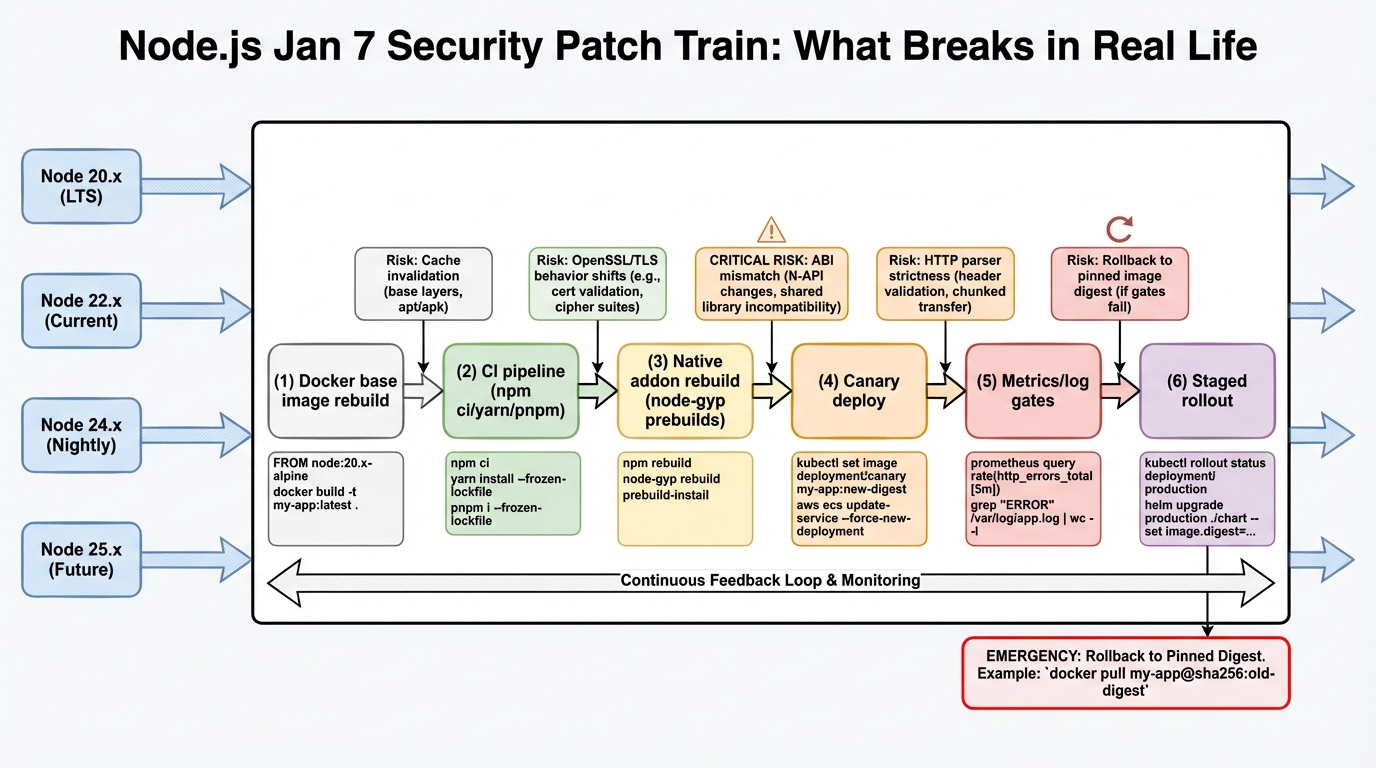
Node.js security patches land Jan 7. The rebuild will hurt you.
Node.js plans security releases on 2026-01-07 for Node 20, 22, 24, and 25. Your CI will feel it first.
What drops on 2026-01-07 (and why it matters)
I have watched teams treat runtime patches like “one quick bump,” then spend the night chasing a broken image rebuild. The Node.js security advisory says four active release lines get patched on the same day, and it lists 3 high severity issues plus 1 medium and 1 low. Details stay under embargo until release, so you cannot “wait for the CVE writeups” and still patch on time.
So.
This is not one upgrade, it is four parallel patch bumps, and most orgs somehow run all four at once across different services.
- Expect rebuild work: base images, lockfiles, CI caches, SBOM generation, signing, and every pipeline that compiles native addons.
- Assume different blast radii: internet-facing APIs need faster waves than internal cron jobs, even if both run the same Node line.
What actually got fixed: the 6 CVEs
The embargo lifted with the patches. Here’s what the advisory revealed — six CVEs across the permission model, TLS handling, HTTP parsing, async_hooks, and buffers:
- CVE-2025-55132 (High): Permission model bypass. If you use Node’s experimental permission model (
--experimental-permission), an attacker could escape the sandbox. Most production deployments don’t use this yet, but if you do, patch immediately. - CVE-2025-59465 (High): HTTP request smuggling vector. If you run Node.js behind a reverse proxy (nginx, Caddy, ALB), certain malformed requests could bypass your proxy’s rules and hit Node differently than expected. This is the one that matters most for public-facing services.
- CVE-2025-55130 (High): TLS certificate validation issue. The TLS fixes route errors through handlers instead of letting exceptions crash the process. If you terminate TLS in Node (some teams still do), treat this as urgent.
- CVE-2025-59466 (Medium): async_hooks resource tracking issue that could leak information across requests in certain async patterns.
- CVE-2025-55131 (Medium): Buffer safety fix for edge cases in Buffer allocation under memory pressure.
- CVE-2026-21637 (Low): Minor fix in the undici HTTP client (bumped to 6.23.0).
The practical read: map each CVE to your attack surface. If you expose HTTP endpoints to the internet, CVE-2025-59465 is your priority. If you terminate TLS in Node, CVE-2025-55130. If you don’t use the permission model, you can deprioritise CVE-2025-55132.
The thing nobody mentions: the tarball isn’t the artifact
This bit me once in a monorepo. We “just bumped Node,” rebuilt 30 images, and a single postinstall script changed behavior because the build environment changed under it. The outage did not come from Node itself. The outage came from the rebuild doing exactly what it always does, just on a bad day.
I do not trust “patch releases are safe.” Not in container fleets.
- Rebuilds re-run scripts: npm lifecycle hooks, node-gyp builds, and download steps run again. They will happily fail behind a proxy or a TLS inspection box.
- Native addons bite first: bcrypt, sharp, sqlite bindings, and grpc variants often fail as “missing symbols” or “ELF load” errors when the runtime or libc combo shifts.
Operational rule I use: treat security runtime drops like an infrastructure release. If you cannot canary it, you should not roll it fast.
Before Jan 7: prep like you actually want to sleep
Do this before the release date, not while everyone refreshes the Node blog and your change calendar fills up. The maintainers delayed this drop to avoid holiday chaos, which means your org will probably patch the first week back when traffic and meetings both spike.
Pick a patch SLA now. If you wait until release day to define “patch within X hours,” you already lost the argument.
# Step 1: Inventory what runs where
# Don't rely on "we standardize on Node 22" — someone always
# ships Node 20 in a forgotten worker.
for host in $(kubectl get nodes -o name); do
  kubectl debug $host -it --image=node:alpine -- node -v
done

# Or for Docker-based deployments:
docker ps --format '{{.Names}}' | while read c; do
  echo -n "$c: "; docker exec $c node -v 2>/dev/null || echo "no node"
done- Freeze installs: use
npm ci,pnpm install --frozen-lockfile, oryarn install --immutableso the rebuild stays deterministic. - Pin your base image digest: do not trust
latest. Build canaries off a pinned digest so you can reproduce a good build after the patch drops. - Pre-warm caches: warm your CI runners and dependency caches, or your rollout window becomes “waiting for compilers” time.
# Step 2: Pin image digest (not tag)
# Bad:  FROM node:20-alpine
# Good: FROM node:20-alpine@sha256:abc123...
# Find current digest:
docker pull node:20-alpine
docker inspect --format='{{index .RepoDigests 0}}' node:20-alpine
Canary plan (the minimum that works)
Some folks skip canaries for patch releases. I don’t, but I get it if you run a tiny dev cluster and you can rollback in 2 minutes.
For production, be boring.
# Build one canary image per Node line
docker build -t your-service:canary-20.20.0 \
  --build-arg NODE_VERSION=20.20.0 .

# Deploy and watch
kubectl set image deploy/your-service \
  app=your-service:canary-20.20.0

kubectl rollout status deploy/your-service --timeout=300s

# Verify the patch is actually applied (not cached layer)
kubectl exec deploy/your-service -- node -e \
  "console.log(process.version)"
# Must show v20.20.0, not v20.19.x- Write down rollback: pin the prior image digest and make rollback a one-command change, not a Slack debate.
Red flags to watch for (these show up fast)
I look at logs first, then graphs. Graphs lag.
- 5xx spikes or upstream connect errors: proxies and HTTP edge cases show up as sudden error bursts right after the rollout. With CVE-2025-59465 fixing request smuggling, your proxy may now correctly reject requests it was previously passing through — that’s good, but it looks like an error spike.
- TLS handshake failures: the CVE-2025-55130 fix changes how TLS errors are routed. Older load balancers, corporate MITM boxes, and weird cipher policies may fail in ways that look like “random client issues.”
- Native addon load errors: watch for “ELF load,” missing symbols, ABI mismatches, and postinstall build failures.
- CPU or RSS jumps: this often means your “locked” install was not locked, and the rebuild pulled a slightly different dependency graph.
When the patches publish: move by wave, not by panic
Pull the release notes the moment they go live, then decide priority based on exposure. If a service sits on the public internet, patch it before the internal worker that only talks to Postgres.
# Wave 1 (same day): Public-facing APIs
# Wave 2 (next day): Internal APIs and workers
# Wave 3 (within 72h): Dev tools, CI runners, batch jobs

# Quick verification after each wave:
curl -s http://your-service/health | jq '.version'
# Confirm version bump matches expected patch level
Anyway. There’s probably a cleaner way to rehearse this in smaller orgs, but the core move stays the same: prep the rebuild path, then ship in waves.
Official Security Advisory Sources
- Node.js vulnerability disclosures – the official blog feed for every Node.js security advisory, including CVE details and severity ratings.
- Node.js security policy on GitHub – how the Node.js project handles vulnerability reports, responsible disclosure, and patch timelines.
- Node.js official downloads – pre-built binaries and package-manager instructions for every supported platform and release line.
Related Reading
- Node 20 vs 22 vs 24: Which LTS to Run — The version decision for production Node.js
- Node.js 20 End of Life: Migration Playbook — EOL April 30, 2026
- Node.js 20.20.0: Patch the 6 CVEs, Then Prove It — The full upgrade guide for these patches
- How to Add Version Health Badges — Track Node.js EOL status in your README
📦 Free tool: npm Package Health Checker — paste your package.json and instantly see which dependencies are deprecated, abandoned, or dangerously stale.
🛠️ Try These Free Tools
Paste your Kubernetes YAML to detect deprecated APIs before upgrading.
Paste a Dockerfile for instant security and best-practice analysis.
Paste your dependency file to check for end-of-life packages.
Track These Releases