0% faster, 3% less logged-in. That’s the real third-party cookie bug.
On our test harness, third-party cookie blocking didn’t crash anything. It just added silent 401s, slow re-auth loops, and “why did conversion drop?” meetings.
This playbook treats the Chrome third-party cookies deprecation like a performance regression. Measure it. Pick the right mitigation. Ship behind flags with rollbacks. Benchmarks vary by workload, so I’ll show you what to time and what to alert on.
Performance impact first: what gets slower (or breaks) when 3P cookies disappear
I’ve watched teams “validate login” on the top-level site and call it done. Then embedded flows start spinning. Users bounce. Support tickets arrive three days later.
Third-party cookie loss usually shows up as higher auth latency and higher failure rates inside iframes. Your P95 time-to-authenticated-page can jump by seconds if you accidentally trigger a top-level redirect fallback on every refresh.
- Embedded auth loops: You see 302 ping-pongs, then a 200, then another 302. Measure redirect count per session and alert when median redirects go above 2.
- Widget identity loss: Chat loads, but users look anonymous. Track “identified user rate” for the widget, not just “widget loaded.”
- Attribution drift: Client-side partner pixels drop events. Your “direct traffic” share climbs while paid looks worse. Re-baseline KPIs before you accuse marketing.
Small sentence. Big problem.
For most top-level first-party sessions, nothing changes. Cookies still work in a first-party context. The pain concentrates in third-party iframes, cross-site SSO shortcuts, and legacy silent refresh patterns.
What actually changed (and why you should not bet on dates)
The thing nobody mentions is how easy it is to test the wrong future. Chrome has run staged rollouts and experiments here, and the public timeline language has shifted over time.
Do not build your plan around a single year printed in a slide deck. Treat third-party cookie blocking as “already happening for a slice of users, and expanding.” Validate current behavior against the official Chrome Privacy Sandbox updates and your supported Chrome versions.
Data-driven stance: if 0.5% of your sessions already run with stricter cookie behavior, that is enough to justify a canary and synthetic monitoring.
Run this before and after: the benchmark harness I’d ship this week
Measure three timings and two rates. That’s it.
If you only measure errors, you’ll miss the slow failures. I time (1) time-to-authenticated-UI, (2) time-to-first-authenticated-API-200, and (3) total redirects. Then I track (4) auth success rate and (5) fallback-trigger rate.
- Timing 1, time-to-authenticated-UI (ms): Start timer at initial iframe load, stop when a selector like [data-test=nav-user] appears.
- Timing 2, time-to-first-API-200 (ms): Start timer before calling /api/me, stop on first 200 with expected payload.
- Rate 1, auth success rate (%): Successful embedded sessions divided by attempted embedded sessions, split by top-level site.
- Rate 2, fallback-trigger rate (%): How often you had to open a new tab or top-level redirect because the iframe flow could not persist state.
Here’s a simple gating rule I use in most cases. YMMV.
At canary, I block rollout if auth success drops by more than 0.5 percentage points or if P95 time-to-authenticated-UI increases by more than 200 ms. Some folks skip gates for “just browser changes.” I don’t. Browsers break revenue quietly.
Audit: find every third-party cookie dependency without guessing
I start in DevTools, then I add cheap telemetry. I do not start by coding CHIPS.
First, you need an inventory of cookies and the contexts that send them. Then you need to know how often users hit those contexts, because you will not fix every edge case in week one.
- DevTools cookie export: In Application storage, list cookies per domain. Record Domain, Path, SameSite, Secure, HttpOnly, expiry. Flag anything used during embedded flows.
- Network, per-frame inspection: Filter by iframe frame and confirm which requests actually carry cookies. “Cookie exists” does not mean “cookie sends.”
- Vendor dependency list: Write down every third-party script and iframe on P0 routes. If a vendor has no public 3PC guidance, treat it like an end-of-life dependency.
Then I add one tiny client beacon. It’s ugly, but it works.
Log whether you run embedded, the referrer, and which auth branch you took. Keep it async. Use sampling if you worry about overhead.
Decision rules: CHIPS vs Storage Access API vs FedCM
Pick the tool that minimizes user-visible latency. That’s the benchmark junkie view.
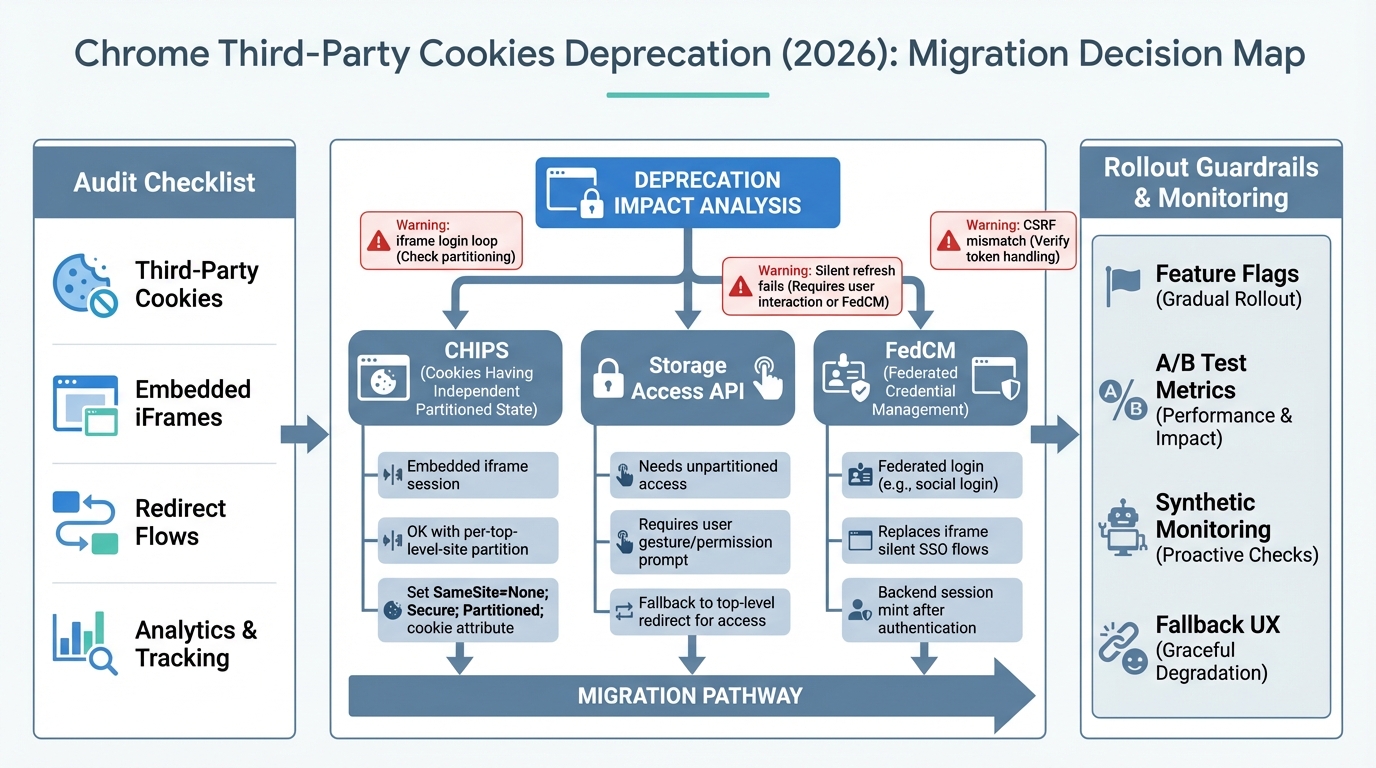
CHIPS usually wins for stateful embeds. FedCM wins for federated login when the IdP supports it. Storage Access API sits in the “permission and UX tax” bucket, so I treat it as a fallback, not a default.
- Use CHIPS when: Your product runs inside a third-party iframe and needs a session cookie, but you can accept per-top-level-site partitioning. You get state without cross-site tracking.
- Use Storage Access API when: You truly need access to existing, unpartitioned cookies inside an embed, and you can tolerate a user gesture plus a permission flow. Measure conversion impact, don’t argue about it.
- Use FedCM when: You rely on an IdP flow that used hidden iframes and third-party cookies for “silent” SSO. FedCM shifts the flow to a browser-mediated identity path.
One strong opinion. Do not try to “save” cross-site tracking cookies.
Third-party cookie blocking targets that category. Move attribution to first-party measurement and server-side event collection where you can. Your dashboards will change. Plan for it.
Implementation patterns (with the failure modes I keep seeing)
Pattern A: CHIPS for embedded sessions
This bit me when a team assumed one cookie should identify a user across 40 partner sites. CHIPS does not do that. It partitions on purpose.
Set a cookie that works in an iframe. That means SameSite=None and Secure. Then add Partitioned when you enable CHIPS. Gate it behind a server-side flag so you can roll back fast.
Pattern B: Storage Access API as an explicit, measurable fallback
Storage Access API can fix a broken embed. It can also add a permission prompt that tanks your funnel.
Only ship it when you can measure its delta on time-to-auth and completion rate. Tie the prompt to a user action, like a “Continue” click. If it fails, open a top-level flow as an escape hatch.
Pattern C: FedCM for federated identity
If your OIDC silent refresh uses prompt=none in a hidden iframe, cookie blocking will break it. You’ll see token refresh fail, then a hard logout at expiry.
FedCM changes the UX and the integration shape, so you need an experiment. Measure median and P95 time-to-login and compare against your current redirect-based flow.
Pattern D: Stop depending on cookies across sites, use token handoff
So. This is often the fastest path to reliability.
Have the host page hand a signed token to the iframe (postMessage), then mint a session inside the embed origin. You can still use cookies, but you stop requiring third-party cookie behavior as the “glue.” PostMessage adds overhead, but in practice I see it in the tens of milliseconds on real devices unless you do something wild.
Other stuff in this release: vendor updates, dependency bumps, the usual.
Rollout plan: feature flags, guardrails, and synthetic monitors
Put every mitigation behind a kill switch. Seriously.
You want separate flags for CHIPS cookie attributes, Storage Access prompting, FedCM entry points, and fallback UX. Then run a staged ramp with guardrails tied to the metrics you timed earlier.
- A/B criteria that matter: auth success rate, median and P95 time-to-auth, redirect loops per session, checkout completion, identified-user rate for support widgets.
- Synthetic monitoring: Run Playwright in third-party-cookie-blocked mode against a real multi-origin staging harness. Assert selectors and API 200s, but also assert latency budgets.
- Fallback UX: When the iframe cannot keep state, do a top-level redirect or “open in new tab.” Log every trigger with referrer so you can pressure-test partner sites that behave badly.
Troubleshooting: fast signals for React SPAs and Node SSR/APIs
React infinite loops show up as CPU spikes and repeated navigation. Node CSRF failures show up as clean 403s that only happen when embedded. Both waste hours if you do not instrument.
- React embedded login loop: Check cookie attributes first. Missing SameSite=None; Secure causes “it never sticks.” If attributes look correct, you probably need CHIPS or token exchange for embedded mode.
- Silent refresh fails: If you used hidden iframes against an IdP, assume third-party cookies caused the dependency. Move to FedCM where available, or force top-level auth flows.
- 401 from iframe fetch: Confirm credentials: ‘include’ and correct CORS headers. If those look fine, you’re back to strategy choice, not debugging.
Bottom line
No measurable performance win comes from this migration. You do it to prevent slow failures and silent revenue loss.
Inventory every cross-site cookie assumption, benchmark the user-task timings, then choose the smallest-latency fix: CHIPS for partitioned embedded sessions, FedCM for federated identity, Storage Access API only when you can stomach the UX cost. Roll it out with flags, canaries, and synthetic tests that run with third-party cookies blocked. There’s probably a cleaner way to model all of this, but the measurements will keep you honest.
🛠️ Try These Free Tools
Paste your dependency file to check for end-of-life packages.
Plan your upgrade path with breaking change warnings and step-by-step guidance.
Compare EKS, GKE, and AKS monthly costs side by side.
Track These Releases