React Server Components in Production (2026): Cache, Stream, Debug
Runbook. Five operator decisions. Most failures come from caching.
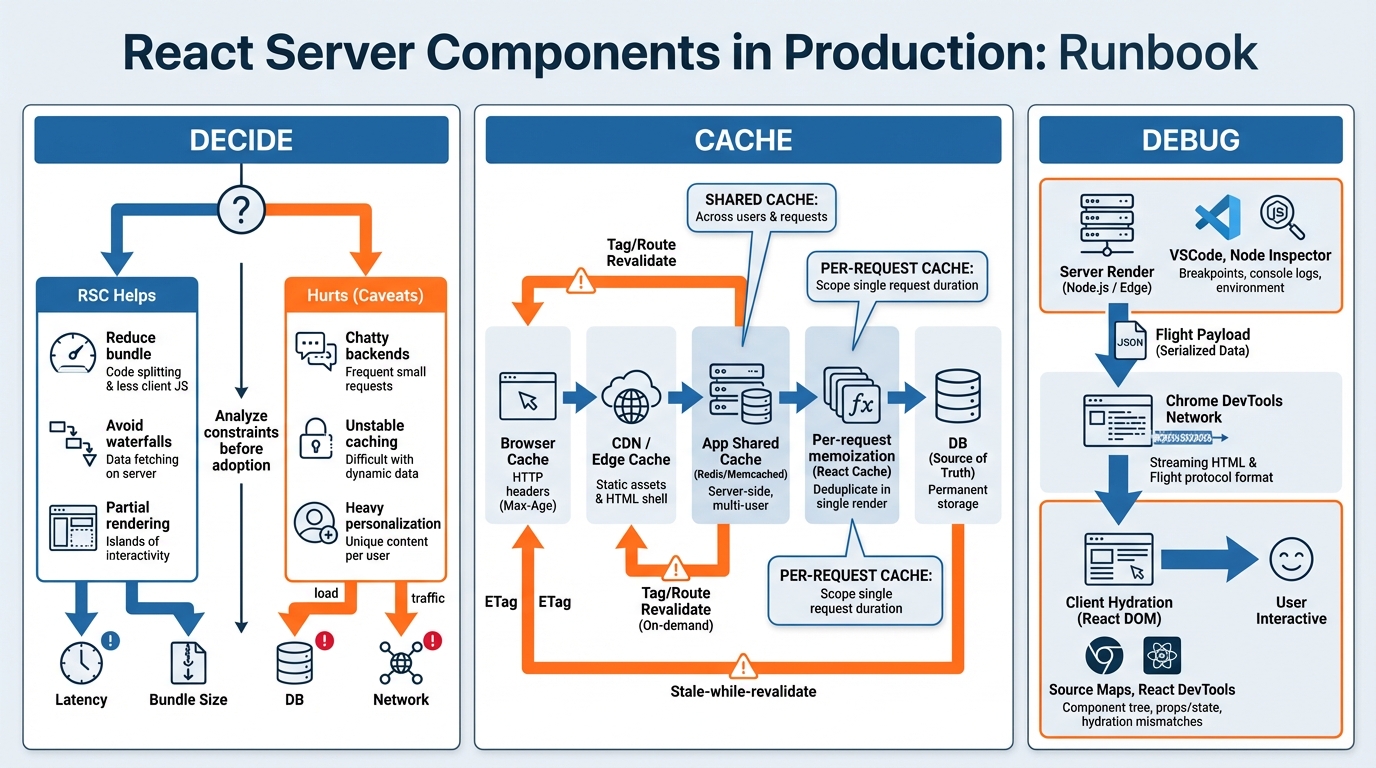
1) Decide where RSC helps (and where it hurts)
I have watched teams ship RSC everywhere. Then roll it back.
- Use RSC when: You can remove client JS. You can pre-resolve server data. You can stream without proxy buffering.
- Avoid RSC when: Your backend runs chatty. Your page needs per-user pricing. Your team cannot trace renders.
- Hard rule: Do not “global switch” RSC. Gate by route.
- Rollout pattern: Start with 1 or 2 public routes. Keep stable data. Pick the route with the fattest client bundle.
- Baseline first: Track TTFB, LCP, INP. Track origin p95 CPU. Track cache hit ratio. Track upstream call count.
- Traffic slice: 1% then 10% then 50%. Auto-rollback on regression.
The rest of the debate is bikeshedding. Ship one route.
2) Caching: name the layers, then set rules
This bit me when a CDN cached “your account” for strangers.
- Per-request memoization: Safe for personalization. It only lives for one request.
- Process memory cache: Risky. Workers restart. Keys must be strict.
- Shared app cache (Redis): Works for public or tagged data. Invalidation matters more than TTL.
- CDN cache: Assume “shared by strangers.” Prove otherwise.
- Minimum bar: Memoize repeated fetches inside one request. Stop same-request “call it 6 times.”
- Shared cache sweet spot: Docs, marketing, catalog pages. Anything with tag invalidation like product:123.
- Shared cache danger zone: Auth cookie keys. Per-user keys. Per-session keys.
Set headers like you mean it. Do not let the CDN guess.
- Private HTML: Cache-Control: private, no-store. Vary: Cookie.
- Public HTML: Cache-Control: public, max-age=0, s-maxage=300, stale-while-revalidate=600.
- Deploy safety: If your RSC payload format changes, bust caches. Version the key.
If you cannot explain your cache key on a whiteboard, you will ship the wrong UI.
3) Streaming: treat it like a network feature
Streaming feels fast. Or it feels haunted.
- Validate in prod: Some proxies buffer. Local dev lies.
- Timeouts: Align Node timeouts with your load balancer. Pick values. Document them.
- Client disconnects: Abort upstream work. Stop paying for ghosts.
- Allowed late: Below-the-fold modules. Recommendations. Comments.
- Not allowed late: Pricing. Auth state. Entitlements. Checkout totals.
Streaming does not justify wrong content. Ever.
4) Debugging: answer two questions fast
Debugging RSC means finding the boundary. Then blaming the right thing.
- Question 1: Did it render on the server or client?
- Question 2: Did it fail in HTML shell, streamed chunks, or Flight payload?
- Tracing: Propagate one request ID through edge logs, origin logs, upstream fetch spans, and client nav events.
- OpenTelemetry: Model “server render” as a span. Add route, cache status, render mode.
- Server sourcemaps: Upload them. Server traces now describe UI failures.
- VSCode: Attach to the worker process. Attaching to the parent wastes time.
- Chrome DevTools: Use Network Timing. Confirm early TTFB. Confirm progressive download.
I have not tested every proxy vendor here, so. Verify streaming yourself.
5) Operational checklist (copy/paste)
- Pre-rollout: Pick 1 or 2 routes. Set cache policy. Wire server sourcemaps. Confirm streaming in production.
- During rollout: Gate routes or hostnames. Slice traffic. Watch cache hit ratio and origin load.
- Post-rollout: Re-audit “not allowed late” UI. Load test with real upstream latency. Document invalidation.
The rest is dependency bumps. Moving on.
Bottom line
Use React Server Components in production when you can cache safely, stream reliably, and trace failures end-to-end. If you cannot observe it, do not scale it.
🛠️ Try These Free Tools
Paste your dependency file to check for end-of-life packages.
Track These Releases