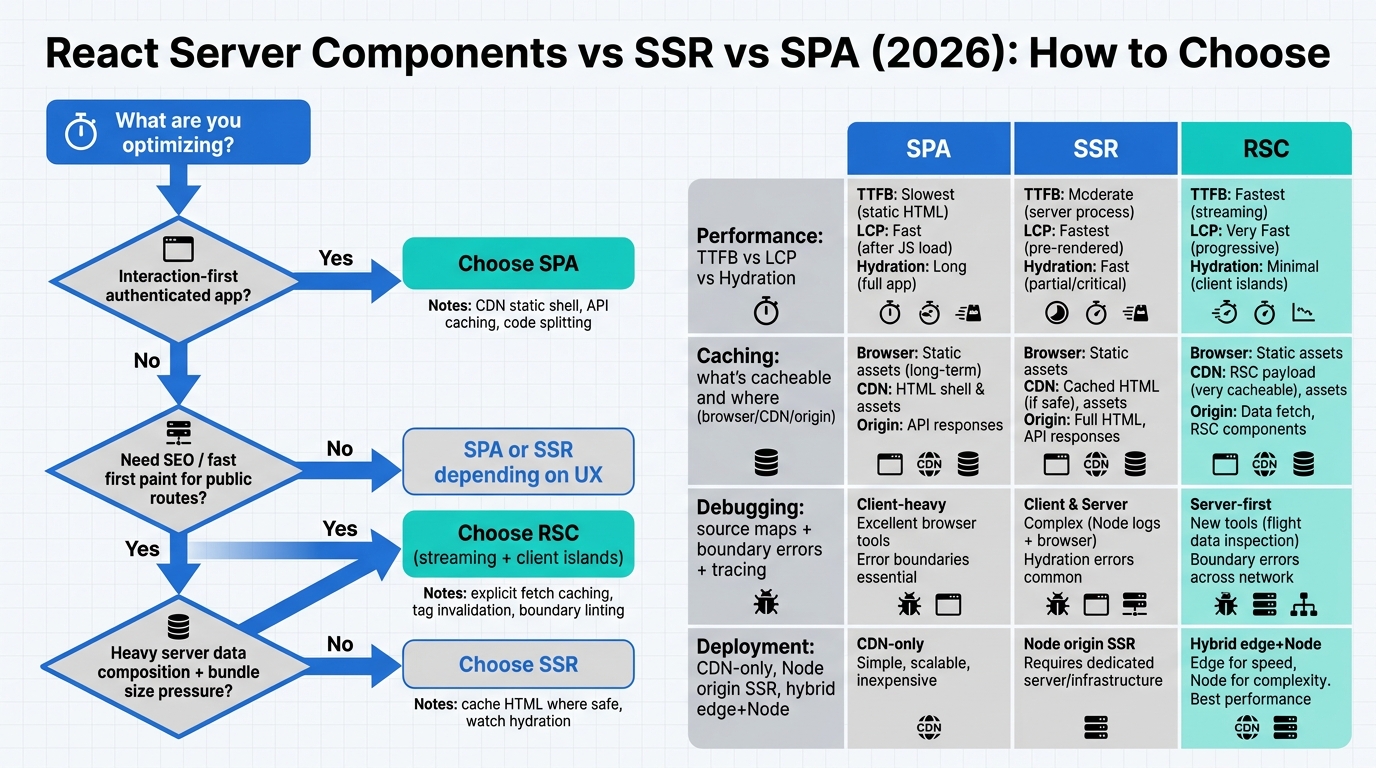
React in 2026 gives you three viable web app architectures: SPA (client-rendered), SSR (server-rendered HTML + hydration), and React Server Components (RSC, typically with SSR + streaming and selective client components). The wrong choice shows up as slow LCP, flaky caching, or debugging sessions where you can’t tell which side rendered what.
This guide gives you an operator-grade selection flowchart, concrete performance models (TTFB vs hydration vs streaming), caching/invalidation patterns (CDN, edge, origin, RSC payload caching), and production debugging tactics (source maps, tracing, and boundary errors) with Node.js deployment patterns.
Contents
- Architecture options in 2026 (SPA vs SSR vs RSC)
- Decision flowchart: choose RSC vs SSR vs SPA
- Performance model: TTFB, streaming, hydration, and what actually moves Core Web Vitals
- Caching & invalidation: CDN strategies, RSC payload caching, and debugging stale data
- Production debugging & ergonomics: boundary errors, source maps, logs, traces, TypeScript across the split
- Node.js deployment patterns for each architecture (origin, edge, hybrid)
- Migration paths (SPA → SSR → RSC) without burning the team
Architecture options in 2026 (SPA vs SSR vs RSC)
These aren’t ideological buckets; they’re different performance and caching contracts.
| Architecture | What you ship | First render | Interactivity | Best for | Common failure mode |
|---|---|---|---|---|---|
| SPA (client-rendered) | JS bundle(s) + API | Browser executes JS, then fetches data | Fast after load; slow to become usable on cold load | Highly interactive apps, authenticated dashboards, offline-ish UX | Bad LCP/INP on low-end devices; “loading skeleton forever” when APIs lag |
| SSR (HTML on server + hydrate) | HTML + JS bundle(s) | Server returns HTML quickly; browser paints earlier | Hydration cost can dominate; CPU-bound | Content pages with SEO needs, moderate interactivity | Hydration jank; double-fetching data; cache strategy gets messy |
| RSC (server components + client islands) | RSC payload (serialized component tree) + smaller client JS | Streaming server render; server does data access for server components | Only client components hydrate; less JS overall | Mixed content + interactivity, heavy data fetching, “app + marketing site” combos | Stale data from caching rules; boundary mistakes; “works locally, breaks at edge” |
Most “RSC apps” in production are actually RSC + SSR streaming + partial hydration. If you’re choosing an architecture, you’re choosing how much work happens on the server vs the browser, and what can be cached where.
Reference docs worth keeping open:
Decision flowchart: choose RSC vs SSR vs SPA
This is the shortest path to a sane default.
Start
 |
 |-- Is the app mostly authenticated + highly interactive (dashboard, IDE-like, drag/drop)?
 |       |
 |       |-- Yes → SPA (or RSC with client-heavy routing, but treat as SPA)
 |       |
 |       '-- No
 |
 |-- Do you need strong SEO / link previews / fast first paint for public pages?
 |       |
 |       |-- Yes
 |       |     |
 |       |     |-- Do you have lots of server data fetching per page (DB, internal APIs)?
 |       |     |       |
 |       |     |       |-- Yes → RSC (streaming + server data access)
 |       |     |       '-- No  → SSR (simple HTML + hydrate)
 |       |     |
 |       |     '-- Is JS bundle size a recurring problem? → Prefer RSC
 |       |
 |       '-- No
 |
 |-- Is your primary bottleneck “JS CPU on client” (slow devices, heavy hydration)?
 |       |
 |       |-- Yes → RSC (minimize hydration surface)
 |       '-- No  → SSR or SPA depending on UX needs

Finish
Choose this if… scenarios
- Choose SPA if the product is interaction-first and you can tolerate slower cold loads (or you control the environment, e.g., internal tools). Pair it with aggressive code-splitting and API caching.
- Choose SSR if you need fast first paint and your pages are not data-fetch labyrinths. SSR is the “boring default” for content + some interactivity.
- Choose RSC if you need SSR benefits but want to cut hydration and move data fetching to the server component layer. RSC pays off when you have complex data composition and want smaller client bundles.
Performance model: TTFB, streaming, hydration, and what actually moves Core Web Vitals
Stop arguing about “SSR is faster than SPA.” The bottleneck depends on what you’re optimizing: TTFB, LCP, INP, and the user’s CPU/network.
What each architecture optimizes (and what it taxes)
| Metric / cost | SPA | SSR | RSC (streaming) |
|---|---|---|---|
| TTFB | Often good (static shell from CDN), but content waits on JS + data | Depends on origin latency + server render time | Depends on server work, but streaming reduces “all-or-nothing” delay |
| LCP | Commonly bad on cold loads (JS + data gate rendering) | Often good (HTML paints quickly), but can regress with heavy hydration | Often best when tuned: stream critical UI, reduce client JS |
| Hydration/CPU on client | N/A (client render instead), but JS execution is the tax | High: entire tree hydrates unless you do islands | Lower: only client components hydrate |
| Streaming / progressive rendering | Usually no (unless you build your own progressive app shell) | Possible with Suspense streaming but commonly underused | Core to the model; good fit for data waterfalls |
How to measure it (Chrome tooling + real-user metrics)
Use lab tools to identify causes; use RUM to decide if it matters.
- Chrome DevTools Performance panel: record a cold load. Look for long tasks (JS execution), scripting time, and “Recalculate Style/Layout” bursts during hydration.
- Lighthouse: useful for regressions and budget checks, not as a single score to chase.
- CrUX / RUM: track LCP and INP by route. If you can’t segment by route and device class, you’re guessing.
Typical bottlenecks and fixes
SPA bottleneck: JS + data gating first paint.
- Ship a smaller initial route: route-level code splitting, remove expensive client libs from the critical path.
- Prefer server-provided HTML for public landing pages even if the “app” is SPA (hybrid). If you refuse SSR, accept slower LCP.
SSR bottleneck: hydration time dominates, especially on mid/low-end devices.
- Audit hydration: do you need everything interactive on load? Convert large static regions to non-interactive markup or islands.
- Keep server render cheap: precompute, cache, and avoid synchronous CPU-heavy transforms at request time.
RSC bottleneck: server work + cache misses + waterfalls between server components.
- Batch/compose data access on the server. If every component hits the DB independently, you rebuilt N+1 queries with nicer syntax.
- Stream intentionally: ensure your Suspense boundaries align with “what can render now” vs “what waits on slow data.”
If your build pipeline becomes the bottleneck while you chase performance, fix that too. This playbook is useful when TypeScript compile time is blocking iteration: https://releaserun.com/blog/speed-up-typescript-build-ts-5-7-5-8-performance-playbook.
Caching & invalidation: CDN strategies, RSC payload caching, and debugging stale data
Caching is where architectures stop being “framework choices” and start being operational risk. Your job is to decide: what is cacheable, where, for how long, and how you invalidate.
Cache layers you actually have
- Browser cache: controlled by Cache-Control, ETag, and service workers (if you use them).
- CDN / edge cache: HTML, RSC payloads, and API responses can be cached if headers allow it.
- Origin cache: in-process LRU, Redis, or application-level memoization for expensive reads.
- Data source cache: DB query cache, internal service caches.
How caching differs by architecture
| What you cache | SPA | SSR | RSC |
|---|---|---|---|
| Static assets (JS/CSS) | Easy: immutable fingerprints | Easy: immutable fingerprints | Easy: immutable fingerprints |
| HTML | Usually just the shell | Often cacheable for public pages; tricky with personalization | Often cacheable; can also cache streamed chunks/payloads depending on framework |
| Data | API caching (CDN) + client cache (React Query) | Server data fetch caching + CDN for public endpoints | RSC fetch caching (framework-level) + CDN + origin cache |
| Invalidation | Mostly client-driven revalidate | Revalidate HTML/data; beware “stale HTML” | Hardest: component-level caching means more ways to go stale |
Practical CDN strategies (edge vs origin)
Public, non-personalized pages: cache at the CDN with s-maxage and short stale-while-revalidate.
// Example Cache-Control for CDN-cached HTML
Cache-Control: public, max-age=0, s-maxage=300, stale-while-revalidate=30
Personalized pages: avoid caching full HTML at the CDN unless you have strong vary keys and you’re comfortable with the blast radius.
- Prefer edge auth + origin render for personalized HTML.
- Cache data fragments (public portions) and keep private data uncacheable (
private, no-store).
RSC payload caching and invalidation
RSC changes the unit of caching from “HTML page” to “server-rendered component output / fetch results.” In frameworks like Next.js, fetch() can be cached by default in server components unless you opt out, and revalidation becomes a first-class mechanism.
Rules to keep you out of trouble:
- Default to explicit cache behavior for data that matters. “Implicit caching” creates bug reports that read like ghost stories.
- Tag-based invalidation (when supported) beats time-based TTL for data with business-driven freshness needs.
- Make staleness observable: add headers like
x-cache,x-revalidated-at, and log cache hits/misses.
// Server-side data access with explicit cache semantics (framework-specific knobs vary)
export async function getProduct(id: string) {
  const res = await fetch(`https://api.example.com/products/${id}`, {
    // Next.js examples:
    // cache: 'force-cache',
    // next: { revalidate: 60, tags: [`product:${id}`] },
    headers: {
      'accept': 'application/json'
    }
  });

  if (!res.ok) throw new Error(`Failed to fetch product ${id}`);
  return res.json();
}
Debugging stale data (the checklist)
When users report “I updated X but the UI still shows old data,” you need to localize which cache lied.
- Check response headers (HTML, RSC payload, and API): Cache-Control, Age, ETag, x-cache.
- Confirm vary keys: cookies, Authorization, Accept-Language, device hints. A missing
Varycan leak personalization. - Trace revalidation path: did your mutation endpoint trigger invalidation/tag purge, or is it TTL-only?
- Reproduce at the same layer: bypass CDN (direct origin) vs normal traffic path.
- Inspect server component fetch caching rules: “why is this fetch cached” is the #1 RSC production surprise.
Production debugging & ergonomics: boundary errors, source maps, logs, traces, TypeScript across the split
Debuggability is an architecture feature. RSC improves runtime performance but raises the bar on observability because you now have a hard server/client boundary in the component tree.
Source maps that work in production
Regardless of architecture, set up:
- Server source maps for Node.js stack traces (upload to your error tracker if you use one).
- Client source maps gated appropriately (public source maps are a policy decision, not a technical limitation).
- Release identifiers embedded in both server and client builds so you can correlate errors to deploys.
Boundary errors you’ll see with RSC
- Importing client-only modules into server components (DOM APIs,
window, browser-only SDKs). - Passing non-serializable props from server → client components (functions, class instances, certain complex objects depending on framework rules).
- Environment mismatch: code that assumes edge runtime features while running on Node (or the reverse).
Make these failures loud in CI:
- ESLint rules / framework linting for server/client boundaries
- TypeScript
"lib"separation (don’t compile server code withdomlibs unless necessary) - Build-time assertions for
process.env.RUNTIME(or equivalent) where you have runtime forks
Node.js logging and tracing patterns
For SSR and RSC, the server render path is request-driven. Treat it like an API: structured logs, request IDs, and tracing.
// Minimal request-scoped logging (Node.js + any SSR/RSC framework)
import { randomUUID } from 'node:crypto';
import pino from 'pino';

const logger = pino({ level: process.env.LOG_LEVEL ?? 'info' });

export function withRequestContext(req: Request, handler: (ctx: { requestId: string }) => Promise<Response>) {
  const requestId = req.headers.get('x-request-id') ?? randomUUID();
  return handler({ requestId }).catch((err) => {
    logger.error({ err, requestId, path: new URL(req.url).pathname }, 'request failed');
    throw err;
  });
}
Tracing: if you already run OpenTelemetry for your APIs, extend it to server rendering and server component data fetches. The point is to answer: “Why was this request slow?” without guessing.
TypeScript types across server/client boundaries
RSC makes it easier to accidentally share the wrong types.
- Define DTOs in a shared, serialization-safe module (plain objects, JSON-friendly types).
- Keep server-only types (DB models, ORM entities) in server-only modules and map them to DTOs.
- Use runtime validation on boundary inputs/outputs (zod/typebox) for anything exposed to clients.
// shared/dto.ts
export type ProductDTO = {
  id: string;
  name: string;
  priceCents: number;
};

// server/product-mapper.ts
import type { ProductDTO } from '../shared/dto';

export function toProductDTO(row: any): ProductDTO {
  return {
    id: String(row.id),
    name: String(row.name),
    priceCents: Number(row.price_cents)
  };
}
Node.js deployment patterns for each architecture (origin, edge, hybrid)
Node deployments in 2026 are usually one of: traditional origin servers (containers/VMs), serverless functions, or edge runtimes. Your rendering architecture determines which one is painless.
SPA deployment (Node optional)
- Best default: static assets on CDN + separate Node API (or any backend).
- Node pattern: API behind a load balancer, scale independently from the frontend.
- Operational win: deploy frontend without touching backend.
SSR on Node (origin-rendered)
- Pattern: Node server (or serverless) renders HTML per request.
- Cache: CDN in front, with clear rules for which routes are cacheable.
- Scaling: SSR is bursty and CPU sensitive; load test with realistic concurrency.
RSC deployment (hybrid edge + Node origin)
RSC apps often end up hybrid:
- Edge for routing, auth gating, and caching decisions (fast TTFB, cheap redirects).
- Node origin for server component rendering that needs full Node APIs, DB drivers, or long-lived connections.
- CDN caches RSC payloads/HTML where safe, with explicit invalidation.
Node version choice matters for stability and tooling (perf hooks, diagnostics, security updates). If you’re standardizing, use a current LTS and avoid “latest just because.” This guide is relevant: https://releaserun.com/blog/node-20-vs-22-vs-24-which-nodejs-lts-should-you-run-in-production.
Practical runtime split: what runs where
| Workload | Edge | Node origin |
|---|---|---|
| Redirects, A/B routing, locale detection | Yes | Yes, but slower |
| Auth session validation | Yes (if token-based and lightweight) | Yes |
| DB access (Postgres/MySQL drivers) | Usually no | Yes |
| SSR/RSC render with heavy server libraries | Sometimes (framework/runtime dependent) | Yes |
| Binary/native modules | No | Yes |
Migration paths (SPA → SSR → RSC) without burning the team
SPA → SSR
- Start with SSR for a small set of public routes (marketing, docs, pricing). Keep the app as SPA.
- Introduce a CDN strategy for HTML and API responses before expanding SSR.
- Measure: if LCP improves but INP tanks, hydration is your new problem.
SSR → RSC
- Pick one route with obvious wins: heavy data composition + too much client JS.
- Move data fetching into server components and shrink client components to actual interactive islands.
- Make caching explicit early. “We’ll fix caching later” turns into weeks of stale-data bug reports.
RSC guardrails you want from day 1
- Boundary linting: server/client import rules enforced in CI.
- Observability: request IDs, structured logs, and tracing around render + data fetch spans.
- Cache policy document: which routes and fetches are cacheable, TTLs, and invalidation triggers.
If your app uses third-party auth and identity flows, browser privacy changes can affect session strategies and caching assumptions (especially on public-to-auth transitions). Keep this on your radar: https://releaserun.com/blog/chrome-third-party-cookies-deprecation-2026-migration-playbook-chips-storage-access-api-fedcm.
For a deeper RSC production angle (caching/streaming/debugging), see: https://releaserun.com/blog/react-server-components-in-production-2026-caching-streaming-and-debugging-on-react-nodejs.
And for a broader architecture overview, this comparison guide is the right companion piece: https://releaserun.com/blog/react-server-components-vs-ssr-vs-spa-guide.
Bottom Line
Use SPA when interactivity dominates and you can invest in keeping the initial route light. Use SSR when you need fast first paint and your data needs are straightforward. Use RSC when you want SSR-quality first paint but need to cut hydration costs and move data composition to the server—then commit to explicit caching rules and real observability, because that’s where RSC failures hide.
🛠️ Try These Free Tools
Paste your dependency file to check for end-of-life packages.
Plan your upgrade path with breaking change warnings and step-by-step guidance.
Check extension compatibility across PostgreSQL versions.
Track These Releases