Node.js meta commits in v24.13.1: use meta: add
Test first. Treat meta: add as release hygiene, not style.
Should you care? Upgrade verdict
Yes, if you contribute to nodejs/node and you ship automated release notes. If you write app code and never open PRs upstream, skip this.
In my experience, noisy changelogs cause real outages. Someone misses the one behavioral change buried under five “repo housekeeping” bullets. Then you page the wrong person at 02:00.
- Verdict: Use meta: for metadata-only changes, and keep them in their own commit.
- Evidence: Node.js v24.13.1 release notes include multiple meta: add entries (collaborator additions), so reviewers recognize the pattern.
- Caveat: Do not assume tooling will exclude meta commits from changelogs unless you verified the repo’s release-note rules.
Should you care? What changed in v24.13.1 (the evidence)
This matters. The project actually uses meta: add in the release notes for v24.13.1.
You can point reviewers at upstream reality instead of arguing taste. In v24.13.1, the release notes show meta: add … to collaborators entries. That tells you the prefix exists in practice, not just in someone’s blog post.
- What to cite in your PR: “v24.13.1 release notes include meta: add commits, so this commit follows the existing convention.”
- What not to claim: “Node enforces commitlint for this.” I have not seen a repo-wide enforced commitlint config in the draft you gave me. Your mileage may vary depending on current CI.
Some folks treat patch releases like a free pass. I do not. Metadata can still break CI, and CI breakage blocks real fixes.
Should you care? The runbook (do this, not that)
Do this. Keep the change small and the commit message boring.
I’ve watched “tiny” metadata PRs spiral because someone mixed an innocuous labels change with a build script tweak. Reviewers then argue whether it is behavioral. CI then fails on formatting. Now you’ve burned half a day.
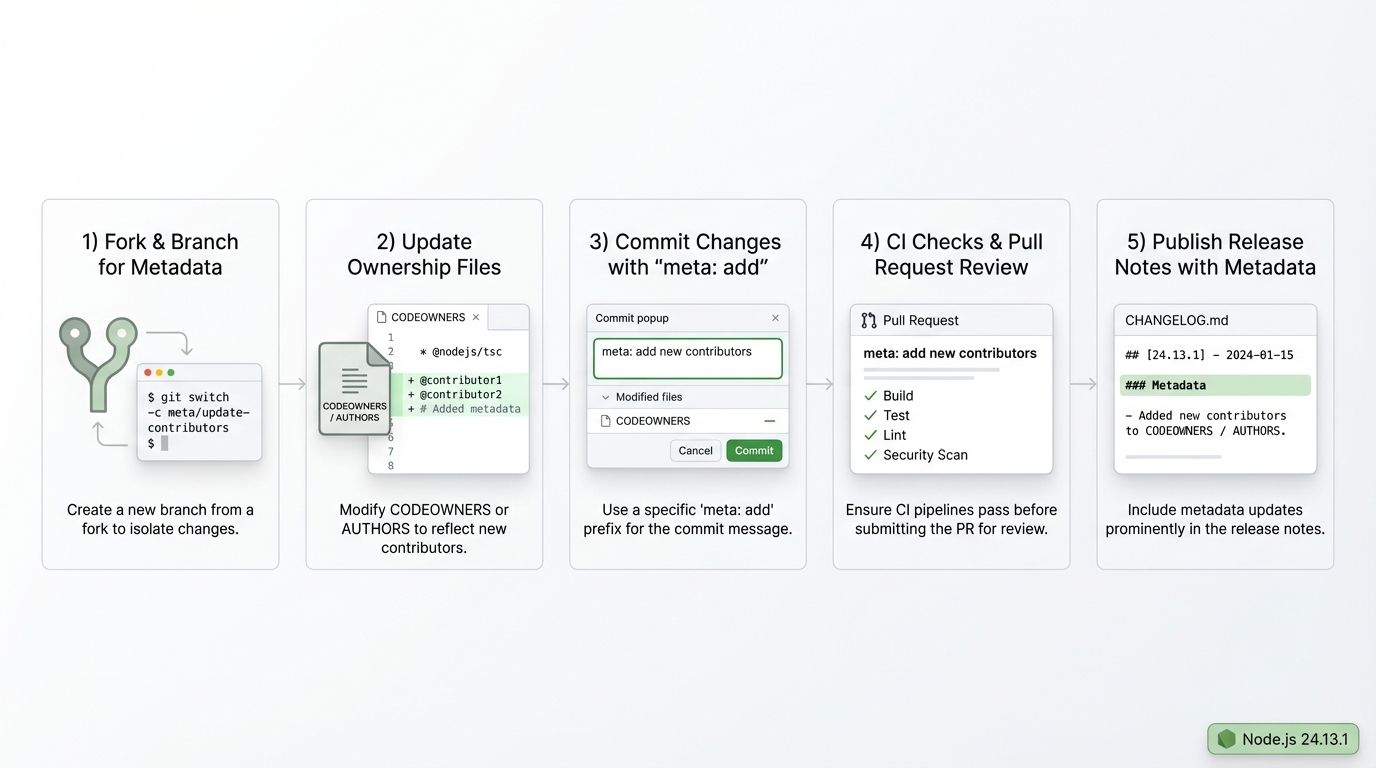
- Branch like you mean it: create a topic branch that screams intent, for example meta/add-labels.
- Change one class of thing: CODEOWNERS, .github files, AUTHORS, label configs. Do not sneak in runtime behavior changes.
- Commit message: use a subject like meta: add .github/labels.yml or meta: add CONTRIBUTORS.md.
- Body: one or two lines. Say what you added. No essays.
Should you care? How to verify before you waste reviewer time
Check it. Then push.
Run whatever the repo uses for commit message checks, if anything. If CI runs message validation, you want the failure locally, not 12 minutes into a GitHub Actions queue. In my experience, the fastest way to lose goodwill is “fix commit subject” nitpicks after a reviewer already looked.
- Local sanity check: run the repo’s documented contributor checks from CONTRIBUTING.md before you push.
- CI sanity check: watch the first CI run. If it fails, fix it fast and keep the PR focused.
- Release-note sanity check: after merge, confirm the change lands where you expect in generated notes, if you have access to those artifacts.
Should you care? Monitoring and alerting after merge
Yes. Watch the dashboard.
“Metadata-only” does not mean “risk-free.” A labels schema change can break triage bots. A CI config tweak can block every PR behind you. Check your CI failure rate and your bot error logs right after merge. If you run internal mirrors of nodejs/node, watch sync jobs too.
- First 30 minutes: check CI queue depth, failure rate, and any “workflow parsing” errors.
- First day: check issue triage automation, labeler bots, and PR automation error rates.
Should you care? Common failure modes (and how to get out)
This bites people. Usually on Friday.
If your commit message fails linting, fix the subject and amend. If release notes still show the entry and you expected exclusion, you probably assumed a rule that does not exist. Some setups require an exact prefix mapping, scope, or a completely different process.
- Commit message rejected: rewrite to the exact allowed prefix, then amend the commit. Keep the subject short.
- Reviewer says “behavioral change”: split the PR. Put the behavioral diff in a separate change with a non-meta prefix.
- Changelog still includes it: verify the repo’s release tooling config. Do not argue with “often excluded” folklore.
Should you care? What I’d do next
Document it. Then enforce it.
Add one line to your PR template about meta commits. Add a lightweight CI check if your repo wants consistency. Keep it fast. Under 10 seconds, or people will start bypassing it. Ignore the GitHub commit count. It’s a vanity metric.
- Read the real rules: follow CONTRIBUTING.md in nodejs/node, not random blog posts.
- Automate carefully: if you add commit message checks, roll them out in warning mode first.
- Keep an escape hatch: during an incident, you might need to merge a fix even if the commit subject format looks ugly.
Other stuff in this release: dependency bumps, some build fixes, the usual. There’s probably a better way to test this, but…
The exact commit format (copy-paste ready)
Here is what a properly formatted meta commit looks like in the Node.js repository. The prefix, scope, and body all matter for automated tooling.
git commit -m "meta: add @username to collaborators

PR-URL: https://github.com/nodejs/node/pull/XXXXX
Reviewed-By: Name <email@example.com>"
If you are adding labels, CODEOWNERS entries, or other non-runtime files, the pattern is the same:
# Adding a new label configuration
git checkout -b meta/update-labels
echo "new-label:" >> .github/labels.yml
git add .github/labels.yml
git commit -m "meta: add new-label to labels.yml"
git push origin meta/update-labels
The key rules: one logical change per commit, the meta: prefix goes before the colon with no space, and the body references the PR URL plus at least one reviewer.
Validating your commit message locally
Before pushing, you can check whether your message matches the expected format. Node.js uses git-node tooling for validation. Here is a quick local check you can run:
# Check your last commit message format
git log -1 --format="%s" | grep -E "^(meta|fix|feat|doc|test|build|ci|chore|refactor|perf|style|revert)(\(.+\))?: .+"
if [ $? -eq 0 ]; then
  echo "✅ Commit prefix is valid"
else
  echo "❌ Commit prefix does not match expected pattern"
fi

# Verify the commit body has PR-URL
git log -1 --format="%b" | grep -q "PR-URL:"
if [ $? -eq 0 ]; then
  echo "✅ PR-URL found in commit body"
else
  echo "⚠️  Missing PR-URL (required for most Node.js PRs)"
fi
Run this before you push. Catching format issues locally saves you a round-trip through CI and avoids the “please fix commit message” review comment that delays landing.
Official References
For the full context on Node.js contribution conventions and the meta commit pattern:
- Node.js Pull Request Guidelines — the official contributing guide covering commit message format, review process, and landing rules for the nodejs/node repository.
- Node.js Project Governance — how the Node.js project manages collaborators, committees, and the meta-level repository changes that
meta:commits represent.
Where this fits in the Node.js release lifecycle
Meta commits appear in every Node.js release cycle. They are part of how the project manages its contributor base and repository configuration between feature releases. If you track Node.js releases, you will see meta: entries mixed in with fix: and feat: commits in every changelog.
For a broader view of how Node.js versions are tracked and when they reach end-of-life, check our Node.js release tracker. If you are still running Node.js 20, our Node.js 20 EOL migration playbook covers what you need to plan for. You can also compare LTS versions in our Node.js 20 vs 22 vs 24 comparison.
To check whether your current Node.js version is still supported, try our free dependency EOL scanner. Paste your package.json and it will flag any runtime or dependency that is approaching end-of-life.
🛠️ Try These Free Tools
Paste your dependency file to check for end-of-life packages.
Plan your upgrade path with breaking change warnings and step-by-step guidance.
Paste your workflow YAML to audit action versions and pinning.
Track These Releases