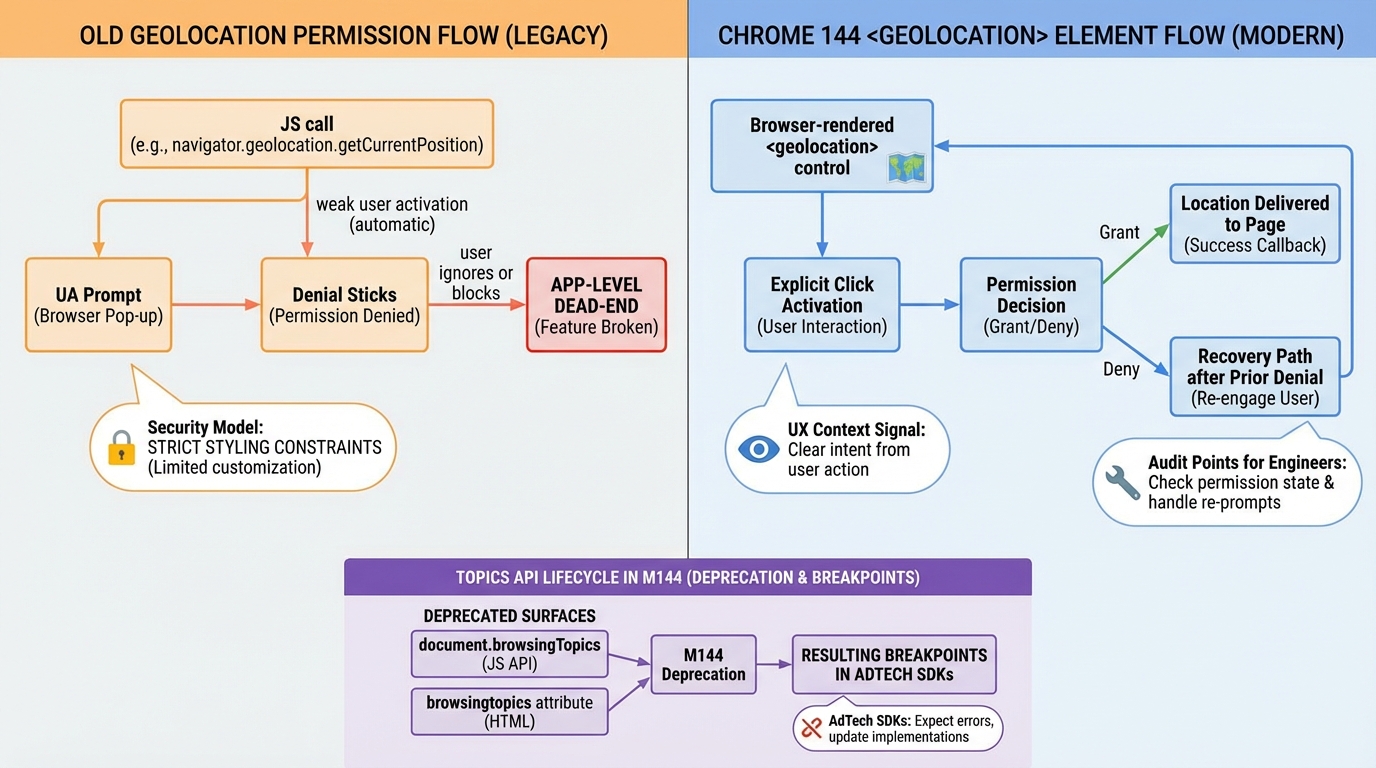
Chrome 144 breaks two habits: JS geolocation prompts and Topics
I’ve watched “location is broken” pages wake people up at 2 AM. It usually starts with a user who denied a prompt months ago, then your UI gives them no way back.
What I’d do this week (before Stable sneaks up)
Test Beta now. Your future self will thank you when support asks why conversions dropped on Tuesday.
- Run permission-flow E2E on Chrome Beta: hit first-run allow, deny, and “previously denied” states. Do not stop at “it works on my laptop.”
- Inventory Topics usage: search your codebase and your bundled vendors for document.browsingTopics and anything that smells like Privacy Sandbox.
- Add a view-transition watchdog: treat waitUntil() promises like production timeouts. A never-resolving promise can turn into a slow leak.
1) <geolocation>: permission UX you can stop owning
This bit me when a product manager asked, “Why can’t the user just re-enable location?” Because the browser prompt happened out of context, the user hit Deny, and we never built a recovery path.
Chrome 144 adds <geolocation>, a declarative control where the user click acts as the intent signal and the browser runs the permission flow. In most cases, that means you can stop building custom “go to Settings, then Site permissions” screens that look like a scam.
- What breaks without a plan: your app calls navigator.geolocation.getCurrentPosition(), the user denies once, and your UI keeps asking for a location you can never read.
- What to change in your UX: show a real “Get my location” control that the user clicks on purpose. Then show a plain recovery state when the browser says “denied.”
- What I’m not fully sure about yet: I have not tested the new control across Android WebView embeds. If you ship inside a WebView wrapper, assume you need a fallback.
If your product needs location, treat “denied” as a first-class state. Don’t hide it behind a spinner.
2) Topics API deprecation: the ad SDK foot-gun
Here’s the thing. You might not use Topics, but your dependencies probably do.
Chrome 144 starts the deprecation path for the Topics API. Code that assumes document.browsingTopics() exists can either throw or silently stop producing signals, depending on how the SDK wrote its guard rails.
- Fast detection: watch for TypeError traces that mention browsingTopics, especially in vendor bundles and consent frameworks.
- Fast mitigation: add feature detection before any call path touches Topics. If you cannot patch the vendor quickly, isolate the SDK behind a kill switch.
- My opinion: do not bet roadmap items on Topics “coming back.” Treat the whole surface as temporary.
3) View Transitions: waitUntil() can hang forever
Small API, big sharp edge. A single stuck fetch can keep a transition alive longer than you expect.
ViewTransition.waitUntil() lets you keep the transition pseudo-elements around until a promise settles. That helps when “animation finished” and “data ready” do not line up. It also makes it easy to ship a transition that never releases resources if your promise never resolves.
- What to test: simulate a slow network or a failed fetch during a transition, then confirm your UI recovers and the transition ends.
- What to log: track transitions that run longer than your normal animation budget. Treat multi-second transitions as suspect.
4) WebGPU: uniform packing rules change underneath you
If you hand-packed uniform buffers, you should re-check your assumptions. I’ve seen “it renders fine on my machine” turn into subtle corruption on one GPU driver and not the others.
Chrome 144 aligns WebGPU with WGSL’s uniform buffer standard layout so uniforms stop pretending everything needs 16-byte alignment and padding. That should reduce CPU-side packing ceremony, unless you mix old packing code with new layout expectations.
- What breaks: shaders validate but render wrong because your CPU packer still pads like the old rules.
- What to do: version your packing layer and run a render-diff test across Beta and Stable before you ship.
5) Clipboard: clipboardchange stops the polling circus
Stop polling. Please.
Chrome adds a clipboardchange event so apps like remote IDEs and remote desktops can sync clipboard state without hammering timers. It should reduce battery drain and remove a whole class of “why did we miss the copy” race conditions, assuming the event ships broadly on your target platforms.
6) CSS and DOM nits that show up as “random regressions”
These are the ones that slip through because nobody writes tests for them. Then your design system ships a tiny change and somebody blames React.
Chrome 144 includes smaller changes like ::search-text styling hooks, keyboard scrolling behavior respecting overscroll-behavior, and subtle shifts around container queries and SVG2 cascading. None of these sound scary until you roll out and a modal stops trapping scroll.
- What to add to your test suite: at least one keyboard-scroll test and one “find in page” contrast check on your most visited page.
- What to watch in production: spikes in rage clicks around scrollable panels, and support tickets that say “page won’t scroll” with no console errors.
Beta rollout plan (the boring part that saves you)
Pin Chrome Beta in CI and run Playwright or Puppeteer smoke tests against it. Do this before you read Twitter threads about “Chrome broke the web,” because that thread will not debug your app.
- Topics failures: alert on new browsingTopics errors, and tag them by vendor bundle.
- Location funnel shifts: track allow, deny, and “blocked” rates separately. “Denied got sticky” looks like a conversion drop, not a crash.
- Transition leaks: flag pages where view transitions never end, or where pseudo-elements stick around across navigations.
- WebGPU issues: watch for shader validation errors, plus the worse case where nothing errors and frames still look wrong.
Other stuff in this release: dependency bumps, image updates, the usual. Anyway.
Keep Reading
- Chrome Release History
- Chrome third-party cookies: what breaks, what to ship, how to test
- Chrome Geolocation Changes (2025–2026): Keep Location Working in Production
- Chrome 143.0.7499.40 update: the CVEs, what to do, how to verify
Frequently Asked Questions
- What does Chrome 144 change for geolocation? Chrome 144 introduces the permission-element HTML element for geolocation, replacing the traditional JavaScript-triggered permission prompt in some flows. More importantly, Chrome now requires a user gesture before showing location permission dialogs. If your site calls navigator.geolocation.getCurrentPosition() without a button click, the prompt won’t appear and you’ll get a silent PERMISSION_DENIED error.
- What is the Topics API deprecation in Chrome 144? Chrome 144 deprecates parts of the Topics API that allowed ad SDKs to access browsing topic categories. If your site includes third-party ad scripts that rely on document.browsingTopics(), those scripts will stop receiving topic data. First-party sites are mostly unaffected — this primarily hits ad-tech SDKs and programmatic advertising pipelines.
- Does Chrome 144’s Temporal API replace Date? Temporal doesn’t replace Date — Date still works and isn’t deprecated. But Temporal is now available natively in Chrome 144 without polyfills. It fixes Date’s broken time zone handling, immutable-by-default design, and provides proper duration arithmetic. New code should use Temporal; existing Date code works fine but won’t get improvements.
- How do I test Chrome 144 changes before they hit my users? Install Chrome Canary or Chrome Dev channel, which gets features weeks before Stable. For enterprise rollouts, use Chrome’s group policies to control feature flags. Test your critical user journeys — especially any flow involving location, third-party cookies, or View Transitions — in the pre-stable channel at least 2 weeks before each Stable release date.
Related Reading
- Chrome Third-Party Cookies: What Breaks — The privacy change affecting every web app
- Chrome Geolocation Changes (2025-2026) — Keep location features working
- Chrome 144 Ships Temporal — The new date/time API landing in browsers
- How to Add Version Health Badges — Track release health in your README
Check your geolocation code
Chrome 144 changes how geolocation permission prompts work. If your web app relies on navigator.geolocation, test this now:
// Test geolocation in Chrome 144+
// The prompt behavior changes - test on both desktop and mobile
if ("geolocation" in navigator) {
  navigator.geolocation.getCurrentPosition(
    (pos) => {
      console.log("Lat:", pos.coords.latitude);
      console.log("Lng:", pos.coords.longitude);
      console.log("Accuracy:", pos.coords.accuracy, "meters");
    },
    (err) => {
      // Handle the new prompt rejection flow
      switch (err.code) {
        case err.PERMISSION_DENIED:
          console.log("User denied - check Chrome 144 prompt changes");
          break;
        case err.POSITION_UNAVAILABLE:
          console.log("Location unavailable");
          break;
        case err.TIMEOUT:
          console.log("Request timed out");
          break;
      }
    },
    { enableHighAccuracy: true, timeout: 10000, maximumAge: 0 }
  );
}
Verify your Chrome version
Make sure you are actually running 144 before testing any of these changes:
# Check Chrome version from the command line
# macOS
/Applications/Google\ Chrome.app/Contents/MacOS/Google\ Chrome --version

# Linux
google-chrome --version

# Or check in the browser: chrome://version
# Look for "Google Chrome 144.x.xxxx.xx"

# For enterprise fleet verification
# Windows PowerShell
# (Get-Item "C:\Program Files\Google\Chrome\Application\chrome.exe").VersionInfo.FileVersion
Topics API deprecation impact
If you were using the Topics API for interest-based advertising, you need to migrate. Check if your site is affected:
// Check if Topics API was available (it's being removed)
if ("browsingTopics" in document) {
  console.log("Topics API still present - will be removed");
  // Start migrating to Privacy Sandbox alternatives
} else {
  console.log("Topics API not available - already removed or never enabled");
}

// Check your Permissions-Policy header for topics
// In DevTools Console:
fetch(window.location.href).then(r => {
  const pp = r.headers.get("permissions-policy");
  if (pp && pp.includes("browsing-topics")) {
    console.log("You have a Topics policy set - review it");
  }
});
Check your site’s security headers after the Chrome update with the Security Header Analyzer. See what other technologies in your stack need attention with the Stack Health Scorecard.
Official resources:
🛠️ Try These Free Tools
Paste your dependency file to check for end-of-life packages.
Compare EKS, GKE, and AKS monthly costs side by side.
Analyse HTTP security headers for best-practice compliance.
Track These Releases