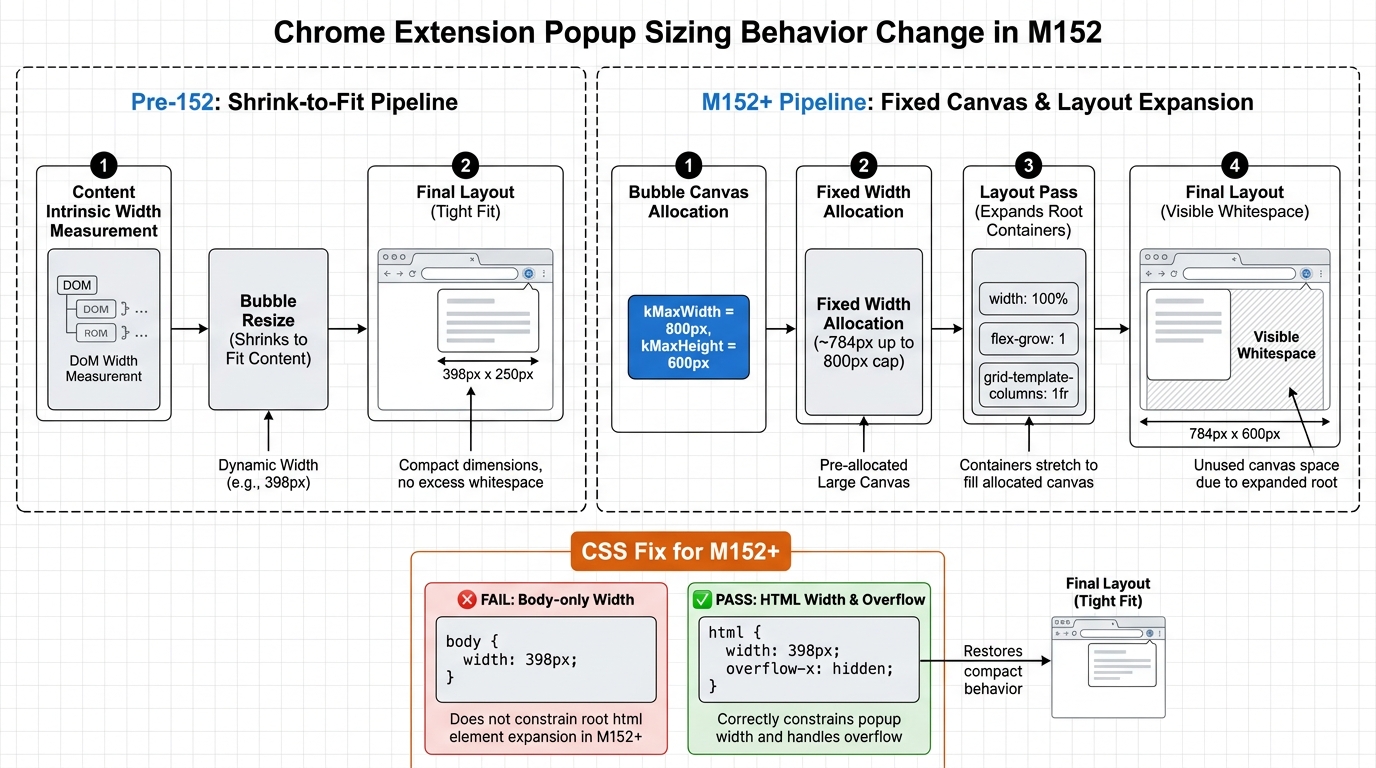
platform version release preview: you know that support ticket that says “your extension UI is broken” right after you shipped nothing? Chrome 152 is lining up one of those. Toolbar popups that used to shrink-to-fit content can now get laid out against a near-max canvas (~784px wide, capped at 800px), and your carefully constrained UI turns into a stretched mess.
Engineers love deterministic rendering. Users love not seeing blank space and misaligned controls. Chrome 152 is about to deliver neither—unless you pin your popup width explicitly.
Popup sizing behavior: shrink-to-fit is no longer your safety net
A report from extension developers testing Chrome Beta v152 describes a behavioral shift: older Chrome did a content measurement and sized the popup to the “natural” width; Chrome 152 can provide the popup with the maximum available container width (~784px) upfront. Any root container that happily expands—width: 100%, unconstrained flex/grid, Tailwind w-full—will take the hint and fill the canvas. ([reddit.com](https://www.reddit.com/r/chrome_extensions/comments/1vgb8jv/psa_chrome_152_changes_popup_autosizing_your/?utm_source=openai))
Chrome still has hard limits: Chromium’s ExtensionPopup defines kMaxWidth=800 and kMaxHeight=600. That’s why the symptom clusters around ~784px rather than “infinite width.” ([chromium.googlesource.com](https://chromium.googlesource.com/chromium/%2B/HEAD/chrome/browser/ui/views/extensions/extension_popup.cc?utm_source=openai))
So what? If your popup UI implicitly relied on shrink-to-fit to keep a tidy layout, you’re now at the mercy of a layout pass that starts at (nearly) max width. You didn’t change code. Chrome did. Your users won’t care which repo the regression landed in.
The gotcha: setting width on body isn’t enough
The field fix that’s actually working in the wild is boring and brutal: set an explicit width on html, not just body. Body-only constraints can still leave the document root expanding, producing the classic “giant blank space” failure mode inside the bubble.
So what? Expect this to hit any extension UI built with modern CSS defaults where the root is designed to be fluid. A popup is not a responsive webpage; it’s a bubble with strict caps and now a different initial sizing strategy.
Cross-ecosystem blast radius: Electron 44 ships on the same day
Electron 44.0.0 is scheduled stable on 2026-08-25 and tracks Chromium M152. ([releases.electronjs.org](https://releases.electronjs.org/schedule?utm_source=openai)) If you ship extension-like UIs or embed similar popup/bubble constructs inside Electron shells, do a quick sanity pass. Chromium UI behavior changes have a habit of leaking into places nobody budgeted time for.
Browser vendors keep optimizing UI frameworks and layout pipelines for performance, accessibility, and consistency across platforms. Sometimes that’s real engineering. Sometimes it’s a refactor that removes a special-case that quietly protected you.
This particular change smells like a maintainability move: stop doing a shrink-to-fit measurement dance for a bubble, allocate a predictable canvas, let the renderer do its thing, and clamp to caps (800×600). Chrome’s own docs historically promised “automatically sized to fit contents,” but that statement was always fuzzy around the edges—and in 152 it becomes actively misleading unless you constrain your root. ([developer.chrome.com](https://developer.chrome.com/docs/extensions/reference/browserAction/?utm_source=openai))
Also, Chrome is on a tighter cadence now, which means you get less time between “Beta has a weird regression” and “Stable just updated on everyone’s managed fleet.” Plan accordingly, or enjoy your next 2AM incident where the ‘fix’ is CSS.
Test Chrome 152 now (Beta channel):
# macOS
/Applications/Google Chrome Beta.app/Contents/MacOS/Google Chrome Beta

# Windows (PowerShell)
Start-Process "$Env:ProgramFilesGoogleChrome BetaApplicationchrome.exe"

# Linux (package name varies)
google-chrome-beta
Minimal CSS mitigation (pin width at the document root):
/* popup.css */
html {
  width: 398px;          /* pick a real number; don’t rely on auto */
  overflow-x: hidden;
}
body {
  margin: 0;
}
Red Flags (watch your own logs + user screenshots):
- Popup content aligned left with a huge blank area to the right (classic “html expanded” symptom).
- Flex/grid layouts that look fine in a normal tab but stretch in the popup bubble.
- UI that becomes “wide mode” unintentionally (tables, settings panes, side-by-side panels) because the container width jumped.
- Support tickets clustered around 2026-08-25 with “no recent extension update” on your side.
🛠️ Try These Free Tools
Plan your upgrade path with breaking change warnings and step-by-step guidance.
Paste a PEM certificate to check expiry and get a security grade.
Paste HTML source or HTTP headers to detect frameworks, CMS, analytics, and CDNs.