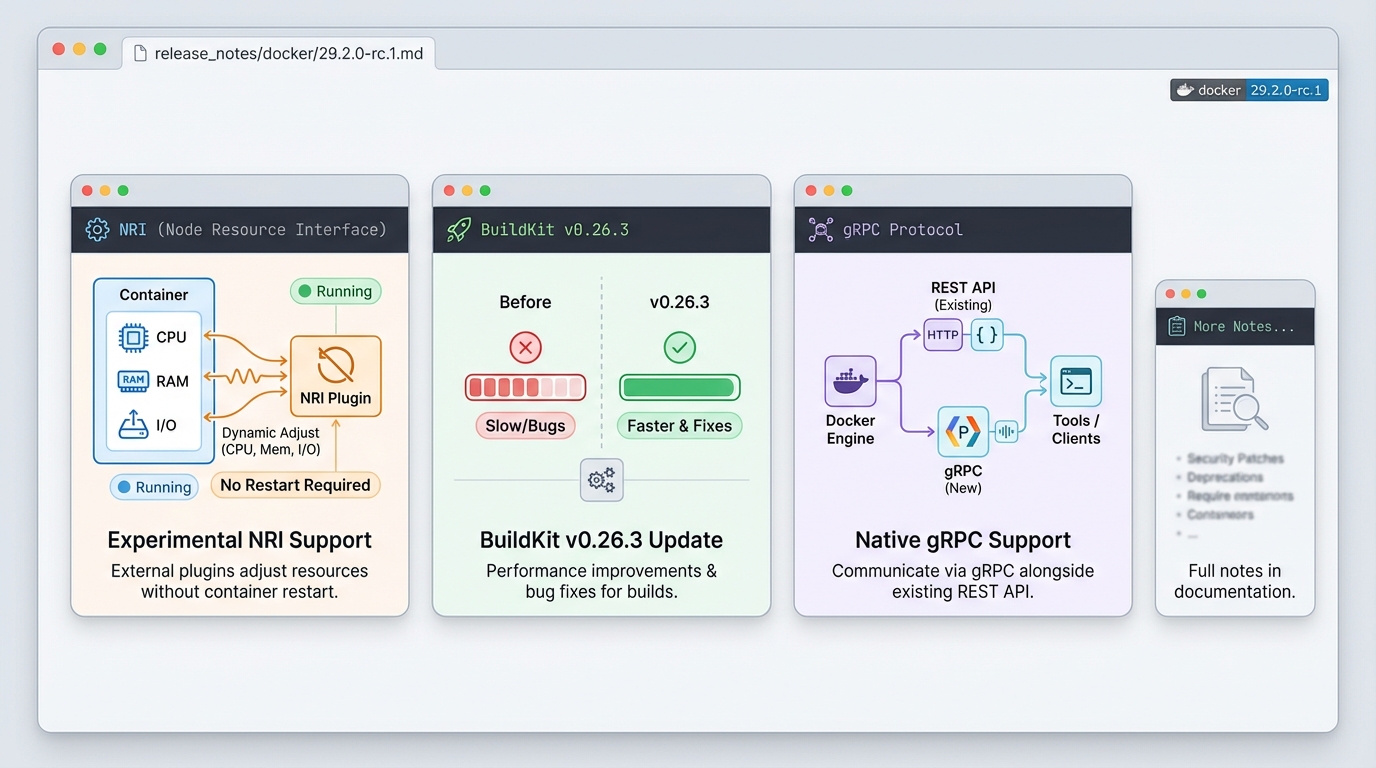
Docker v29.2.0-rc.1: Experimental NRI and gRPC Support
For developers and administrators evaluating the latest container innovations, the docker 29.2.0-rc.1 release notes detail a significant pre-release candidate shipped on December 17, 2025. This update introduces experimental Node Resource Interface (NRI) support, a major feature that allows external resource management plugins to dynamically adjust container CPU, memory, and I/O allocations without requiring container restarts. Alongside this, the release adds native gRPC support on the Docker Engine’s listening socket, enabling more efficient API communication for modern tooling. The underlying BuildKit component has been updated to version 0.26.3, bringing performance improvements and bug fixes for image builds. This release candidate is a testing ground for new integration capabilities, particularly for teams looking to implement advanced, dynamic resource management strategies.
This release candidate introduces experimental features and component updates for testing and evaluation. This pre-release is recommended for DevOps engineers and API developers working in non-production environments who want to explore dynamic resource management and modern API protocols. Users should upgrade to evaluate the new NRI and gRPC capabilities for future integration planning, but should not deploy this version in production systems.
What Changed
- Experimental NRI Support: Added Node Resource Interface support, enabling external plugins to dynamically manage container resources. The
docker infocommand now includes an NRI section displaying plugin status. - BuildKit Update: Updated BuildKit to version 0.26.3, which includes performance improvements and bug fixes for container image builds.
- gRPC API Support: Added native gRPC protocol support on the Docker Engine listening socket, allowing tools to communicate using gRPC alongside the existing REST API.
- Rootless CDI Path Expansion: Enhanced rootless Container Device Interface compatibility by considering
$XDG_CONFIG_HOME/cdiand$XDG_RUNTIME_DIR/cdipaths when looking for CDI devices.
Why It Matters
- The experimental NRI support opens the door to more sophisticated container orchestration, where third-party plugins can adjust resources in real-time based on workload demands, potentially improving cluster efficiency.
- Native gRPC support modernizes how tools interact with Docker Engine, offering a more efficient, streaming-friendly protocol that’s becoming standard in cloud-native ecosystems.
- The BuildKit update delivers tangible performance gains for developers building container images, reducing wait times in CI/CD pipelines.
- Rootless CDI path improvements enhance security and usability for users running Docker without root privileges, ensuring better compatibility with standard Linux directory conventions.
Who Should Upgrade
This release is particularly relevant for DevOps engineers and system administrators who manage containerized workloads and want to test dynamic resource allocation strategies. API developers building integrations with Docker Engine should evaluate the new gRPC support for potential performance benefits. Infrastructure teams planning future container management enhancements should examine the NRI capabilities in development environments. This release candidate is not intended for production use but serves as an important testing milestone for these advanced features.
How to Upgrade
- Backup current Docker configurations, container states, and important data.
- Review the experimental NRI documentation to understand compatibility requirements and plugin architecture.
- Run
docker versionto verify your current installation details. - Follow Docker’s official release candidate installation instructions for your specific platform (Linux, macOS, or Windows).
- Test NRI functionality with sample plugins in a controlled development or staging environment.
- Validate existing workflows and tools that might use gRPC communication with the Docker Engine.
Usage Examples
- Configuring NRI plugins to automatically adjust container CPU limits when batch processing jobs spike in resource consumption, optimizing cluster utilization.
- Using the updated
docker infocommand to monitor the NRI section, checking plugin health and viewing real-time resource adjustment statistics. - Implementing custom gRPC clients to communicate with Docker Engine for monitoring or automation tasks, taking advantage of the protocol’s efficiency for streaming data.
Known Issues
- This is a release candidate (rc.1) not intended for production deployment or critical workloads.
- The experimental NRI feature may have stability issues and could undergo significant API changes in future releases.
- No specific security fixes or critical bug patches are mentioned in these docker 29.2.0-rc.1 release notes, so evaluate accordingly.
Feature Flow
Official Release Notes
Related Reading
- Docker vs Kubernetes in Production (2026) — The deployment decision
- Container Image Scanning in 2026 — Security scanning for your stack
- How to Add Version Health Badges — Track release health in your README
Try NRI in a dev environment
NRI plugins communicate with containerd through a Unix socket. Here is how to enable and test NRI on a Linux dev machine running Docker v29.2.0-rc.1:
# Check if NRI is available in your Docker build
docker info 2>/dev/null | grep -A5 "NRI"
# Expected output (when enabled):
#  NRI:
#   Enabled: true
#   Socket: /var/run/nri/nri.sock

# If NRI is not showing, enable it in the containerd config
sudo mkdir -p /etc/containerd
cat >> /etc/containerd/config.toml << EOF
[plugins."io.containerd.nri.v1.nri"]
  disable = false
  socket_path = "/var/run/nri/nri.sock"
EOF

# Restart containerd to pick up NRI config
sudo systemctl restart containerd
Once NRI is enabled, plugins can hook into container lifecycle events (create, start, update, stop) and modify resource allocations on the fly. This is the same mechanism that Kubernetes uses for node-level resource management, now available at the Docker engine level.
Test gRPC API communication
The new gRPC support means you can talk to Docker Engine using Protocol Buffers instead of the REST API. Here is a quick test using grpcurl:
# Install grpcurl if you don't have it
go install github.com/fullstorydev/grpcurl/cmd/grpcurl@latest

# List available gRPC services on the Docker socket
grpcurl -plaintext -unix /var/run/docker.sock list

# Check Docker version via gRPC
grpcurl -plaintext -unix /var/run/docker.sock   moby.buildkit.v1.Control/ListWorkers
For custom tooling, you can use the gRPC protocol definitions from the Moby project to generate typed clients in Go, Python, or any language with gRPC support. This is significantly faster than JSON-over-HTTP for streaming operations like build logs or container events.
Rootless CDI device paths
The CDI path expansion fix matters if you run Docker rootless and use GPU passthrough or other device plugins. Verify your CDI paths are recognized:
# Check where Docker looks for CDI specs
echo "XDG_CONFIG_HOME: ${XDG_CONFIG_HOME:-$HOME/.config}"
echo "XDG_RUNTIME_DIR: ${XDG_RUNTIME_DIR:-/run/user/$(id -u)}"

# List CDI specs Docker can see
ls -la ${XDG_CONFIG_HOME:-$HOME/.config}/cdi/ 2>/dev/null
ls -la ${XDG_RUNTIME_DIR:-/run/user/$(id -u)}/cdi/ 2>/dev/null

# Verify CDI devices are detected
docker info | grep -i "cdi"
Track Docker releases
Docker v29.2.0-rc.1 is a release candidate. The stable v29.2.0 is now available with these features production-ready. Track the latest Docker versions on our Docker release tracker, or check your Docker installation health with our free Docker Compose checker. For Dockerfile best practices, try the Dockerfile linter.
NRI Plugin Compatibility Notes
The Node Resource Interface support in Docker 29.2.0-rc.1 opens the container runtime to external plugins that can observe and modify pod and container lifecycle events. Before you rely on it in staging, keep these compatibility notes in mind.
Containerd version requirement. NRI hooks work through containerd, not the Docker daemon directly. You need containerd 1.7.0 or later with the NRI feature gate enabled. Verify with containerd --version and confirm the [plugins."io.containerd.nri.v1.nri"] section exists in /etc/containerd/config.toml. Set disable = false to activate it.
Plugin socket path. NRI plugins communicate over a Unix socket at /var/run/nri/nri.sock by default. If your Docker data root lives on a non-standard mount, you must pass the socket path explicitly via the plugin’s --socket flag. A mismatch causes a silent timeout with no error in docker logs.
Security implications. NRI plugins run with the same privileges as containerd, which means a malicious or buggy plugin can modify resource limits, environment variables, and mounts for every container on the node. Audit plugin binaries carefully. The NRI README documents the full permission model and recommended sandboxing approaches.
Rollback path. Because this is an RC release, keep a pinned version of Docker 29.1.x available. Use apt-mark hold docker-ce or the equivalent on your package manager to prevent accidental upgrades in production.
Test gRPC support
The experimental gRPC support in 29.2.0-rc.1 is worth testing in a staging environment. Verify it works with your setup:
# Check if gRPC is available in your Docker build
docker info --format '{{json .Plugins}}' | jq .

# Test gRPC health check on a container
# First, run a container with gRPC health checking enabled
docker run -d --name grpc-test --health-cmd="grpc_health_probe -addr=:50051"   --health-interval=10s your-grpc-service:latest

# Verify health status
docker inspect grpc-test --format '{{.State.Health.Status}}'

# Check gRPC connectivity with grpcurl
grpcurl -plaintext localhost:50051 grpc.health.v1.Health/Check
Lint your Dockerfiles for best practices with the Dockerfile Linter. Check your docker-compose for outdated images with the Compose Checker. Full Docker timeline at our Docker Release Tracker.
Official resources:
🛠️ Try These Free Tools
Paste your Kubernetes YAML to detect deprecated APIs before upgrading.
Paste a Dockerfile for instant security and best-practice analysis.
Paste your docker-compose.yml to audit image versions and pinning.