Kubernetes Gateway API vs Ingress vs LoadBalancer: What to Use in 2026
I’ve watched teams “just add an annotation” and accidentally turn their ingress controller into a production API nobody owns.
If you’re choosing between Service type LoadBalancer, Ingress, and Gateway API in 2026, you’re really choosing who gets to change traffic rules, how safely they can do it, and how ugly rollback feels at 2am.
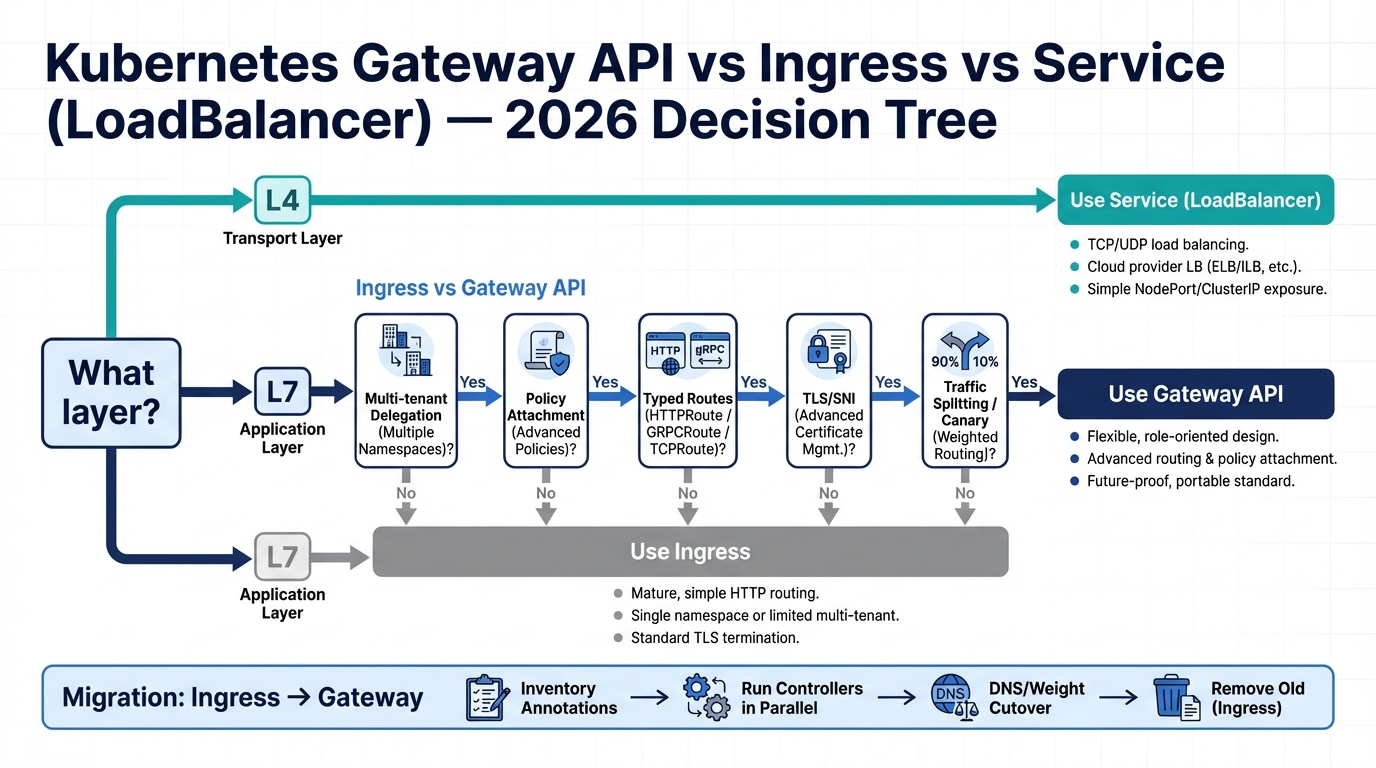
The blunt 2026 rule: pick the layer first
| Feature | Service LoadBalancer | Ingress | Gateway API |
|---|---|---|---|
| Layer | L4 (TCP/UDP) | L7 (HTTP/HTTPS) | L4 + L7 |
| Protocol Support | TCP, UDP | HTTP, HTTPS | HTTP, HTTPS, gRPC, TCP, UDP, TLS |
| TLS Termination | At load balancer | At controller | At gateway (configurable) |
| Traffic Splitting | No | Annotation-dependent | Native (HTTPRoute weights) |
| Header-Based Routing | No | Annotation-dependent | Native |
| Multi-Cluster | Manual | Annotation-dependent | Designed for it |
| Role Separation | None | Single resource | GatewayClass / Gateway / Route split |
| Portability | High (core API) | Low (annotations vary) | High (standard spec) |
| Maturity | Stable since K8s 1.0 | Stable but frozen | GA since K8s 1.26 |
| Cloud Cost | $15-25/mo per LB | Shared (1 LB) | Shared (1 LB) |
| Best For | Non-HTTP services, databases | Simple HTTP routing | New projects, complex routing |
Here’s the thing. Most debates happen at L7, but plenty of outages start at L4 when someone changes the wrong shared object.
So start with the layer you need, then pick the Kubernetes API that matches it.
- Expose raw TCP/UDP: Use Service type LoadBalancer. It gives you boring L4 plumbing, usually with the smallest number of moving parts.
- Route HTTP(S) in one team’s cluster: Keep Ingress if your controller and annotations already behave like a stable product in your org.
- Share one edge across teams and namespaces: Use Gateway API. It gives you a built-in “platform owns the Gateway, app teams own Routes” split.
Decision tree (the one you can actually use)
This bit me when we tried to “standardize ingress.” We ended up with six different annotation dialects and a week of guess-and-check every time we touched timeouts.
Use these triggers as hard requirements, not vibes.
- You need multi-tenant delegation: Choose Gateway API when platform owns listeners and app teams need to attach routes without PR wars on one giant Ingress.
- You need reusable policy without annotation soup: Start with Gateway API, but verify your controller’s policy CRDs and conformance. Do not assume portability.
- You can tolerate one IP per service: Keep Service type LoadBalancer for “single service, single VIP” setups. It isolates blast radius.
- You want basic host/path routing and nothing else: Ingress still works. I do not love it, but pretending it is dead will waste your time.
Requirements checklist (what actually forces the choice)
Some folks migrate because Gateway API feels inevitable. I don’t, and I get skeptical when “future-proof” becomes the whole business case.
Migrate when you hit at least one of these constraints, otherwise you’re signing up for work that won’t pay you back.
Multi-tenant routing and cross-namespace delegation
If platform owns the edge and app teams own their routes, Ingress turns into a constant negotiation. One giant shared Ingress creates merge conflicts and shared blast radius, many Ingresses create ownership chaos unless you build guardrails.
Gateway API bakes in the ownership split: platform owns the Gateway, app teams own HTTPRoute and friends. The listener controls which namespaces can attach routes, and cross-namespace references need explicit grants depending on what you reference.
Policy attachment (and how annotation sprawl comes back)
Ingress started thin, and real behavior moved into controller annotations and side CRDs. That’s how you end up with YAML that looks “Kubernetes-y” but only works on one controller.
Gateway API pushes policy attachment into the model, but you still need governance. Otherwise teams will recreate annotation sprawl using a new set of implementation-specific policy objects with a different name.
TLS/SNI and who owns certificates
I’ve seen cert ownership turn into a political problem. Ingress often forces you into “copy secrets into app namespaces” or “centralize everything and block teams.”
Gateway listeners let platform own cert references and let teams attach routes by hostname, but you must design delegation and secret reference rules up front.
Typed routing (HTTPRoute, GRPCRoute, TCPRoute, TLSRoute, UDPRoute)
If you run gRPC seriously, “Ingress supports gRPC” usually means “your controller has conventions.” That can work, but it gets weird fast during migrations.
Gateway API makes routing intent explicit with typed Routes, but controller support varies. Treat “the spec defines it” and “my controller ships it and my SLO survives it” as two separate checkboxes.
Compatibility reality check (spec vs controller vs cloud)
Ignore the GitHub commit count. It’s a vanity metric.
What matters is whether your chosen controller, your cloud load balancer, and your security rules support the features you plan to depend on.
- Service (LoadBalancer) portability: Medium. The API stays stable, but cloud-specific annotations and load balancer behavior differ.
- Ingress portability: Low to medium. The core API stays small, and production features often live in controller-specific annotations.
- Gateway API portability: Medium to high when you stick to what your controller proves in conformance and production tests. It still matures.
Migration that survives production (Ingress to Gateway API)
Do not “big bang” this. I’ve seen that movie and it ends with a rollback and a postmortem full of screenshots.
The safest path changes the control plane objects first, keeps the data plane stable, then shifts traffic with boring knobs.
Phase 0: inventory what you really use
Start by exporting every Ingress and listing every annotation in use. Group them by controller because each controller turns annotations into different behavior.
Then capture baseline signals. Grab 4xx/5xx rates, p95 latency, TLS handshake errors, and upstream resets before you touch anything.
Phase 1: pick a controller and prove support
Gateway API is a spec. Your controller determines how it behaves, how it fails, and what “supported” even means.
Validate conformance level, the exact features you need (TLS modes, header matches, retries, gRPC), and how it maps to your cloud load balancer model.
Phase 2: run Gateway alongside Ingress
Most clusters can run both at once if you isolate them. Use separate namespaces, separate external addresses, and explicit class selection for both stacks.
Keep rollback simple by keeping the old ingress path alive until dashboards show equivalence under real load.
Phase 3: create one platform Gateway, then migrate one service
I prefer one shared Gateway owned by the platform team, at least at the start. App teams then attach HTTPRoutes from their namespaces with explicit hostname ownership.
Here’s a trimmed example, not a full manifest dump.
- Platform-owned Gateway: Listener on 443, hostname wildcard you actually own, and allowedRoutes restricted by namespace selector.
- App-owned HTTPRoute: Hostname, path matches, backendRefs with weights for controlled cutover testing.
Phase 4: cut traffic with DNS or weights
DNS cutover stays low drama if you manage TTLs and have a rollback plan. Weighted load balancer cutovers work too, but you need cloud support and clean observability.
Either way, keep the old path ready. Roll back the moment error budgets start burning faster than expected.
I don’t trust “known issues: none” from any project. Build your own checks and pick a rollback trigger before you start.
Phase 5: translate annotations into policies without creating a new mess
This is where migrations fail. Teams copy every annotation into a controller-specific policy CRD and then nobody can reason about behavior anymore.
Decide which policies platform owns (timeouts, max body size, TLS floor, WAF), which policies tenants can tune, and how you enforce that boundary with admission and RBAC.
Service (LoadBalancer) to Gateway API: the trade you can’t dodge
You can reduce cloud load balancer sprawl by consolidating entrypoints behind a Gateway. You also create shared fate.
Move HTTP services first. Leave pure L4 services alone unless your Gateway implementation supports the L4 routes you need and you’ve tested performance. It depends on your controller and your traffic shape, and I haven’t seen one rule that fits every shop.
Controller selection (what bites later)
“Gateway API vs Ingress” is never just about YAML. It’s a controller decision with real failure modes.
Check conformance claims, data plane model (Envoy, NGINX, HAProxy, cloud-managed), policy story, and observability. If the controller can’t give you clean metrics and logs, you’ll fly blind during cutover.
- Multi-tenancy controls: Restrict who can attach Routes, who can reference Secrets, and who can point at backends across namespaces.
- Operational ergonomics: If upgrades feel scary in staging, you will hate this in production because the edge sits on the request path.
Production pitfalls (the 2am list)
Small mistakes here cause loud incidents. Test this twice if you run customer-facing APIs.
If you’re migrating a dev cluster, just yolo it on Friday and learn fast.
- Annotation sprawl returns: Set a small supported policy set and block random escape hatches unless on-call owns a runbook.
- Delegation foot-guns: Prevent hostname collisions, lock down certificate secret references, and require explicit cross-namespace grants.
- Catch-all behavior surprises: Old Ingress default backends often hide broken hostnames. Define explicit hostnames and test negative paths.
- Traffic splitting under load: Retries, HTTP/2 multiplexing, and long-lived gRPC streams can skew “weights.” Validate distribution and error amplification.
- Upgrades magnify instability: Fix node churn and kubelet weirdness before you move edge traffic onto a new controller.
What changed since 2022 (why 2026 feels different)
Ingress didn’t get worse. Teams outgrew it.
Multi-tenant edges and policy delegation pushed people toward an API designed for that shape, and more controllers started taking Gateway API seriously. Other stuff too: conformance work, more typed route semantics, the usual, probably a few bugs you’ll only find on a Monday. Anyway.
Bottom line
Use Service type LoadBalancer when you need L4 exposure with minimal abstraction and you can afford one load balancer per service.
Use Ingress when your HTTP routing stays basic and your annotation set already behaves like a governed internal standard. Use Gateway API when you need multi-team delegation, typed routes (including gRPC), and policy attachment that doesn’t turn annotations into your real API.
Practical examples: Gateway API, Ingress, and LoadBalancer configs
Seeing the YAML side by side makes the role-separation argument concrete. Here are minimal working examples for each approach.
Service type LoadBalancer
apiVersion: v1
kind: Service
metadata:
  name: my-app-lb
spec:
  type: LoadBalancer
  selector:
    app: my-app
  ports:
    - protocol: TCP
      port: 443
      targetPort: 8443
Ingress resource
apiVersion: networking.k8s.io/v1
kind: Ingress
metadata:
  name: my-app-ingress
  annotations:
    nginx.ingress.kubernetes.io/rewrite-target: /
spec:
  ingressClassName: nginx
  rules:
    - host: app.example.com
      http:
        paths:
          - path: /
            pathType: Prefix
            backend:
              service:
                name: my-app
                port:
                  number: 80
Gateway API with HTTPRoute
apiVersion: gateway.networking.k8s.io/v1
kind: Gateway
metadata:
  name: shared-gateway
  namespace: infra
spec:
  gatewayClassName: istio
  listeners:
    - name: https
      protocol: HTTPS
      port: 443
      tls:
        mode: Terminate
        certificateRefs:
          - name: wildcard-cert
      allowedRoutes:
        namespaces:
          from: All
---
apiVersion: gateway.networking.k8s.io/v1
kind: HTTPRoute
metadata:
  name: my-app-route
  namespace: team-a
spec:
  parentRefs:
    - name: shared-gateway
      namespace: infra
  hostnames:
    - app.example.com
  rules:
    - matches:
        - path:
            type: PathPrefix
            value: /
      backendRefs:
        - name: my-app
          port: 80
Quick kubectl check: which routes attach to a gateway
# List all HTTPRoutes and their parent gateway
kubectl get httproutes -A \
  -o custom-columns="NAMESPACE:.metadata.namespace,NAME:.metadata.name,GATEWAY:.spec.parentRefs[0].name,HOSTNAMES:.spec.hostnames[*]"

# Check gateway status and attached routes
kubectl describe gateway shared-gateway -n infra | grep -A5 "Attached Routes"
Official references
- Kubernetes Gateway API documentation – the official spec, conformance profiles, and implementation status for every supported controller.
- Kubernetes Ingress documentation – the current stable Ingress resource reference, including IngressClass and TLS configuration.
- Gateway API GitHub repository – GEPs (Gateway Enhancement Proposals), release notes, and the conformance test suite you can run against your own controller.
Keep Reading
- Kubernetes Release History
- Docker vs Kubernetes in Production (2026): Security-First Decision Rubric
- Kubernetes 1.35 release: the stuff that can break your cluster
- Kubernetes EOL policy explained for on-call humans
Frequently Asked Questions
- Should I migrate from Ingress to Gateway API in 2026? If you’re starting fresh, absolutely use Gateway API — it’s the future and Ingress is in maintenance mode. If you have working Ingress configs, migrate only when you hit a concrete limitation (multi-tenancy, typed routing, or policy attachment). Don’t migrate for the sake of it.
- Does Gateway API replace all Ingress functionality? For HTTP/HTTPS routing, yes. Gateway API’s HTTPRoute covers everything Ingress does plus header manipulation, traffic splitting, and cross-namespace delegation. For TCP/UDP/TLS, Gateway API actually goes beyond Ingress with dedicated route types. The gap is in controller maturity — not every implementation supports every route type yet.
- Can I run Ingress and Gateway API side by side? Yes, and this is the recommended migration approach. Deploy a GatewayClass alongside your existing Ingress controller, migrate routes one service at a time, and run both in parallel until you’ve validated everything. Most controllers (Nginx, Envoy, Istio) support both APIs simultaneously.
- What’s the difference between Gateway API and a service mesh? Gateway API handles north-south traffic (external clients to your cluster). Service meshes handle east-west traffic (service-to-service inside the cluster). They complement each other — Gateway API for ingress routing, mesh for mTLS and observability between pods. Some controllers (like Istio) bridge both.
Related Reading
- Kubernetes 1.32 End of Life: Migration Playbook — EOL Feb 28 — upgrade now
- Popular Kubernetes Distributions Compared (2026) — which managed K8s handles Gateway API best
- Kubernetes Statistics and Adoption Trends in 2026 — how K8s adoption is shaping networking choices
- Gateway API vs Ingress: A 2025 Decision Framework — our earlier comparison with migration paths
🛠️ Try These Free Tools
Paste your Kubernetes YAML to detect deprecated APIs before upgrading.
Paste your dependency file to check for end-of-life packages.
Plan your upgrade path with breaking change warnings and step-by-step guidance.
Track These Releases