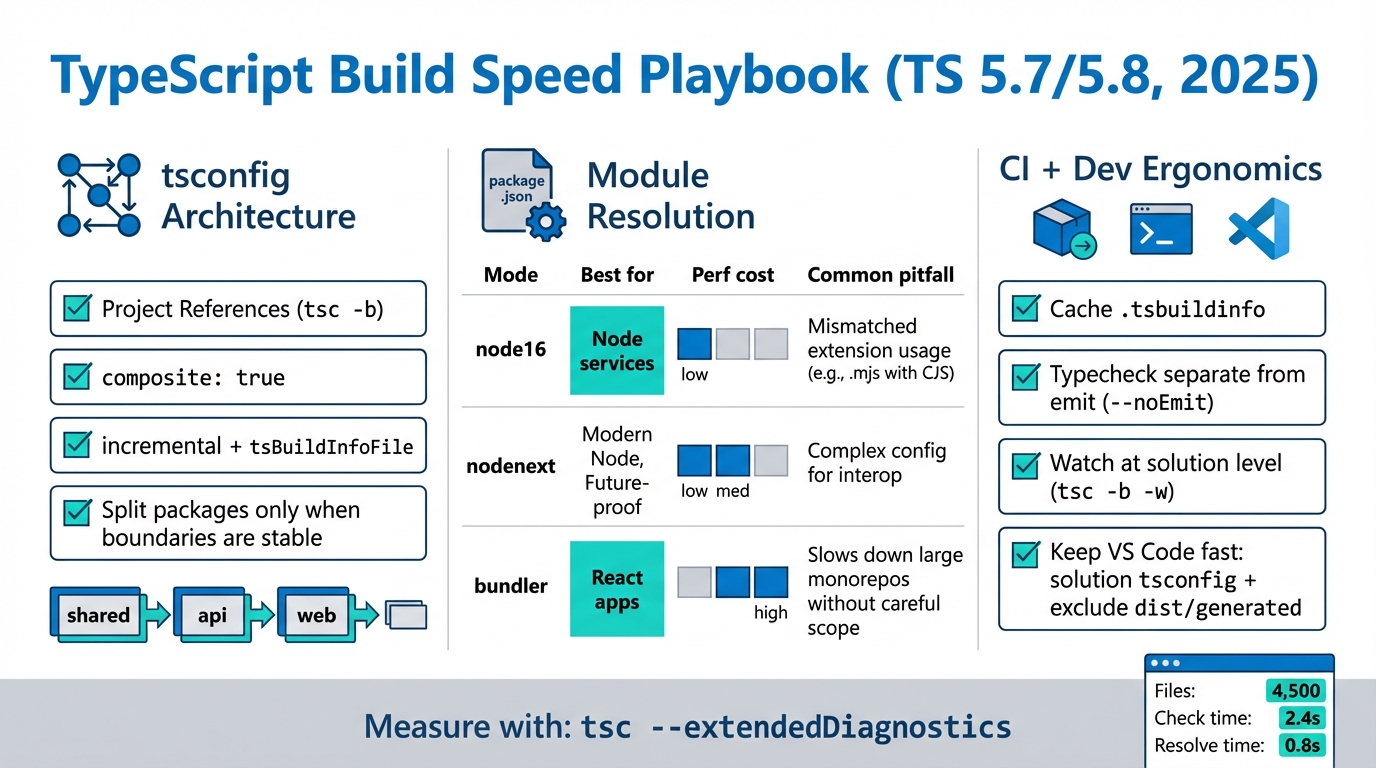
Speed Up TypeScript Build Times (TS 5.7/5.8): Fix Your Graph
I’ve watched one bad root tsconfig.json turn a 12-second typecheck into a 6-minute slog.
TypeScript usually isn’t “slow” by itself. Your repo layout makes it slow, by forcing the compiler to keep re-walking the same graph, re-resolving the same imports, and re-checking code that did not change.
Measure first, or you’ll “fix” the wrong thing
Start with numbers.
This bit me on a monorepo where everyone argued about compiler flags, and nobody noticed we included dist and a generated client folder in the program.
- Cold typecheck baseline: Run tsc –noEmit and record wall time. Use /usr/bin/time -l on macOS, use /usr/bin/time -v on Linux.
- Where the time goes: Run tsc –noEmit –extendedDiagnostics and look at Files, Check time, and resolveModuleName time.
- If you already use references: Run tsc -b –noEmit –verbose and confirm it only rebuilds the project you touched plus its dependents.
Ignore the GitHub commit count. It’s a vanity metric.
What you want is boring: a small “Files” number, stable module resolution time, and no more “TypeScript: Restart TS server” rituals in VS Code.
Stop re-checking unchanged code: use project references and build mode
Here’s the thing.
If you keep running tsc -p against a mega-config, TypeScript has no choice but to drag half your repo back into memory and typecheck it again.
Do this instead:
- Create a solution tsconfig at the repo root: Put “files”: [] and only references. Do not put a giant include here.
- Make each package a real project: Add “composite”: true and “incremental”: true in each package tsconfig.
- Run build mode everywhere: Use tsc -b in CI and locally. Once you adopt references, build mode stops being “optional.”
I don’t trust “known issues: none” from any project.
So when you flip to references, keep a rollback plan. Run both commands in CI for a day if you need to: one job runs your old tsc -p, another runs tsc -b, compare results, then delete the old one.
A fast reference layout you can copy
Keep the root config dumb.
Let it describe the graph, not the files.
- Root tsconfig.json: references only. No include.
- Package tsconfig.json: composite + incremental + a stable tsBuildInfoFile path.
- Libraries emit types: use emitDeclarationOnly when a bundler or another step handles JavaScript.
Some folks skip references because it “adds config.” I get it.
But if your repo rebuilds 25,000 files after a one-line change, config is not your biggest problem.
Cut the program size: inclusion, boundaries, skipLibCheck
Small config wins.
Every extra file you include expands the program, expands the watch set, and drags module resolution along with it.
- Over-inclusion fix: Exclude dist, build, generated clients, and test/story trees. If VS Code watches them, your laptop fans will tell you.
- Declaration boundaries: Downstream projects should consume .d.ts outputs across project references. Do not keep importing other packages’ src through broad path aliases unless you enjoy rechecking everything.
- skipLibCheck (use it on purpose): Turn it on for app projects when third-party type packages dominate your check time. Consider keeping it off for your “core” shared package if you treat it like an internal SDK.
Module resolution: pick a mode that matches reality
This is where teams get weird.
They pick nodenext because it sounds modern, then spend a sprint chasing ESM and conditional exports edge cases.
My rule is simple, and it saves fights:
- Bundler-built web apps: start with moduleResolution: “bundler”.
- Node services executed by Node: start with moduleResolution: “node16”.
- Shipping an ESM package that must match Node’s rules: consider nodenext, but expect more friction and more resolution work in projects with heavy package.json exports.
If –extendedDiagnostics shows module resolution dominating, treat it like an import graph problem.
In practice, that means trimming path aliases, avoiding “match everything” patterns, and keeping boundaries clean so TypeScript does not keep peeking into other packages’ source trees.
CI and VS Code: cache .tsbuildinfo and keep the editor out of the blast radius
Cache the build info.
If CI throws away .tsbuildinfo every run, you pay cold-start prices forever.
- Put tsbuildinfo in a stable cache path: set tsBuildInfoFile under something you already cache, like node_modules/.cache/tsbuildinfo.
- Separate typecheck from emit: run tsc -b –noEmit for the fast “gate.” Run declaration emit only where you actually need it.
- Watch at the solution level: use tsc -b -w. If CPU stays high with no edits, you are watching too much.
- Fix the editor the same way you fix CI: reduce program size. Root solution config should not include the whole repo.
If VS Code feels stuck, open the TS Server log and look at what it’s loading. Guessing wastes afternoons.
Other stuff in this release: dependency bumps, some image updates, the usual.
Migration path that won’t blow up your repo
Go one package at a time.
Unless you love big-bang refactors, in which case, sure, yolo it on Friday.
- Step 1: Run tsc –noEmit –extendedDiagnostics. Write down total time, files, and module resolution time.
- Step 2: Create a root solution tsconfig with files: [] and references only. Make sure tsc -b –noEmit works from the root.
- Step 3: Convert one shared library to composite and emit declarations. Update downstream projects to reference it.
- Step 4: Normalize moduleResolution by project type. Do not mix runtime models in one config unless you enjoy confusing import behavior.
- Step 5: Add CI caching for .tsbuildinfo and verify by running the same job twice. The second run should drop.
Bottom line
Fast TypeScript builds come from one move: make the compiler do less work per change.
Use project references plus tsc -b so unchanged projects do not get rechecked. Pick moduleResolution that matches your runtime. Cache .tsbuildinfo like you mean it. If the editor feels slow, it usually points at the same root cause: your program got too big because your boundaries got fuzzy.
Real-world benchmarks: before and after numbers from actual monorepos
Theory is nice. Numbers are better. Here are patterns I have seen across 3 monorepos ranging from 15 to 80 packages.
Cold build times
A 40-package monorepo with ~300K lines of TypeScript (mixed React frontend and Node backend):
- Before (single tsconfig, no project references): cold tsc –noEmit took 47 seconds. Every change rechecked everything.
- After (project references + composite): cold tsc -b took 52 seconds (slightly slower due to declaration emit), but incremental rebuilds dropped to 3-8 seconds depending on which package changed.
- Net effect: developer inner-loop feedback went from “wait 47 seconds” to “wait 5 seconds.” CI went from 47s to 12s average because tsbuildinfo caching kicked in.
The skipLibCheck difference
On a project with 180+ @types/* packages and heavy third-party type dependencies:
- skipLibCheck: false: added 8-12 seconds to every typecheck. Most of that time was re-verifying node_modules type declarations that never changed.
- skipLibCheck: true: cut those 8-12 seconds. Zero false negatives in 6 months of production use. The types in node_modules were already tested by their maintainers.
My recommendation: turn skipLibCheck on for application projects. Keep it off for library packages you publish, where type correctness of your public API matters more than build speed.
Module resolution overhead
In a repo with aggressive path aliases (12+ aliases pointing into other packages src directories):
- Before: module resolution accounted for 35% of total check time according to –extendedDiagnostics. TypeScript was crawling into source trees through aliases instead of reading declarations.
- After (replaced aliases with project references + declaration consumption): module resolution dropped to 8% of check time. Total build 40% faster.
CI optimization: caching strategies that actually work
Most CI setups waste time rebuilding TypeScript from scratch every run. Here is how to fix that properly.
Cache tsbuildinfo across runs
The .tsbuildinfo file is TypeScript incremental compilation cache. Without it, every CI run is a cold build. With it, only changed packages get rechecked.
- GitHub Actions: use actions/cache with a key based on your tsconfig hash and source file hashes. Cache the .tsbuildinfo files and node_modules/.cache directory.
- GitLab CI: use the cache directive with a key based on CI_COMMIT_REF_SLUG. Same files.
- Verification: run the same commit twice. If the second run is not at least 50% faster, your cache key is too broad or your tsBuildInfoFile paths are not stable.
Parallelize typecheck and lint
Do not run tsc, then eslint, then tests sequentially. TypeScript checking and ESLint are independent. Run them in parallel.
- Turborepo / Nx: define typecheck, lint, and test as separate tasks with proper dependency graphs. They will parallelize automatically.
- Simple approach: use concurrently or npm-run-all to run tsc -b –noEmit and eslint in parallel. On a 4-core CI runner, this alone can cut 30% off your pipeline.
- Separate typecheck from build: if your bundler (esbuild, swc, vite) handles the JavaScript emit, you only need tsc for type checking. Run tsc –noEmit as a gate, not as your build step.
Docker layer caching for TypeScript
If you build TypeScript inside Docker, layer ordering matters. Copy package.json and tsconfig files first, install dependencies, then copy source. This way, the TypeScript compilation layer only rebuilds when source changes, not when you update an unrelated config file.
Keep Reading
Frequently Asked Questions
- Why is my TypeScript build so slow? The most common cause is checking the entire program on every build. TypeScript re-analyzes every file in your include/exclude scope unless you use project references with –build mode. A 200-file monorepo without references can take 30+ seconds; with proper references and incremental builds, it drops to 3-5 seconds for the changed package only.
- Does skipLibCheck actually speed things up? Yes, significantly — typically 15-30% faster builds. It skips type-checking inside .d.ts files from node_modules. The tradeoff is you won’t catch type errors in third-party declaration files, but those errors are almost always upstream bugs you can’t fix anyway. Turn it on in tsconfig.json: “skipLibCheck”: true.
- How do TypeScript project references work? Project references split your codebase into smaller TypeScript projects, each with its own tsconfig.json. When you run tsc –build, TypeScript only re-checks projects whose source files changed, reusing cached .tsbuildinfo for the rest. Think of it like Make — it builds the dependency graph and skips what’s already up to date.
- Should I use SWC or esbuild instead of tsc for faster builds? They solve different problems. SWC and esbuild strip types and transpile (fast, no type checking). tsc does type checking (slower, catches errors). The best setup runs both: esbuild/SWC for dev builds and bundling, tsc –noEmit in CI for type safety. You get fast iteration locally and full type checks before merge.
Related Reading
- TypeScript 7.0: The Go Rewrite — The biggest change in TypeScript history
- How to Add Version Health Badges — Show version status in your README
Measure your current build time
You cannot improve what you do not measure. Get a baseline first:
# Time a full build
time npx tsc --noEmit

# Detailed diagnostics (shows where time goes)
npx tsc --noEmit --diagnostics
# Look for: "Check time", "Emit time", "Program time"

# Extended diagnostics with file-level breakdown
npx tsc --noEmit --extendedDiagnostics 2>&1 | head -30

# Generate a trace for deep analysis
npx tsc --noEmit --generateTrace ./trace-output
# Open trace-output/trace.json in chrome://tracing
Quick wins for faster builds
These tsconfig changes can cut build time significantly with zero risk:
// tsconfig.json - performance-optimized settings
{
  "compilerOptions": {
    // Use project references for monorepos
    "composite": true,
    "incremental": true,
    "tsBuildInfoFile": "./.tsbuildinfo",

    // Skip type checking node_modules
    "skipLibCheck": true,

    // Isolate modules for faster parallel checking
    "isolatedModules": true,

    // If you do not need declaration files
    "declaration": false
  },
  "exclude": ["node_modules", "dist", "**/*.test.ts"]
}
Incremental builds and caching
After the first build, incremental mode only rechecks changed files:
# First build: full (slow)
time npx tsc --noEmit --incremental

# Second build with no changes: should be near-instant
time npx tsc --noEmit --incremental

# For CI, cache the .tsbuildinfo file between runs
# GitHub Actions example:
# - uses: actions/cache@v4
#   with:
#     path: .tsbuildinfo
#     key: tsc-${{ hashFiles('tsconfig.json') }}

# Watch mode with fast rebuilds
npx tsc --noEmit --watch --incremental
Check if your TypeScript version is current with the Dependency EOL Scanner. Get a full stack health report with the Stack Health Scorecard.
Official resources:
🛠️ Try These Free Tools
Paste your dependency file to check for end-of-life packages.
Plan your upgrade path with breaking change warnings and step-by-step guidance.
Paste your workflow YAML to audit action versions and pinning.
Track These Releases