Kubernetes PodReplacementPolicy (v1.36 beta): what broke, and what you can control
Another beta knob in Deployments. What broke this time, and what did they “forget” to say in the notes?
I’ve watched “minor” rollout behavior tweaks quietly turn into quota alerts, stuck rollouts, and an on-call page at 02:00. So when Kubernetes adds .spec.podReplacementPolicy, I assume there’s pain behind it. They claim it gives you control. I’ll believe it when I see it in production.
Concerns first: what the changelog does not promise
This feature sits behind a feature gate and it is not GA. That’s the part they say out loud. The part they do not promise: stable semantics, stable gate names, or that your rollout tooling will keep making the same assumptions.
Short version. Be suspicious.
- Feature-gate name drift: the work around pod replacement and terminating replica tracking has used different gates in upstream discussion. Do not cargo-cult a flag from a blog post, check the feature-gates table for the exact Kubernetes minor you run.
- “Rollout complete” still lies: your pipeline might treat updatedReplicas == replicas as done. That assumption already caused bad deploys. This change makes the lie easier to spot, not magically fixed.
- Controller bookkeeping smells real: the design mentions the annotation deployment.kubernetes.io/replicaset-replicas-before-scale when proportional scaling across ReplicaSets cannot fully apply. Any time a controller has to stash “what it meant to do” in annotations, expect edge cases during retries and rollbacks.
- Terminations do not finish on schedule: hung finalizers, long preStop hooks, and slow drains will turn “safe and stable” into “stuck and confusing” unless you already know your shutdown behavior.
What actually changed: Deployment .spec.podReplacementPolicy
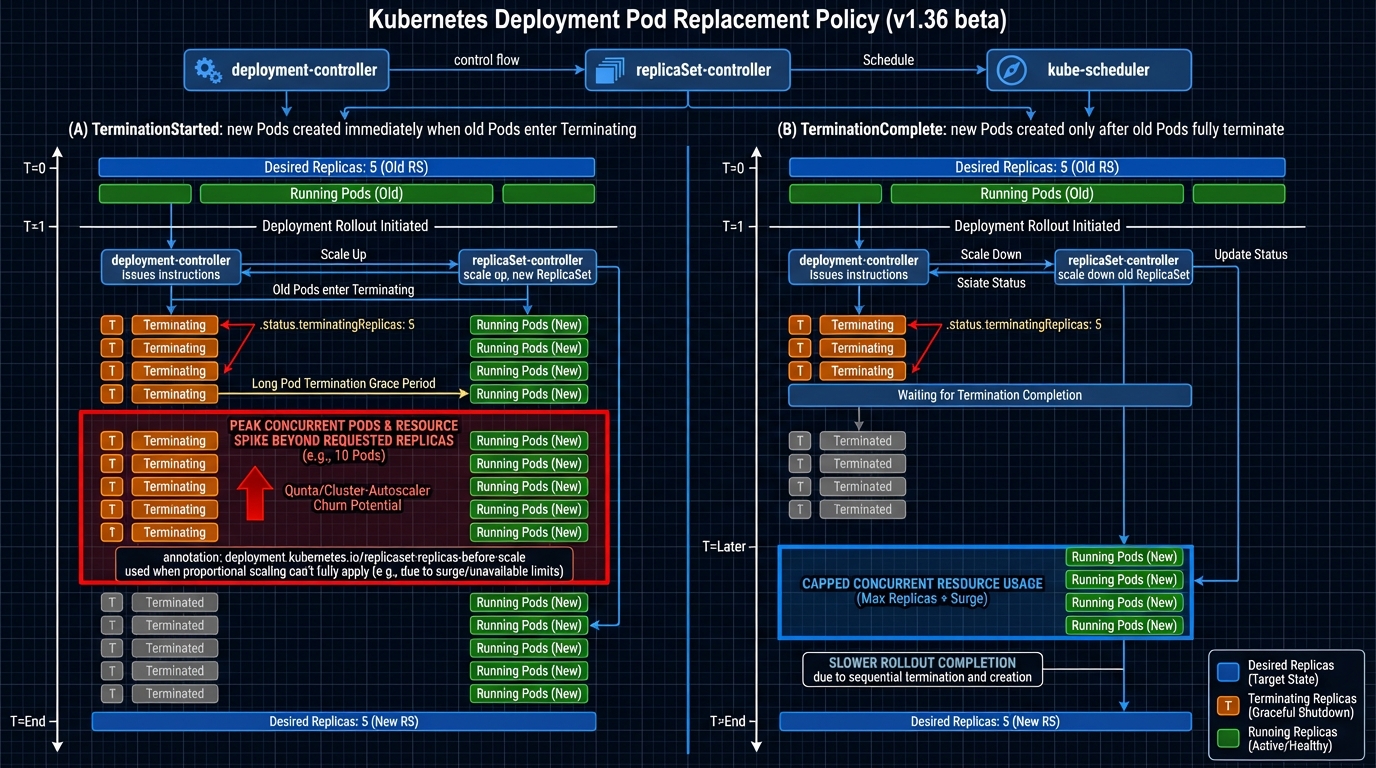
The thing nobody mentions is that Kubernetes has always made a choice here, it just hid the choice behind controller behavior. This feature makes you pick, explicitly, when the Deployment controller can create replacement Pods while old Pods still terminate.
Two policies show up in the implementation text:
- TerminationComplete: the controller waits until old Pods fully disappear, then it creates replacements. You trade speed for a stable headcount. If you run tight on quota or your autoscaler reacts like it’s on dial-up, this policy usually hurts less.
- TerminationStarted: the controller can create replacements as soon as termination starts. You get faster rollouts, but you also accept a resource spike window. If your cluster already runs hot, that spike window will show up as Pending Pods, node scale-outs, or both.
Why did they add this now. Because operators run clusters with less slack than they used to, and managed platforms punish transient spikes harder than marketing slides admit. I do not trust “it’s just a transient” in any environment with strict quota.
terminatingReplicas: the status bit that makes “done” less wrong
This bit bit me before. Our deployment automation declared success, traffic shifted, and we still had old Pods draining connections for minutes. We treated it as a fluke. It wasn’t.
The work around this feature adds explicit tracking for terminating replicas so you can see “new Pods ready” and “old Pods still dying” as two separate realities. That matters if you gate downstream steps on rollout completion, like running migrations, flipping feature flags, or scaling down a canary ReplicaSet.
If your tooling equates “updatedReplicas matches desired” with “safe to proceed,” go audit it. Today.
How I would test this (beta) without torching a real cluster
I would not start in prod. I would not start in my main staging cluster either, unless I enjoy surprise capacity events. I’d wait a week after beta drops, then test on a throwaway cluster, probably kind.
Test setup, in human terms:
- Create a disposable cluster: use a Kubernetes version that contains the feature you want to test (for v1.36.0-beta.0, wait until the kind node image actually exists).
- Enable the feature gate on control plane components: you typically need to touch kube-apiserver and kube-controller-manager. The exact flag names depend on kubeadm versus static manifests versus a managed control plane. Verify gate names against docs for your exact minor version.
- Deploy a “bad shutdown” workload: add a preStop hook that sleeps for a while, set a long terminationGracePeriodSeconds, and include a finalizer if you want to simulate the worst case. Then you can watch the controller behavior instead of guessing.
Then apply the new field on a Deployment (once your API server accepts it) and run both policies back-to-back so you can compare behavior under the same load and the same termination delay.
Red flags I would watch for (because I do not trust controllers)
Here’s what I’d tail in a canary environment before I let anyone flip this on widely. If you see these, stop and dig. Do not “just rerun the pipeline.”
- Repeated scale events with no progress: the deployment controller loops, emits scale events, and nothing changes. That smells like proportional scaling and annotation bookkeeping getting weird.
- Rollouts that look stuck under TerminationComplete: you probably have Pods that never finish terminating. Look for hung finalizers and preStop hooks that wait on dependencies that already went away.
- Quota alarms and autoscaler churn under TerminationStarted: you see a sudden wave of Pending Pods, scheduling failures, node scale-outs, then slow stabilization. That’s the resource spike window in real life, not in a diagram.
- Tooling that “finishes” early: anything that proceeds just because updated replicas match desired replicas. That logic will produce false positives more often once terminating replicas become visible.
Grudging recommendation
They added a knob because people kept getting burned. That part I respect.
If you run close to quota, start with TerminationComplete in a canary cluster and measure how long terminations really take. If you have plenty of headroom and your workloads exit fast, you can try TerminationStarted, but set alerts for Pending Pods and quota usage first. And yes, I would still wait a week after the beta drops. Why rush it.
Other stuff in this release train: more tests, some docs updates, controller refactors, the usual. There’s probably a better way to test this, but…
🔍 Free tool: K8s YAML Security Linter — paste any Kubernetes manifest and instantly catch security misconfigurations: missing resource limits, privileged containers, host network access, and more.
🛠️ Try These Free Tools
Paste your Kubernetes YAML to detect deprecated APIs before upgrading.
Plan your upgrade path with breaking change warnings and step-by-step guidance.
Compare EKS, GKE, and AKS monthly costs side by side.
Track These Releases