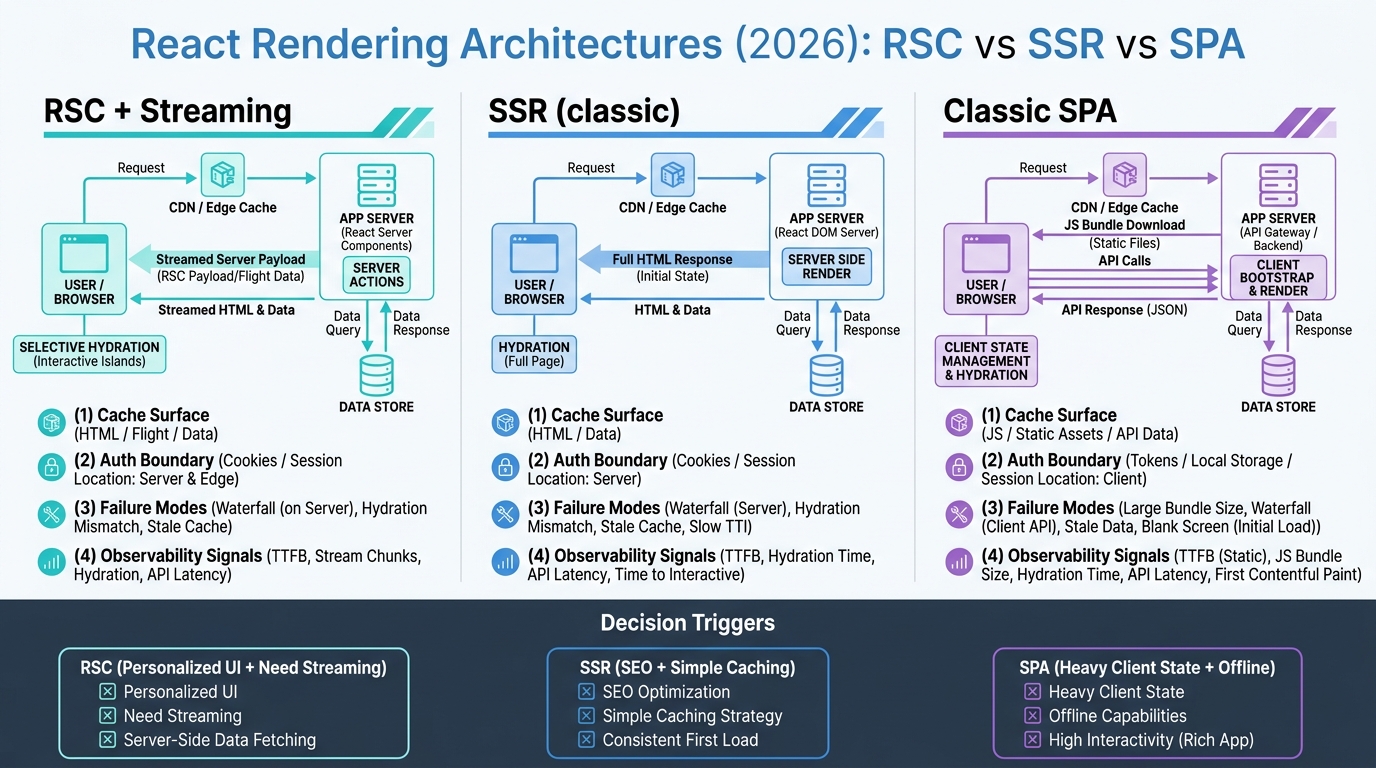
In 2026, “React” isn’t a single architecture choice. You can ship a classic client-rendered SPA, you can do SSR the 2018 way, or you can adopt React Server Components (RSC) with streaming and server-only data access. The trade-offs aren’t academic: they show up in cache hit rate, auth/session correctness, edge/runtime constraints, and whether your on-call can debug production without guesswork.
Use React Server Components when you want server-side data access and streaming without paying the full “hydrate everything” tax. Use classic SSR when you want predictable HTML caching and you can keep personalization limited. Use a classic SPA when you want maximal client autonomy (offline, complex local state) and you can tolerate slower first-load and heavier bundles.
Contents
- Architecture comparison: RSC + streaming vs SSR vs classic SPA
- Caching and invalidation: what you actually key, cache, and purge
- Auth/session + data boundaries: cookies, server-only modules, and failure modes
- Observability and performance: what to measure and where it breaks
- Production readiness checklist + rollout plan
- Migration paths: SPA → SSR → RSC without rewrites
Architecture comparison: RSC + streaming vs SSR vs classic SPA
Think of these as different answers to one question: where does data fetching happen, and what do we cache? React Server Components push more work (and data access) to the server while sending less JavaScript to the browser. Classic SSR sends HTML then hydrates. Classic SPA ships code first, then fetches data from the client.
| Dimension | RSC + streaming (React Server Components) | SSR (classic React SSR) | Classic SPA (CSR) |
|---|---|---|---|
| Primary payload | Streamed “Flight” payload + HTML shell; selective hydration | HTML response (often buffered) + JS for hydration | JS bundle first; UI renders after client fetches data |
| Data fetching | Server components fetch directly (DB/services); client components fetch only when needed | Server fetch to render HTML; client may refetch after hydration | Client fetch to APIs; server is mostly JSON |
| Cache surface area | More granular: component/data-level caching + streamed segments; higher risk of cache key explosion | HTML/page-level caching is straightforward; personalization reduces hit rate quickly | Static assets cache well; API responses cache separately; UI is mostly uncached |
| Invalidation model | Tag/path-based revalidation (framework-dependent) + data-layer invalidation; easy to get stale partial UI | Purge page caches; simpler mental model | Invalidate API caches; client state invalidation via query libraries |
| Streaming behavior | First-class: progressive server render and partial UI updates | Possible but often limited by data dependencies; many apps still buffer HTML | No server streaming of UI; can do skeletons/spinners |
| Runtime constraints | Server-only modules must stay server-side; edge runtimes can restrict Node APIs; bundler boundaries matter | Fewer bundler boundary rules; still needs Node/edge constraints awareness | Mostly browser constraints; server can be any backend |
| Operational failure modes | Cache fragmentation, waterfall fetches across components, “works locally” server/client boundary leaks | Hydration mismatch, double-fetch, slow TTFB under personalization | Large JS, slow first interaction on low-end devices, API chatiness |
| Best fit | Personalized pages that still need speed (search, feeds, dashboards) with controlled data boundaries | Mostly public content, limited personalization, SEO needs, simple cache strategy | Highly interactive apps, offline-ish UX, heavy client state, long-lived sessions |
If you want the longer operational version of this argument, see: React Server Components in production (2026): caching, streaming, and debugging.
Caching and invalidation: what you actually key, cache, and purge
Caching is where architecture decisions become billing decisions. The question isn’t “does it support caching?”; it’s “what are the cache keys, and how often do they explode?”
RSC caching: cache keys tend to multiply
With React Server Components, you often end up caching at least three layers:
- Static assets (easy, same as everywhere)
- RSC/Flight payloads (depends on route + params + headers/cookies that influence output)
- Data fetches (server-side fetch/DB calls; often cached by the framework or your own layer)
Operationally, the sharp edge is implicit cache variation: cookies, auth headers, geolocation headers, AB test bucketing, and even request-specific headers can silently become part of the cache key depending on your framework. That’s how teams think they have a CDN-hit-heavy app and then discover every request is effectively uncacheable.
Use explicit cache policy and explicit variation:
// Pseudocode-style patterns you should enforce
// (Exact APIs vary by framework)

// 1) Public, cacheable fetch with tags for invalidation
export async function getCatalog() {
  return fetch("https://api.example.com/catalog", {
    // cache: "force-cache",
    // next: { tags: ["catalog"], revalidate: 300 }
  }).then(r => r.json());
}

// 2) Personalized fetch: mark as non-cacheable
export async function getUserHome(userId: string) {
  return fetch(`https://api.example.com/users/${userId}/home`, {
    // cache: "no-store"
  }).then(r => r.json());
}
For invalidation, prefer tag-based invalidation when the output is reused across routes. Prefer path-based invalidation when the cached unit is literally “this page”. Mixing both without a policy is how you get stale UI wedges that only reproduce for certain accounts.
SSR caching: simpler keys, but personalization kills hit rate
Classic SSR makes the cache unit obvious: HTML for /some/path. You can cache at CDN with standard headers and purge by URL. The catch is personalization: the moment HTML output varies by user/cookie, you either:
- Stop caching HTML entirely, or
- Start varying by cookie (cache fragmentation), or
- Split the page into public SSR + client-side personalized islands
SPA caching: assets are easy; your APIs become the problem
Classic SPAs do well on CDN caching for bundles and static assets. Most of your performance work shifts to:
- API caching (HTTP caching semantics or edge caching)
- Client cache correctness (React Query/SWR invalidation discipline)
- Reducing API roundtrips (batching, denormalized endpoints, GraphQL persisted queries)
Auth/session + data boundaries: cookies, server-only modules, and failure modes
The real RSC learning curve is not JSX—it’s where code is allowed to run, and what state is safe to assume.
Server-only modules: enforce the boundary or you’ll leak secrets
In an RSC world, you’ll typically have modules that must never reach the client bundle (DB clients, internal service tokens, admin credentials). Treat “server-only” as a build-time contract, not a convention.
// server/db.ts
// This module must never be imported by a client component.
import "server-only";
import { Pool } from "pg";

export const pool = new Pool({ connectionString: process.env.DATABASE_URL });
Common failure mode: a shared utility file imports a server-only module, then a client component imports that utility “just for a type” and the bundler pulls in something it shouldn’t. Fix it with hard separation: server/ vs client/ entry points, and lint rules that forbid cross-imports.
Cookies and sessions: design for modern browser constraints
If your auth relies on third-party cookies (embedded apps, cross-site iframes, SSO flows that bounce across domains), 2026 browser behavior will force work. Plan around:
- SameSite rules (defaults that break cross-site flows)
- Partitioned cookies (CHIPS) for some embedded use cases
- Storage Access API for iframe access in some scenarios
- FedCM for certain identity provider patterns
React Server Components intensify this because server renders often depend on cookies. If the cookie isn’t sent, your server output silently becomes “logged out” while the client believes it’s logged in (or vice versa), and you get flicker plus incorrect caching.
Practical rule: if a cookie controls server output, treat the route as personalized and non-cacheable unless you have a deliberate variation strategy. Then test those flows under third-party-cookie-restricted modes.
For browser-side changes and mitigation patterns, keep this playbook handy: Chrome third-party cookies deprecation (2026) migration playbook.
Data-fetching boundaries: avoid RSC waterfalls
RSC makes it easy to scatter data fetching across components. That’s productive until it becomes a serial fetch chain (waterfall) that murders TTFB and streaming usefulness.
Patterns that prevent this:
- Hoist data dependencies to the route/layout level when multiple children need the same entity.
- Batch server calls (one query to fetch related entities) when the DB is the bottleneck.
- Use concurrency intentionally (start fetches early, don’t await too soon).
// Pseudocode: start fetches early to preserve concurrency
export default async function Page({ params }) {
  const userPromise = getUser(params.id);
  const feedPromise = getFeed(params.id);

  const [user, feed] = await Promise.all([userPromise, feedPromise]);
  return <Dashboard user={user} feed={feed} />;
}
Observability and performance: what to measure and where it breaks
RSC + streaming changes what “slow” looks like. A page can have a great TTFB but still feel broken if the stream stalls, or if hydration blocks input.
Minimum signals to instrument (per architecture)
| Signal | RSC + streaming | SSR | SPA |
|---|---|---|---|
| Server timing | TTFB + time-to-first-chunk + stream completion time | TTFB + render time | API latency (server) matters more than HTML timing |
| Client vitals | INP + hydration duration + long tasks during navigation | INP + hydration duration (usually larger) | LCP/INP heavily tied to bundle size + client fetches |
| Error classes | RSC payload errors, server action errors, boundary violations | Hydration mismatch, SSR render exceptions | Chunk load failures, API errors, client state bugs |
| Tracing | Trace across server render → data fetches → stream flush | Trace SSR render → data fetches | Trace APIs + client spans for route transitions |
What breaks in production first
- Streaming stalls behind proxies/CDNs: misconfigured buffering, compression issues, or timeouts can turn “streaming” into “buffer then dump.” Validate with real edge/CDN configs.
- Cache correctness bugs: accidental caching of personalized output, or unbounded cache variation.
- Hydration and interactivity regressions: RSC reduces hydration, but client islands can still block input if you ship too much JS.
- Edge/runtime incompatibilities: Node APIs not available on edge runtimes, subtle differences in fetch behavior.
React streaming behavior is tied to your Node/runtime and framework versions. Keep your runtime choice deliberate: Node 20 vs 22 vs 24: which Node.js LTS should you run in production?
When to Use React Server Components vs SSR vs Classic SPA
This is the production decision framework. Pick the architecture that matches your dominant constraints, not the one with the nicest demo.
Choose React Server Components when…
- You need personalized UI but still want strong performance without shipping tons of JS.
- Your backend access belongs on the server (DB, internal services) and you want fewer “BFF” endpoints.
- You can enforce server/client module boundaries (lint + code organization) and you’re willing to invest in tracing streaming behavior.
- You can tolerate more complex caching rules in exchange for better UX under personalization.
Choose classic SSR when…
- The app is mostly public content with limited personalization.
- You want boring caching: page-level CDN caching, purge by URL, predictable keys.
- You prefer a simpler mental model for on-call and debugging.
Choose a classic SPA when…
- You need heavy client-side state, offline-ish flows, or complex interactions that don’t map cleanly to server-driven UI.
- Your team already has mature API performance, caching, and client state management discipline.
- You can afford bundle optimization work and want to decouple frontend deploys from backend render behavior.
If you’re evaluating broader frontend direction (not just React architectures), this guide is a good cross-check: modern frontend framework guide: Vue, Angular, and React compared (2026).
Migration Path / Getting Started
Most teams shouldn’t “rewrite to RSC.” Migrate by isolating risks: caching, auth, and observability.
Step 1: Stabilize your runtime + dependency upgrade cadence
- Pick a Node LTS and standardize it across dev/CI/prod.
- Track React + framework release notes that affect streaming, fetch caching semantics, and server actions.
- Keep TypeScript current enough to avoid tooling drag during architectural refactors.
TypeScript upgrades tend to land during these migrations; treat them as operational work, not a side quest: TypeScript 6.0 upgrade guide (production).
Step 2: Start with one route that benefits from streaming
Pick a route with obvious “progressive reveal” UX: search results, a feed, or a dashboard. Success criteria should be measurable:
- Lower JS shipped to the browser (bundle analyzer)
- Improved INP under real devices
- Reduced API roundtrips for first render
- No regressions in auth correctness
Step 3: Define cache policy per data domain
Write it down and make it enforceable:
- Public data: cacheable, tagged, short TTL acceptable
- User-personalized data: no-store by default, or explicit variation strategy
- Entitlements/permissions: never cached across users; avoid embedding in shared caches
Step 4: Instrument streaming and server/client boundaries
- Emit
Server-Timingfor render time, data fetch time, and first flush time. - Add traces around server render and each fetch (OpenTelemetry or your APM).
- Fail builds on forbidden imports (server-only from client).
Step 5: Roll out safely
- Ship behind a feature flag per route.
- Use canary releases with real traffic.
- Watch: cache hit ratio, origin RPS, stream completion rate, INP/LCP, auth errors.
- Have a “turn it off” plan that reverts to SSR/SPA behavior without redeploying your entire stack.
Bottom Line
React Server Components are the right 2026 default for teams that want server-side data access and faster user-perceived performance under personalization, and that are willing to treat caching and boundaries as first-class production concerns. Use classic SSR when you want predictable page caching and limited personalization. Use a classic SPA when the product is fundamentally client-driven and you’re prepared to pay the bundle/perf tax and manage API-driven state at scale.
🛠️ Try These Free Tools
Paste your dependency file to check for end-of-life packages.
Plan your upgrade path with breaking change warnings and step-by-step guidance.
Paste your Terraform lock file to check provider versions.
Track These Releases