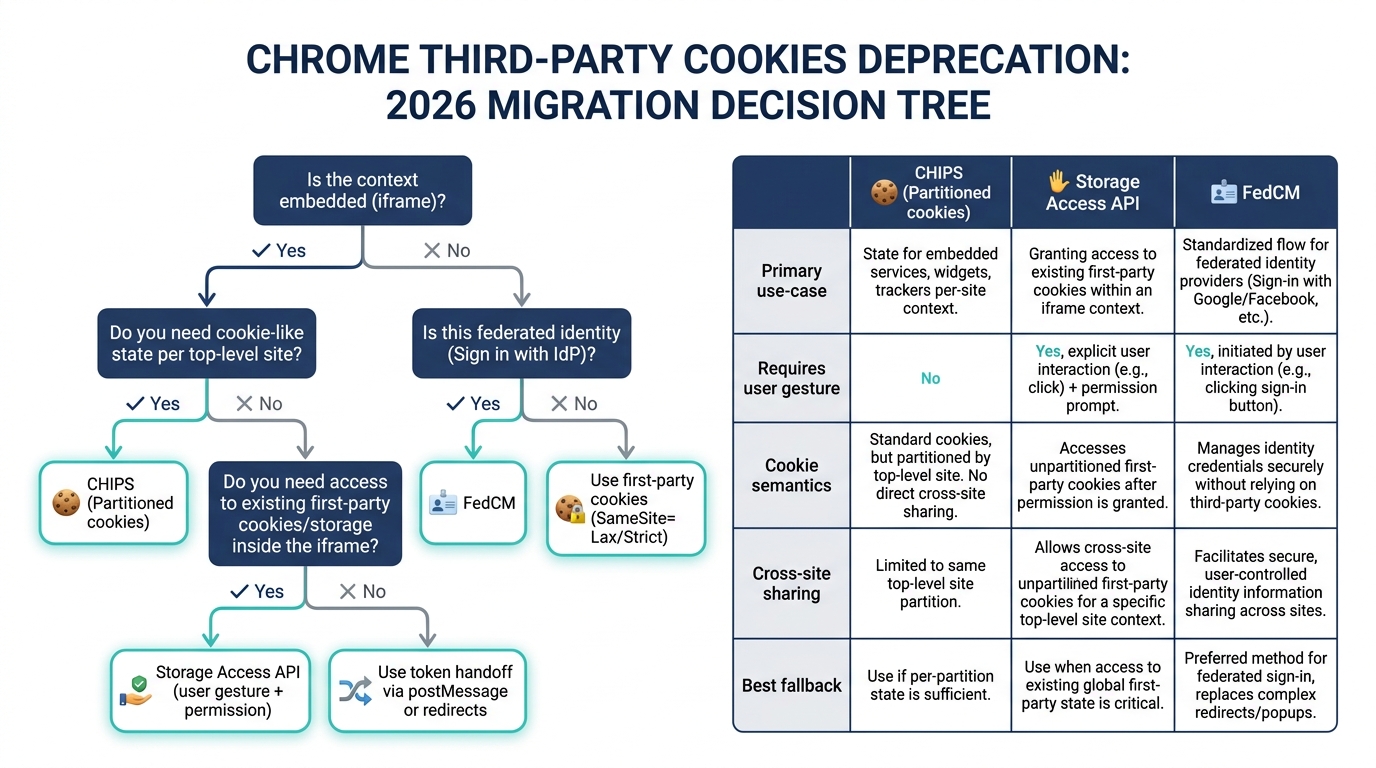
Chrome is removing third-party cookie access in normal browsing, and real production apps are the ones that feel it first: embedded SaaS, cross-site auth flows, analytics tags, payment widgets, and anything that assumed SameSite=None; Secure would keep working forever.
This playbook treats chrome third party cookies deprecation as a migration decision tree: first classify what you’re using third-party cookies for, then pick the right replacement (CHIPS, Storage Access API, or FedCM), then roll it out with controlled experiments, monitoring, and fallbacks for uneven browser support.
Contents
- The decision tree (what replaces what)
- Audit: inventory cookies and reproduce third‑party breakage
- Implementation: CHIPS (partitioned cookies) for embedded state
- Implementation: Storage Access API for embedded login/session recovery
- Implementation: FedCM for identity (stop relying on third‑party IdP cookies)
- Rollout: staged experiments, policies, monitoring, and fallbacks
- Hard edges: analytics, payments, and “it worked in Safari” traps
The decision tree (what replaces what)
The fastest way to get stuck is treating this as “replace third‑party cookies with X”. There is no single X. Use the replacement that matches the original cookie’s job.
| Use-case | What you were doing with 3P cookies | Use this now | Why |
|---|---|---|---|
| Embedded app state (iframe on many customer domains) | Keep session / preferences for widget.example when framed by customer.com |
CHIPS (Partitioned cookies) | Preserves cookie semantics but partitions by top-level site, aligning with Chrome’s model |
| Embedded login where you must read the embedded site’s first-party cookies | Iframe needs access to its own cookies that are blocked in 3P context | Storage Access API | Gated access to unpartitioned cookies/storage after user gesture/permission |
| “Sign in with X” and federated identity flows | Rely on IdP third-party cookies for silent sign-in / session discovery | FedCM | Moves account selection + assertion to a browser-mediated flow; no 3P cookies required |
| Cross-site tracking / attribution | 3P cookies for user-level tracking | Re-architect | No direct like-for-like; you’re in privacy-sandbox / first-party measurement territory |
| Payments embedded widgets | Session continuity inside iframes | Vendor-specific guidance + CHIPS/SAAPI where applicable | Often a mix of redirect flows + embedded components; test in real checkout paths |
Official references for the primitives:
- CHIPS (Cookies Having Independent Partitioned State): https://developer.chrome.com/docs/privacy-sandbox/chips/
- Storage Access API: https://developer.mozilla.org/en-US/docs/Web/API/Storage_Access_API (and Chrome behavior notes in Chrome docs / explainer)
- FedCM: https://developer.chrome.com/docs/privacy-sandbox/fedcm/
- Chrome Testing third‑party cookie phaseout: https://developer.chrome.com/docs/privacy-sandbox/test-third-party-cookie-phaseout/
Related ReleaseRun guides you’ll want open while you execute this:
Audit: inventory cookies and reproduce third‑party breakage
Step 1: export and classify cookies by job
Start with an inventory. The cookie’s name is irrelevant; its job is what matters. Make a table with at least:
- Cookie name + domain + path
SameSite/Secure/HttpOnly- Where it’s set (response header, JS, service)
- Where it’s read (server, JS, iframe)
- Context: first-party, third-party, embedded iframe, redirect, popup
- Use-case bucket: auth, embedded state, analytics, payments, feature flags, etc.
Practical extraction options:
- DevTools → Application → Cookies for manual review
- Chrome DevTools Protocol (automate in CI): use
Network.getAllCookies/Storage.getCookiesdepending on your harness - Server logs: grep
Set-Cookieheaders by domain and correlate to endpoints
Step 2: force the “no third‑party cookies” world in Chrome
You need a reliable repro. For engineering teams, “QA says embedded login is flaky” isn’t actionable. Make Chrome behave like the target state.
- Chrome settings: block third-party cookies (and verify in a fresh profile)
- Flags / test modes: follow Chrome’s official testing guidance for third-party cookie phaseout (link above). Chrome has offered different flags over time; use the ones available in your target Chrome version and document them in your repo.
- DevTools Issues panel: Chrome reports cookie deprecation / blocked cookie reasons; treat this as a build break signal during migration.
Step 3: detect breakage with DevTools like an operator
For each critical flow (login, embed load, purchase, analytics event, SSO), capture:
- Network panel: requests missing expected
Cookieheader, and responses withSet-Cookierejected - Application → Storage: cookie appears but is partitioned / not sent where expected
- Console: FedCM and Storage Access API throw explicit errors when misconfigured
- DevTools → Issues: look for third-party cookie blocking and SameSite warnings
Rule of thumb: if an iframe depends on “ambient authority” (cookies magically present), it will fail. Your fix is either to (a) partition it (CHIPS), (b) request access (Storage Access API), or (c) stop using cookies for that path (token postMessage, redirects, FedCM).
Implementation: CHIPS (partitioned cookies) for embedded state
Use CHIPS when you need cookie semantics in a third-party context, but you don’t need those cookies to be shared across all top-level sites. CHIPS gives you a different cookie jar per top-level site.
What CHIPS changes operationally
- Your widget at
https://widget.exampleembedded onhttps://customer-a.comandhttps://customer-b.comgets two separate cookie partitions. - This stops “track the user across sites” behavior by default, but preserves “keep a session for this embed on this site”.
- Debugging must include “top-level site” context because the same iframe URL behaves differently per embedding domain.
Server header example
Partitioned cookies require SameSite=None; Secure plus the Partitioned attribute.
Set-Cookie: widget_session=abc123; Path=/; Secure; HttpOnly; SameSite=None; PartitionedIf you also need a non-partitioned cookie in first-party contexts, set a second cookie scoped to first-party usage (or separate hostnames). Don’t try to make one cookie serve both worlds; it becomes impossible to reason about.
Node/Express example (TypeScript)
import type { Request, Response } from "express";

export function setWidgetSession(req: Request, res: Response) {
  // For iframe usage across sites (third-party context): CHIPS
  res.setHeader("Set-Cookie", [
    // Partitioned cookie for embedded contexts
    "widget_session=abc123; Path=/; Secure; HttpOnly; SameSite=None; Partitioned",
  ]);

  res.status(204).end();
}
React integration notes (real production gotchas)
- Always set
credentials: 'include'for fetch/XHR from the iframe if you expect cookies to be sent. - If you use multiple subdomains, align
Domain=deliberately. Partitioning is not a substitute for sloppy cookie scoping. - If the embed is behind a CDN or edge cache, ensure
Set-Cookieresponses are not cached incorrectly (or stripped).
// inside an iframe app
await fetch("https://widget.example/api/bootstrap", {
  method: "POST",
  credentials: "include",
  headers: { "content-type": "application/json" },
  body: JSON.stringify({ top: window.location.ancestorOrigins?.[0] ?? "unknown" })
});
When CHIPS is the wrong tool
- You need the same cookie across multiple top-level sites (that’s exactly what Chrome is removing).
- You’re trying to “fix SSO” by partitioning an IdP cookie. Use FedCM or explicit redirect flows instead.
- You need access to unpartitioned storage/cookies in a third-party iframe; that’s Storage Access API territory.
Implementation: Storage Access API for embedded login/session recovery
Storage Access API exists for the cases where an embedded third-party context legitimately needs access to its own first-party cookies/storage, but browsers gate it behind user interaction and permission.
Use it when:
- You embed
app.vendor.comin an iframe oncustomer.com, and the iframe needs to access the vendor’s existing login cookie that was set in a top-level visit tovendor.com. - You can tolerate a permission prompt / UX step, and you can design a “Click to continue” flow that is honest and repeatable.
Core API flow
- Check if storage access is already granted.
- If not, require a user gesture (button click) and call
document.requestStorageAccess(). - After grant, re-run the request that depended on cookies.
async function ensureStorageAccess(): Promise<boolean> {
  // Some browsers implement hasStorageAccess/requestStorageAccess.
  const docAny = document as any;

  if (typeof docAny.hasStorageAccess !== "function") {
    // No API: fall back to redirect or CHIPS-based mode.
    return false;
  }

  const has = await docAny.hasStorageAccess();
  if (has) return true;

  // Must be called from a user gesture handler in most implementations.
  try {
    await docAny.requestStorageAccess();
    return true;
  } catch {
    return false;
  }
}
React pattern: gated bootstrap
Don’t auto-spam permission prompts on load. Gate it behind a “Continue” button that explains why.
import React from "react";

export function EmbeddedBootstrap() {
  const [status, setStatus] = React.useState<"idle" | "needs-gesture" | "ready" | "fallback">("idle");

  async function bootstrap() {
    // try cookie-dependent call first if you want, or go straight to check
    const ok = await ensureStorageAccess();
    if (!ok) {
      setStatus("fallback");
      return;
    }

    await fetch("/api/me", { credentials: "include" });
    setStatus("ready");
  }

  React.useEffect(() => {
    // Don’t call requestStorageAccess here; just indicate need for gesture.
    setStatus("needs-gesture");
  }, []);

  if (status === "needs-gesture") {
    return (
      <div>
        <p>To sign you in inside this embed, we need permission to use cookies for vendor.com.</p>
        <button onClick={bootstrap}>Continue</button>
      </div>
    );
  }

  if (status === "fallback") {
    return (
      <div>
        <p>We can’t access your session in this embedded view.</p>
        <a href="https://vendor.com/login" target="_blank" rel="noreferrer">Open login in a new tab</a>
      </div>
    );
  }

  return <div>Loading…</div>;
}
Backend notes
- You’re still setting normal first-party cookies for
vendor.com. The change is: the iframe won’t see them unless access is granted. - Expect higher support variance than CHIPS. Build a deterministic fallback (top-level redirect/popup or token handoff).
Implementation: FedCM for identity (stop relying on third‑party IdP cookies)
If you operate an Identity Provider (IdP) or integrate with one, FedCM is the path that avoids third-party cookies for session discovery and sign-in prompts. It replaces the old pattern where an RP (relying party) silently loads an IdP iframe to check login state via cookies.
FedCM mental model
- The browser mediates account selection UI.
- The RP calls
navigator.credentials.get()with anidentityconfig. - The IdP provides configuration and endpoints for account lists and assertions.
- The RP receives a token/assertion and exchanges it with its backend for a session.
RP-side example (TypeScript)
type FedCMTokenResponse = {
  token: string;
};

export async function fedcmSignIn(): Promise<FedCMTokenResponse | null> {
  if (!("credentials" in navigator)) return null;

  // The exact fields depend on the FedCM spec/version; follow Chrome’s doc for your target.
  const cred = (await (navigator as any).credentials.get({
    identity: {
      providers: [
        {
          configURL: "https://idp.example/.well-known/web-identity",
          clientId: "your-rp-client-id",
        },
      ],
    },
  })) as any;

  if (!cred) return null;

  // Some implementations expose a token directly; others provide an object to send to backend.
  return { token: cred.token ?? cred.idToken ?? "" };
}
RP backend exchange pattern
Don’t try to keep the IdP token as your app session. Exchange it server-side and mint your own session (first-party cookie on the RP domain).
POST /api/auth/fedcm
Authorization: Bearer <idp_assertion_or_token>

# Response:
Set-Cookie: rp_session=...; Path=/; Secure; HttpOnly; SameSite=Lax
Operational constraints
- FedCM is built for federated identity, not for generic embedded widgets.
- Your security model shifts: tokens/assertions, replay protections, audience restrictions, and short lifetimes matter more than before.
- UX changes: you’re using browser UI, not your own iframe prompt. That’s the point.
Rollout: staged experiments, policies, monitoring, and fallbacks
Phase 0: make the behavior observable
Add instrumentation before you ship changes. You want to answer: “How many sessions fail because cookies weren’t sent?”
- Server-side counters for missing session cookie in endpoints that previously always had it (tag by user agent, embed origin, and route).
- Client-side telemetry for auth bootstrap failures (fetch
401/403, FedCM rejection, Storage Access denied). - Log
Sec-Fetch-Site,Sec-Fetch-Dest,Origin, and referer to classify first-party vs embedded vs cross-site.
Phase 1: ship CHIPS first where it fits
CHIPS is usually the least disruptive for embedded state because it preserves cookies and avoids permission prompts. Typical rollout:
- Set both legacy and partitioned cookies for a short overlap window (if you still have browsers not supporting CHIPS, or if you need rollback).
- Prefer reading partitioned cookie when present; fall back to token-based bootstrap when not.
- Document top-level-site partition behavior in your on-call runbook, because “works on one customer domain but not another” becomes normal.
Phase 2: implement Storage Access API only for the flows that require it
Don’t blanket-apply it. Use it narrowly for “embedded view needs existing first-party session”. If you can change your embed contract to avoid that (token handoff + CHIPS), do it.
Fallback patterns that actually work:
- Top-level redirect to establish first-party cookies, then return to the embedding page with a one-time code.
- Popup login (user-initiated) to your domain to set cookies, then postMessage to the iframe when complete.
- PostMessage token bootstrap: embedding page holds an app-specific token and passes it to the iframe; the iframe exchanges it server-side for its own session.
Phase 3: migrate identity to FedCM (or explicit redirect-based OAuth)
If your “silent SSO” depended on third-party IdP cookies, treat it as broken and rebuild it properly. FedCM is the browser-supported approach in Chrome; redirect-based OAuth remains the universal fallback across browsers.
Origin trials / enterprise policies
Chrome has offered origin trials and enterprise policies around third-party cookie changes in different phases. Use them for controlled rollout and to buy time for large customers, but don’t treat them as a solution.
- Track your usage: which customers depend on temporary exceptions, and when those exceptions expire.
- Keep a “no exceptions” environment in CI so you don’t regress.
Monitoring and alerting targets
- Auth bootstrap failure rate in embedded contexts
- Median time-to-interactive for embedded app (Storage Access prompts add latency)
- Checkout conversion (payments paths are where this hurts revenue)
- FedCM token exchange success/failure, and account selection abandonment
If you need a template for production-grade migration runbooks, ReleaseRun’s broader migration playbooks are a good model (different API, same operational discipline): Chrome geolocation API changes migration playbook.
Hard edges: analytics, payments, and “it worked in Safari” traps
Analytics: stop assuming third-party cookies are the identifier
If your analytics product depends on third-party cookies for cross-site identity, there’s no clean migration. The realistic options are:
- First-party analytics collection (your domain sets your cookies)
- Server-side event forwarding (CDP-style) where identity is based on first-party IDs
- Privacy Sandbox APIs where applicable (design changes, not a patch)
Payments: test real flows, not sandbox demos
Payment providers vary: some use redirects (more resilient), others embed components that previously leaned on third-party state. Your acceptance test should replay:
- New user purchase (no cookies, no saved state)
- Returning user purchase (expected remembered state)
- 3DS / SCA challenges
- Failure/abandon + resume
Safari/Firefox differences
Safari’s tracking prevention has broken third-party cookie assumptions for years. That doesn’t mean your Chrome fix automatically works there:
- CHIPS is Chrome-led; other browsers may behave differently or not support it.
- Storage Access API exists across browsers but with different UX/requirements.
- FedCM is Chrome-led; keep redirect-based OAuth as the universal fallback.
Production guidance: build a capability matrix in code (feature detect) and route users to the correct path, rather than branching on user agent strings.
Bottom Line
For chrome third party cookies deprecation migrations in real apps, the winning strategy is narrow fixes per use-case: CHIPS for embedded state that can be partitioned, Storage Access API for the subset of embeds that must reach unpartitioned first-party sessions, and FedCM for federated identity where third-party IdP cookies used to carry the flow.
Ship observability first, roll out by customer/domain with explicit fallbacks, and assume mixed browser support for the next few years. If you design the decision tree and run it per cookie/job, you’ll avoid the common trap: spending months “fixing cookies” and still having login and embeds fail in production.
🛠️ Try These Free Tools
Paste your dependency file to check for end-of-life packages.
Plan your upgrade path with breaking change warnings and step-by-step guidance.
Paste your Terraform lock file to check provider versions.
Track These Releases