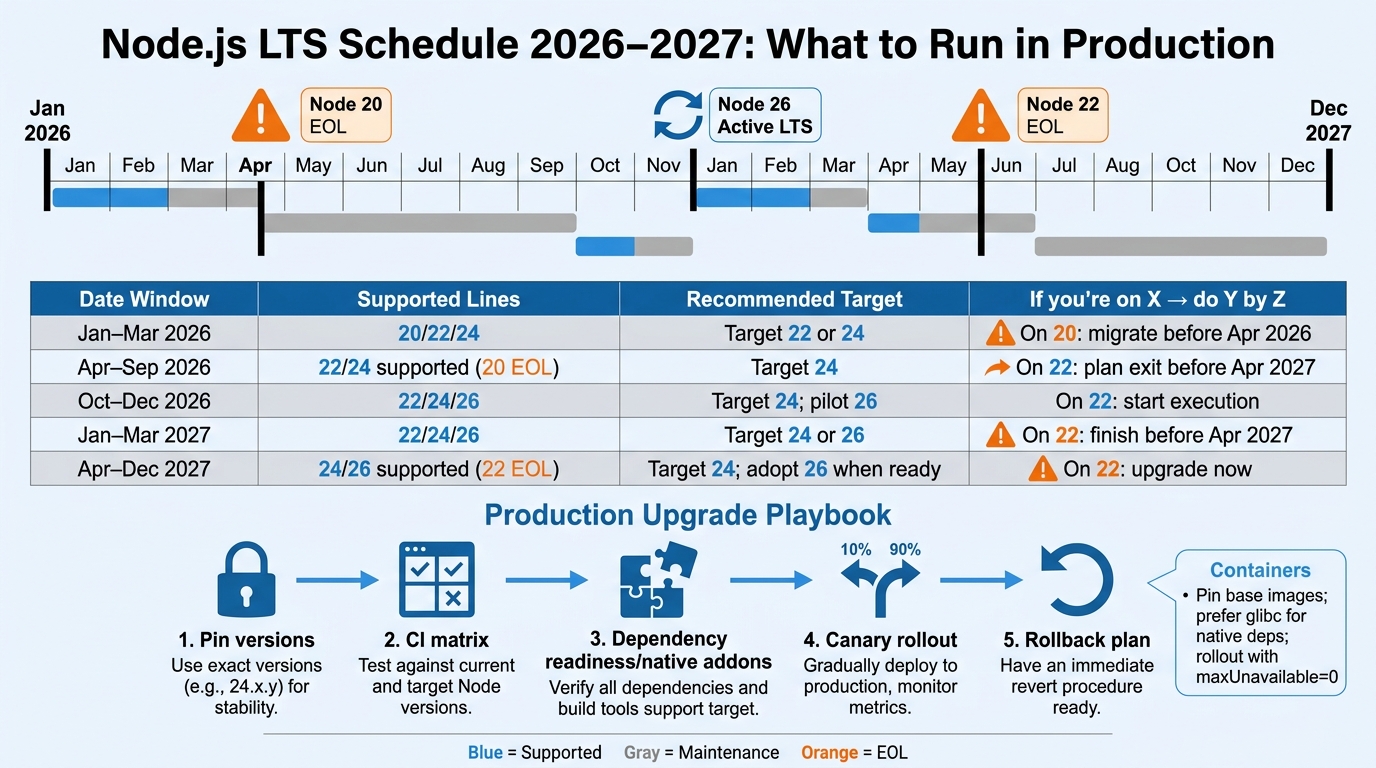
Node upgrades are never “just bump the version.” They intersect with dependency support windows, CI images, Docker base layers, and how fast your org can roll changes across services.
This guide turns the Node.js LTS schedule for 2026–2027 into an operator-friendly decision framework: what to run in production, when to move, and how to execute upgrades with predictable risk.
Contents
Node.js LTS schedule 2026–2027 (what’s supported and what to run)
Node follows a predictable release cadence: an even-numbered major ships in April, becomes Active LTS in October, then transitions to Maintenance LTS the following year, and reaches end-of-life (EOL) roughly 30 months after release.
Official sources:
- Node.js Release Working Group schedule (official): https://github.com/nodejs/release#release-schedule
- Node.js releases page (official): https://nodejs.org/en/about/previous-releases
Key dates you’ll care about
| Major | Initial release | Active LTS starts | Maintenance LTS starts | EOL | 2026–2027 status |
|---|---|---|---|---|---|
| Node 20 | Apr 2023 | Oct 2023 | Oct 2024 | Apr 2026 | EOL in 2026 → must migrate |
| Node 22 | Apr 2024 | Oct 2024 | Oct 2025 | Apr 2027 | EOL in 2027 → safe default for 2026, plan exit in 2027 |
| Node 24 | Apr 2025 | Oct 2025 | Oct 2026 | Apr 2028 | Best long runway through 2027 |
| Node 26 | Apr 2026 | Oct 2026 | Oct 2027 | Apr 2029 | Emerges in 2027 as “next target” after it stabilizes |
Practical interpretation:
- 2026 production default: Node 22 if you need stability and broad ecosystem support; Node 24 if you want longer runway and you can absorb slightly newer-runtime churn.
- 2027 production default: Node 24 for most teams; start evaluating Node 26 after it reaches Active LTS (Oct 2026) and your deps support it.
- Node 20 in 2026: only as a short-lived bridge. Treat it as an incident waiting to happen once it hits EOL in April 2026.
If you want a side-by-side on 20 vs 22 vs 24 beyond the schedule, see: Node 20 vs 22 vs 24: which Node.js LTS should you run in production.
Decision framework: “If you’re on X, do Y by Z date”
This section assumes you’re optimizing for: security patches, predictable maintenance windows, and not being the first team to discover ecosystem breakage.
Date → supported lines → recommended target
| Time window | What’s safely supportable | Recommended production target | If you’re on X… do Y by Z date |
|---|---|---|---|
| Jan–Mar 2026 | 20 (Maintenance), 22 (Maintenance), 24 (Active/early Maintenance depending on month) | Node 22 (default) or Node 24 (runway) |
On Node 20: start migration now; cut over before Apr 2026. On Node 22: you’re fine; decide if you want to skip to 24 this cycle. |
| Apr–Sep 2026 | 20 is EOL. 22 supported. 24 supported. | Node 24 for new services; Node 22 for legacy apps you’ll retire/replace. |
On Node 20: treat as out of policy; upgrade immediately. On Node 22: schedule upgrade planning for 2027 exit (EOL Apr 2027). |
| Oct–Dec 2026 | 22 (Maintenance), 24 (Maintenance), 26 (Active LTS starts in Oct 2026) | Node 24 for most; start a controlled canary of Node 26 in non-critical services. |
On Node 22: begin upgrade execution; aim to be off before Apr 2027. On Node 24: keep patching; run compatibility CI for 26. |
| Jan–Mar 2027 | 22 (Maintenance, last quarter), 24 supported, 26 supported | Node 24 (default) or Node 26 if your deps are ready and you want the longest runway |
On Node 22: finish migration before Apr 2027. On Node 24: pick a quarter to move to 26 (optional); don’t force it. |
| Apr–Dec 2027 | 22 is EOL. 24 supported. 26 supported. | Node 24 for the “stable majority”; Node 26 for teams that have validated deps + runtime behavior. |
On Node 22: out of policy; upgrade immediately. On Node 24: you’re fine through 2027; plan the 26 move when it fits. |
Choosing between Node 22, 24, and 26 in production
- Run Node 22 when you need the most conservative move off Node 20 and you can’t afford ecosystem surprises. It’s also a good “bridge” if your dependencies lag Node 24.
- Run Node 24 when you want runway through 2027 without having to revisit the decision every six months. For many orgs, this is the cleanest “set it and patch it” answer.
- Run Node 26 when you have strong automated coverage, your native addons are already compatible, and you prefer staying near the front of LTS rather than doing big-bang jumps.
If your current fleet is still on 20, read: Node.js 20 end-of-life migration playbook.
Production upgrade playbook (pinning, CI matrix, dependency checks, rollback)
The upgrade process that works is boring: pin versions, expand CI, validate dependencies, deploy progressively, and keep rollback cheap. This is the order that avoids 2 a.m. surprises.
1) Pin what you run (and make it visible)
Pick one source of truth for Node version and make it hard to drift.
- Package manager metadata: enforce engines and packageManager versions.
- Runtime file pin:
.nvmrc(nvm),.tool-versions(asdf), or Volta pinning. - CI and Docker: pin the exact major/minor for build images; pin major for runtime images if you accept patch drift.
Example package.json:
{
  "engines": {
    "node": ">=24 <25"
  },
  "packageManager": "pnpm@9.12.0"
}
Example .nvmrc:
24.6.0
Example Volta pin:
volta pin node@24.6.0
volta pin pnpm@9.12.0
Make version drift obvious in your README and dashboards. If you want badges that reflect runtime health, see: how to add version health badges to your project.
2) Expand CI to a version matrix (without doubling your compute bill)
During migration, test current + target in CI. Don’t run every workflow on every version; reserve the full matrix for unit/integration, and keep lint/typecheck single-version.
GitHub Actions example (unit + integration on 22 and 24):
name: test
on:
  push:
  pull_request:

jobs:
  test:
    runs-on: ubuntu-latest
    strategy:
      fail-fast: false
      matrix:
        node: [22, 24]
    steps:
      - uses: actions/checkout@v4
      - uses: actions/setup-node@v4
        with:
          node-version: $undefined
          cache: 'pnpm'
      - run: corepack enable
      - run: pnpm install --frozen-lockfile
      - run: pnpm test
      - run: pnpm test:integration
CI goal state after the cutover:
- Primary pipeline runs only on the production version (fast feedback).
- A scheduled job runs weekly on “next LTS” (find ecosystem breakage early).
3) Dependency readiness checks (especially native addons)
Most Node LTS upgrades fail for one of three reasons:
- Native addons (node-gyp, prebuilds, N-API/ABI mismatches)
- Framework/runtime coupling (Next.js/Nest/Express middleware assumptions, OpenTelemetry versions)
- Tooling chain (TypeScript, ESLint, Jest/Vitest, ts-node, SWC, Babel)
Use a repeatable checklist:
- Inventory runtime-sensitive packages:
npm lsfor known native deps (bcrypt, sharp, canvas, sqlite, grpc, etc.). - Read each dependency’s supported Node range in release notes / package metadata.
- Run your integration suite against the target Node version in CI and in a container that matches prod libc (glibc vs musl matters).
Quick commands that actually help:
# Show packages with engine constraints (best-effort; not all packages declare them)
npm view your-dep engines

# Find native modules in node_modules (heuristic)
find node_modules -name binding.gyp -o -name "*.node" | head

# Rebuild native deps for the current environment
pnpm rebuild
4) Upgrade in production with a canary + fast rollback
A runtime upgrade should be treated like any other high-risk change: canary first, observe, then ramp.
Baseline plan:
- Build once for each Node line you deploy (don’t compile on the node in prod).
- Canary release 1–5% of traffic to the new runtime for one full business cycle.
- Ramp to 25% / 50% / 100% with explicit SLO gates (p95 latency, error rate, memory RSS, GC pauses).
- Rollback by switching the Deployment/Service selector or image tag back. Avoid “roll back by hotfix” under pressure.
Operator tip: if your Node process is close to memory limits, a major upgrade can change GC behavior enough to trigger OOMKilled. Watch RSS and heap, not just latency.
Docker/Kubernetes implications (base images, distroless/glibc, rolling upgrades)
Most “Node upgrade” incidents in containerized environments are really base-image incidents: libc differences, OpenSSL changes, CA bundle issues, or native module builds that don’t match the runtime container.
Pin your build and runtime images intentionally
Recommended pattern:
- Builder image: Debian-based Node image (glibc) for broad compatibility.
- Runtime image: distroless (glibc) when you can, or slim when you need shell tooling for debugging.
Multi-stage Dockerfile example (Node 24, distroless runtime):
# syntax=docker/dockerfile:1
FROM node:24.6.0-bookworm-slim AS build
WORKDIR /app

# Install deps
COPY package.json pnpm-lock.yaml ./
RUN corepack enable && pnpm install --frozen-lockfile

# Build
COPY . .
RUN pnpm build

# Runtime
FROM gcr.io/distroless/nodejs24-debian12
WORKDIR /app
COPY --from=build /app/dist ./dist
COPY --from=build /app/node_modules ./node_modules
COPY --from=build /app/package.json ./package.json

ENV NODE_ENV=production
CMD ["dist/server.js"]
Notes:
- glibc vs musl: Alpine-based Node images use musl. Native deps often publish glibc prebuilds first (or only). If you run Alpine, expect to compile more often and debug weird edge cases.
- Distroless trade-off: great for minimizing attack surface; worse for live debugging. Solve with a debug image or ephemeral debug containers.
- Pinning strategy: pin builder to an exact patch (reproducible builds). For runtime, either pin patch as well or accept patch drift and rely on regular rebuilds.
Kubernetes rolling upgrades: avoid mixed-runtime surprises
Kubernetes makes it easy to run old and new pods side-by-side. That’s also how you end up with subtle protocol and cache inconsistencies if you aren’t careful.
Rules that keep rollouts predictable:
- Keep wire formats stable: don’t couple runtime upgrade with a breaking API change.
- Use backward-compatible cache/session formats: if you serialize objects, validate deserialization across versions.
- Set explicit rollout parameters: don’t let default rolling updates hammer your DB.
Deployment snippet (safe-ish defaults):
strategy:
  type: RollingUpdate
  rollingUpdate:
    maxSurge: 25%
    maxUnavailable: 0
minReadySeconds: 10
progressDeadlineSeconds: 600
Health checks matter more during runtime upgrades because startup times and memory profiles can shift:
readinessProbe:
  httpGet:
    path: /ready
    port: 3000
  initialDelaySeconds: 5
  periodSeconds: 5
livenessProbe:
  httpGet:
    path: /healthz
    port: 3000
  initialDelaySeconds: 20
  periodSeconds: 10
CI/CD and image build pipelines
During a Node LTS transition, your CI/CD system becomes part of the compatibility surface area: buildkit versions, caching, and multi-arch builds can all change output.
If you’re standardizing container-native delivery, see: container-native CI/CD pipelines: building, testing and deploying with Docker and Kubernetes.
If your org is still deciding where Kubernetes is worth the operational cost (especially for 2026+), this rubric is useful: Docker vs Kubernetes production decision rubric (2026).
Bottom Line
For the 2026–2027 window, treat the Node.js LTS schedule as a maintenance calendar, not trivia.
- If you’re on Node 20: move to Node 22 or 24 before April 2026. Past that date you’re running an EOL runtime.
- If you’re on Node 22 in 2026: schedule the next upgrade and be off it before April 2027. Node 24 is the cleanest target for most teams.
- If you’re choosing a baseline for 2027: run Node 24 unless you have the automation and dependency readiness to adopt Node 26 after it stabilizes in Active LTS.
Execution matters more than the version number: pin versions, run a CI matrix during migration, validate native deps in a production-like container, roll out with canaries, and keep rollback cheap.
🛠️ Try These Free Tools
Paste your Kubernetes YAML to detect deprecated APIs before upgrading.
Paste a Dockerfile for instant security and best-practice analysis.
Paste your dependency file to check for end-of-life packages.
Track These Releases