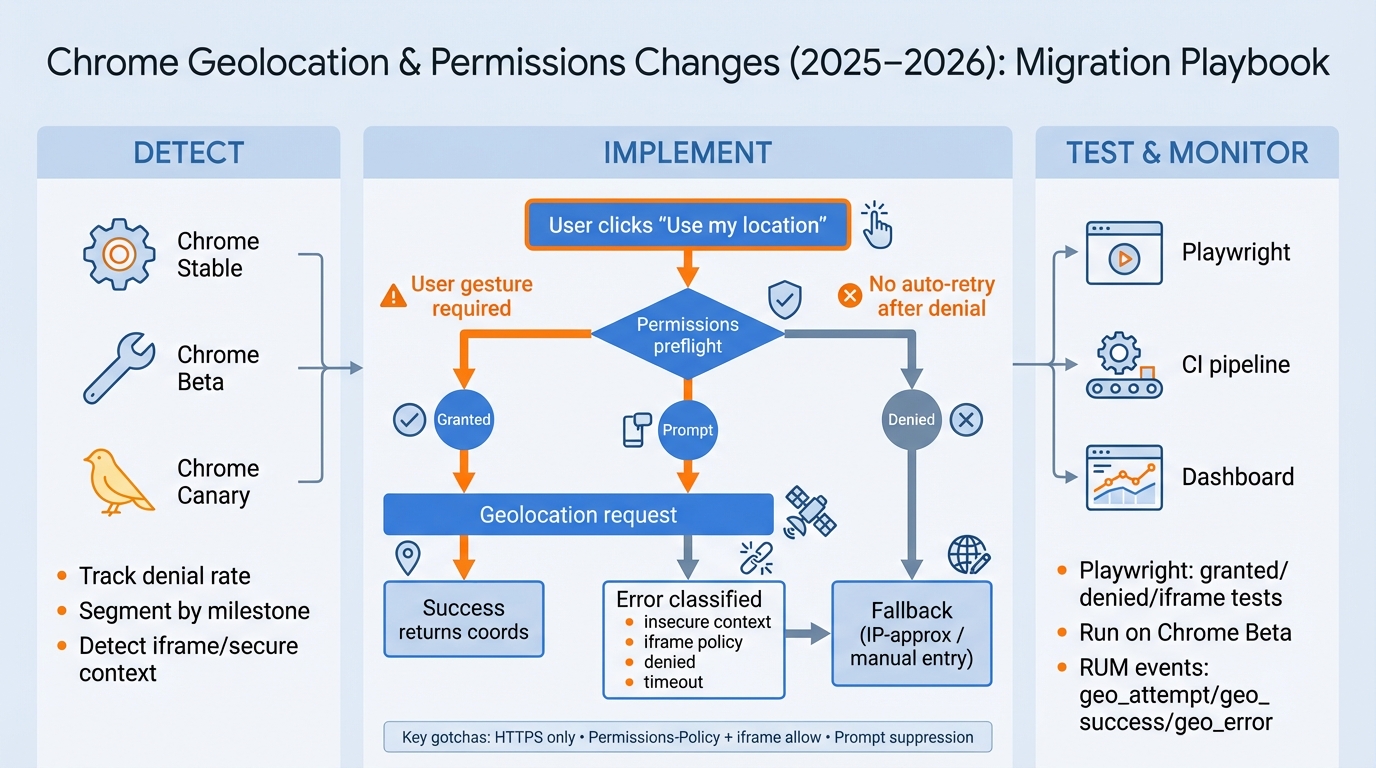
Chrome Geolocation Changes (2025–2026): Keep Location Working in Production
I’ve watched “Use my location” buttons fail overnight after a Chrome update, and the logs showed nothing.
The user clicked, the UI spun, and your app quietly fell into PERMISSION_DENIED because Chrome decided the prompt should not appear.
The one change that saves most teams
Put geolocation behind a click.
If you call navigator.geolocation.getCurrentPosition on page load, you’re gambling on prompt UX that Chrome keeps tightening.
- Do this: Render results with no location (or coarse IP), then show a clear “Use my location” CTA that runs inside a click handler.
- Not this: Auto-request on mount, retry on every render, or “helpfully” call geolocation from an invisible iframe.
If you do only one thing: require a user gesture and build a real fallback. That’s the whole game.
What actually breaks in Chrome (and why it surprises teams)
The API still works.
Chrome breaks your assumptions about when it will show a permission prompt, and it enforces embedding policy harder than your staging environment ever did.
- Prompt eligibility changed: A call without obvious user intent can fail even though your code “looks fine.” Treat “prompt will pop” as a broken contract.
- Dismissals matter: Users who dismiss prompts repeatedly often end up in quieter UI patterns, and your next request looks like spam.
- Embedded contexts bite: An iframe can look “trusted” in your head and still fail because policy gates location.
- Error code 1 is overloaded: PERMISSION_DENIED can mean user denial, insecure context, iframe policy, or prompt suppression. Your app must separate those.
Detect breakage early (Stable is too late)
Stable makes incidents.
Beta makes fixes, Canary makes warnings, and your users will span multiple Chrome versions for months whether you like it or not.
- Track release channels: Run scheduled checks on Chrome Beta at minimum, so you see behavior shifts before customers do.
- Define “breakage” as metrics: Track geo success rate, PERMISSION_DENIED rate, fallback usage, and median time-to-location.
- Segment like an operator: Split dashboards by Chrome major version, Android vs desktop, and framed vs top-level.
Runtime checks that won’t lie to you (most of the time)
This bit me when an embedded widget worked in local dev and failed in production for three days.
We kept staring at Permissions API state until we finally logged the boring stuff: secure context, framed status, and the exact error path.
Use a small preflight, but do not treat it as a guarantee that a prompt will appear.
- Secure context: If window.isSecureContext is false, geolocation should fail. Log it and fall back immediately.
- Framed check: If window.top !== window, assume you need an explicit embedding contract (header plus iframe attributes).
- Feature detection: If ‘geolocation’ in navigator is false, you’re in a WebView or locked-down environment. Do not fight it.
Stop treating PERMISSION_DENIED as “user said no”
It’s not that simple.
Chrome funnels multiple failure modes into the same error code, so you need your own classification to power both UX and alerts.
- Insecure context: Show a hard fallback and fix your deployment. Users cannot fix this for you.
- Framed/policy blocked: Show “Open in a new tab” or go manual. Then fix Permissions-Policy and iframe allow settings.
- Previously denied: Stop looping. Show settings instructions and default to manual entry.
- Prompt likely suppressed: Treat it like a UX failure state, not a permission state. Offer a different path.
Implementation patterns that hold up in production
So.
You want location features that keep working even when Chrome changes the rules mid-quarter.
Pattern: user-intent CTA plus short timeout
I don’t trust “spinner until it works.”
Give geolocation 10 seconds, then fall back, because “stuck loading” looks identical to “your site is broken.”
- CTA copy: “Use my location” beats “Enable location” because it says what happens next.
- Options: Use maximumAge to avoid repeated work, use maximumAge: 0 only when you truly need fresh GPS.
Pattern: the three-tier location strategy
Most products need a place, not a coordinate.
Build a ladder: exact geolocation when users opt in, coarse IP-based approximation for initial content, and a manual textbox for everyone else.
- Exact: Geolocation API after a click, with clear UI.
- Approx: Server-side IP geo for country/region/city. Label it as approximate in the UI.
- Manual: Address, ZIP/postal code, or a map pin, whichever fits your product.
Pattern: after denial, do not loop
Chrome punishes nagging.
When a user denies, repeated programmatic re-asks often lead to suppression patterns, so your best move is to switch the UI, not spam requests.
- Show instructions: “Site settings → Location → Allow” with a link to your help doc.
- Offer a real alternative: Manual entry should sit one click away, not five.
Pattern: background tracking needs a redesign
watchPosition looks fun until it drains batteries and dies in background tabs.
If you need continuous tracking, you probably need a native app or a PWA design with explicit “tracking is active” UI and strict stop conditions.
Permissions-Policy + iframes: treat this like a deployment contract
This is where teams waste the most hours.
You fix code, you ship, and the embedded partner portal still fails because one header or one iframe attribute stayed wrong.
- Top-level page must allow it: Set a Permissions-Policy header that explicitly permits geolocation for the origins that need it.
- The iframe must request it: Add allow=”geolocation” to the iframe.
- Sandbox can block it: If you use sandbox, assume it breaks something until you prove otherwise.
Strong opinion: if location drives checkout or safety flows, don’t run it inside a cross-origin iframe. Pop it out to a first-party page.
CI tests with Playwright: the guardrail you’ll thank later
Test it.
If location affects revenue, add a Playwright test that fails the PR when you break the fallback or the embedded flow.
- Granted path: Assert your UI uses geolocation when the browser grants permission.
- Denied path: Assert you show manual entry fast, no infinite spinner.
- Iframe harness: Maintain a tiny embed test page that mirrors how partners frame your app.
RUM and rollout: ship while Chrome versions diverge
You will run mixed behavior for months.
Build feature flags so you can change UX and fallback strategy per Chrome version cohort without redeploying at 2 a.m.
- Instrument events: geo_attempt, geo_success, geo_error (with your classification), geo_fallback.
- Alert on your fault: Page on insecure-context spikes or iframe-policy spikes. Do not page on genuine user denials.
- Segment by milestone: When a Chrome change lands, you’ll see a step-function in one cohort first.
Migration checklist (copy/paste)
Print this.
Then run it in order, because debugging permission UX from a support ticket feels like eating glass.
- Move geolocation behind a user gesture: No page-load requests.
- Build a three-tier fallback: geolocation, IP-approx, manual.
- Classify failures: insecure context, framed/policy, previously denied, likely suppressed.
- Audit embeds: Permissions-Policy header plus iframe allow=”geolocation”.
- Add CI tests: granted, denied, iframe blocked/allowed. Run Beta on a schedule.
- Add RUM: track attempts, success, errors, and fallbacks by Chrome version.
- Ship flags: control CTA visibility, fallback order, and geolocation options by cohort.
Bottom line
Chrome isn’t removing geolocation. It’s removing your excuses.
Ship gesture-driven requests, treat denial and suppression as real UX states, and make iframes a contract you test, not a hope you carry into production. There’s probably a cleaner way to model all the edge cases, but this gets you out of the incident queue.
Code examples: geolocation permissions and fallback patterns
These snippets cover the patterns discussed above so you can drop them straight into your codebase.
Permissions-Policy header for iframes
# On the parent page: allow geolocation only for your own origin and a trusted embed
Permissions-Policy: geolocation=(self "https://maps.example.com")

# In the iframe tag itself:
# <iframe src="https://maps.example.com/widget"
#   allow="geolocation https://maps.example.com"
#   sandbox="allow-scripts allow-same-origin"></iframe>
If the iframe origin is not listed in both the HTTP header and the allow attribute, Chrome will silently deny the geolocation request — no prompt, no error callback, just a PERMISSION_DENIED.
Geolocation with timeout and error handling
function getLocation() {
  if (!("geolocation" in navigator)) {
    return fallbackToIP();
  }

  navigator.geolocation.getCurrentPosition(
    (pos) => {
      console.log(`Lat: ${pos.coords.latitude}, Lng: ${pos.coords.longitude}`);
      useHighAccuracyLocation(pos);
    },
    (err) => {
      switch (err.code) {
        case err.PERMISSION_DENIED:
          // Do NOT re-prompt — show manual input
          showPostcodeInput();
          break;
        case err.POSITION_UNAVAILABLE:
        case err.TIMEOUT:
          fallbackToIP();
          break;
      }
    },
    { enableHighAccuracy: true, timeout: 8000, maximumAge: 300000 }
  );
}
Playwright CI test: mock geolocation and verify behaviour
// playwright.config.ts — set a default geolocation
import { defineConfig } from "@playwright/test";

export default defineConfig({
  use: {
    geolocation: { latitude: 51.5074, longitude: -0.1278 },
    permissions: ["geolocation"],
  },
});
Feature detection snippet
// Check Permissions API before calling geolocation
async function checkGeoPermission() {
  if (!navigator.permissions) return "unknown";
  const status = await navigator.permissions.query({ name: "geolocation" });
  // status.state is "granted", "denied", or "prompt"
  return status.state;
}
Official references
- Chrome Permission Element origin trial – Chrome’s experimental inline permission element for geolocation and other APIs.
- Geolocation API on MDN – the cross-browser reference for
getCurrentPosition,watchPosition, and all option parameters. - W3C Permissions spec: Permissions-Policy integration – how Permissions-Policy headers interact with iframe allows and the Geolocation API.
Keep Reading
- Chrome Release History
- Chrome third-party cookies: what breaks, what to ship, how to test
- Chrome 144 breaks two habits: JS geolocation prompts and Topics
- Chrome 143.0.7499.40 update: the CVEs, what to do, how to verify
- Firefox 148 adds Location.ancestorOrigins. Your iframe SSO might panic.
Frequently Asked Questions
- Why is Chrome changing how geolocation works? Chrome is tightening the geolocation permission flow to require a user-visible intent gesture (like a button click) before showing the permission prompt. This prevents sites from ambushing users with location requests on page load — a pattern Chrome considers abusive. The change rolled out gradually through Chrome 143-144 and catches teams who trigger navigator.geolocation.getCurrentPosition() without a click event in the call stack.
- How do I test if my site’s geolocation still works in Chrome? Enable the Chrome flag chrome://flags/#permission-element, then test your location flow in Chrome Canary or Dev channel. Check DevTools Console for “Permissions policy violation” warnings. If your code calls getCurrentPosition() on page load or inside a timer without user interaction, it will silently fail with PERMISSION_DENIED — which looks identical to a user declining the prompt.
- What’s the fix for Chrome blocking my geolocation prompt? Move your getCurrentPosition() call into a click handler attached to a visible UI element — a “Use my location” button or a map interaction. The permission prompt will only appear when there’s a recent user gesture in the call stack. If you need location on page load for server-side rendering, use the Permissions API to check existing grants first, and only show a CTA if the user hasn’t already granted access.
- Do these geolocation changes affect Firefox and Safari too? Firefox and Safari have similar user-gesture requirements but implemented them earlier and less strictly. Safari has required user interaction for camera/mic prompts since Safari 13. Firefox added similar restrictions in 2024. Chrome’s changes are the most impactful because Chrome has ~65% browser market share, but testing across all three browsers is essential — the exact behavior differs.
Related Reading
- Chrome Third-Party Cookies: What Breaks — The privacy change affecting every web app
- Chrome 144 Ships Temporal — The new date/time API landing in browsers
- Chrome 144 Breaking Changes — JS geolocation prompts and Topics API
- How to Add Version Health Badges — Track release health in your README
🛠️ Try These Free Tools
Paste your dependency file to check for end-of-life packages.
Plan your upgrade path with breaking change warnings and step-by-step guidance.
Compare EKS, GKE, and AKS monthly costs side by side.
Track These Releases