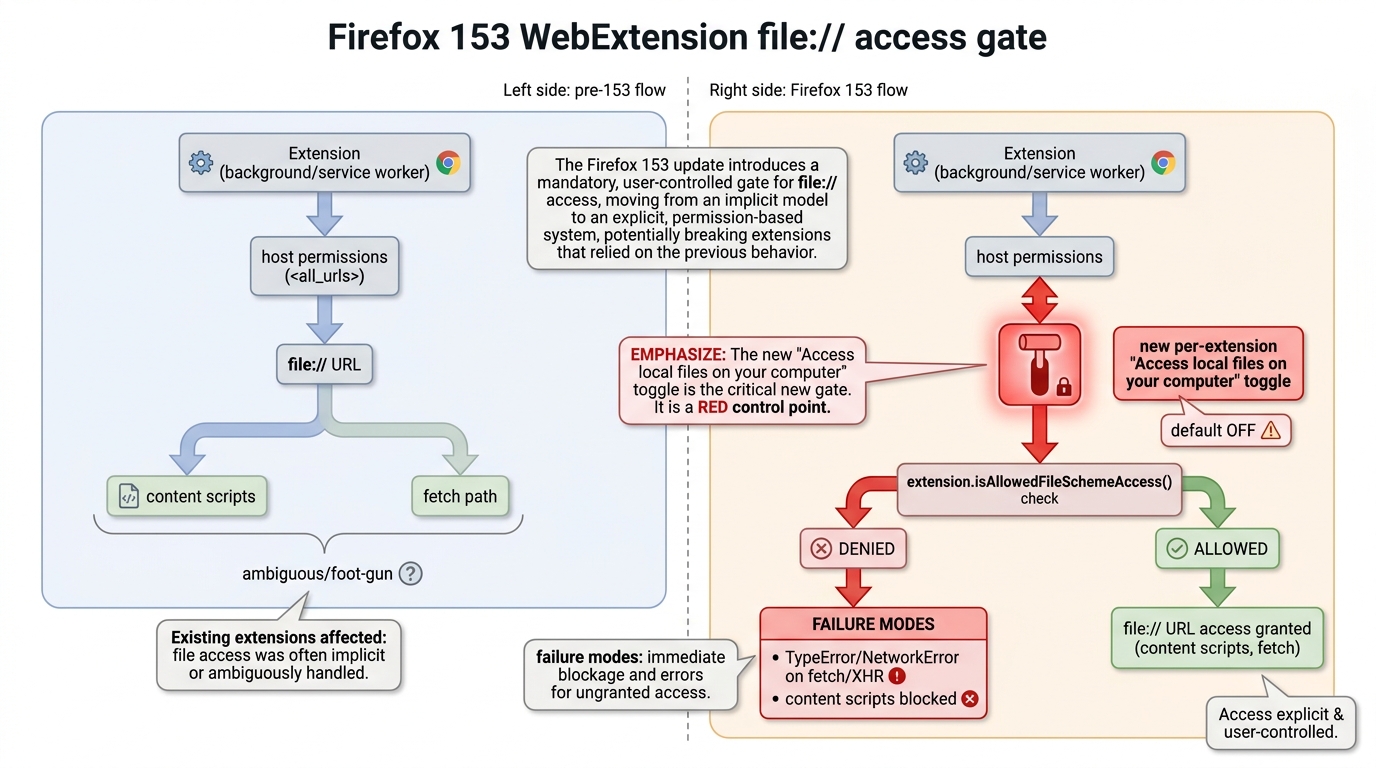
file:// the hard way. Firefox 153 flips local-file access for WebExtensions to off by default, even for extensions that already had broad host permissions. Expect silent failures, confused users, and a week of “works on my machine” debugging that ends with a toggle.WebExtensions: local files are now a first-class permission (Bug 2034168)
Mozilla finally stopped pretending that “Access your data for all websites” implicitly explains local filesystem exposure. Firefox 153 introduces a separate per-extension control: “Access local files on your computer”, and the important part is the default: OFF, including for existing extensions. That means upgrades are enough to break previously-working workflows.
So what? If your extension touches file:// URLs (reading local HTML, instrumenting locally opened docs, devtools-ish tooling, internal apps packaged as local content), your users will see failures that look like regressions. They won’t connect it to a permissions toggle unless you tell them.
API reality check: extension.isAllowedFileSchemeAccess() stops being trivia
Historically, file:// access has been a swamp: Chrome has a visible “Allow access to file URLs” style setting; Firefox had long-standing bugs and partial behavior that let teams accidentally rely on edge cases. Bugzilla threads around Bug 1266960 and Bug 1487353 read like a decade of “this is dangerous, but people depend on it.” Firefox 153 turns that into an explicit user decision.
So what? Add a startup diagnostic. If your extension needs local files, gate the feature behind extension.isAllowedFileSchemeAccess() and throw a loud, actionable UI message when it’s false. Don’t spam logs; be surgical. Your future self will thank you.
Breaking-change profile: support load, not CPU load
No shiny benchmark numbers here. The performance impact you’ll feel is human: support tickets, escalations, and engineers burning hours chasing “CORS?” “sandbox?” “regression?” when the fix is a permissions flip. The MDN 153 beta notes explicitly warn that file access is turned off by default for all extensions. That’s the change.
Mozilla is paying off architectural debt that browsers accumulated by treating local files as “just another origin” until it wasn’t convenient. The security argument isn’t academic: local-file access + content script injection + XSS somewhere else equals “read whatever the user can read.” Bug 1487353 basically spells out the mismatch: broad install-time warnings don’t communicate filesystem consequences, and the browser shouldn’t quietly allow it.
Competitively, this is also table stakes parity with Chromium’s explicit file-URL access controls. The difference: Firefox is doing it in a way that will surprise people because it changes defaults on upgrade. Correct move. Painful rollout.
Target date: Firefox 153 stable is scheduled to ship on 2026-07-21. Start testing on Beta immediately if you own extensions or internal tooling that depends on local files.
Test on Firefox 153 Beta
Install the Beta channel, then reproduce your local-file workflows (open local HTML files, local PDFs, file-based dashboards, etc.). Verify extension behavior with the toggle both OFF and ON.
What to flip / where to look
- Extension permissions UI: confirm whether “Access local files on your computer” is enabled for your extension.
- In code: use
extension.isAllowedFileSchemeAccess()and fail fast with a clear remediation message.
Red Flags (log patterns that waste your night)
- NetworkError / TypeError when attempting
fetch()/ XHR againstfile://resources. - Content scripts not running on local pages despite host permissions you swear are correct.
- User reports that “it broke after updating” where the repro involves opening saved pages from disk.
🛠️ Try These Free Tools
Plan your upgrade path with breaking change warnings and step-by-step guidance.
Paste your workflow YAML to audit action versions and pinning.
Track These Releases