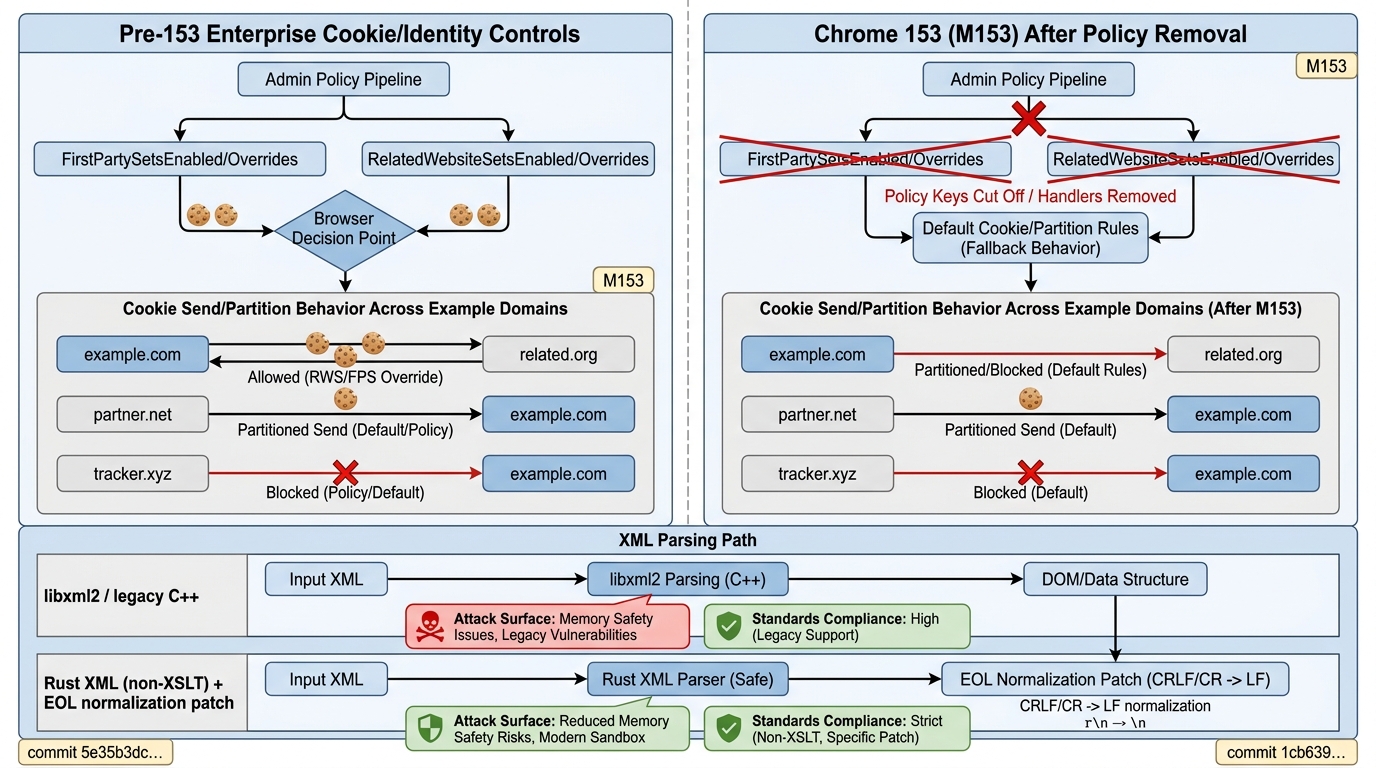
platform version release preview: the kind that shows up as a “minor” browser update and then quietly detonates your managed fleet. Chrome 153 is scheduled for 2026-09-08, and it’s the first Stable under the new two-week train—meaning your usual “wait a week, see what breaks” strategy now overlaps with the next release.
The production nightmare here isn’t users noticing a new icon. It’s your auth stack and embedded web apps behaving differently because (1) enterprise policies you depended on are getting ripped out at the milestone boundary, and (2) XML parsing is marching into a Rust implementation where standards edge-cases matter again.
RWS/FPS enterprise policies are effectively dead starting M153
Chrome 153 removes support and code for the enterprise policies behind Related Website Sets / First-Party Sets. The Chromium change explicitly marks `FirstPartySetsEnabled`, `FirstPartySetsOverrides`, `RelatedWebsiteSetsEnabled`, and `RelatedWebsiteSetsOverrides` as unsupported from M153, and deletes the corresponding handlers/tests.
So what? If you used those policies as a “last mile” control to keep multi-domain sessions alive (especially in regulated environments where third-party cookie policy is locked down), expect behavior to snap back to defaults. That’s not a warning dialog; that’s a Monday morning incident when SSO loops only for managed Chrome profiles.
Gotcha: If your rollout uses staged policy bundles, you can end up with split-brain: older Chrome honoring the knobs, M153 ignoring them. Same config. Different semantics. Enjoy the tickets.
XML parsing shifts further into Rust (and standards corner-cases stop being theoretical)
Chrome 153’s beta notes call out moving XML parsing to a memory-safe Rust implementation for common non-XSLT scenarios. Security-wise, the motivation is obvious: reduce memory-corruption risk in code that eats untrusted inputs.
The gotcha is compatibility. Chromium already had to land a patch to the Rust XML crate to restore end-of-line normalization (CRLF/CR → LF) toward XML 1.1 compliance, with added WPT coverage, while waiting on upstream review.
So what? If your web app parses XML and then does anything line-sensitive—hashing, diffing, signature checks, or brittle parsing of “XML-ish” legacy payloads—test against Beta now. XML regressions don’t show up as pretty console errors; they show up as “why did this one case-management workflow corrupt a document.”
Perf tooling: JS Self-Profiling Markers
Chrome 153 adds JS Self-Profiling Markers that annotate samples with the kind of browser work happening during sampling (script, gc, style, layout, paint, other).
So what? Teams doing real-user perf measurement can finally stop guessing whether gaps correlate to GC or layout. Teams doing automated trace diffs need to update parsers, because marker fields change the schema you ingest and the heuristics you built around “unattributed time.”
The two-week cadence is the real meta-change. Feature work didn’t magically get safer; you’re just getting less buffer between “Beta found a regression” and “Stable shipped it to your workforce.” Chrome is also paying down architectural debt in the only way that moves the needle on security bugs: memory-safety migration (Rust in parsing paths).
On the enterprise side, the policy removal reads like Chrome cutting long-tail complexity that only a subset of managed environments used—likely not worth the maintenance cost relative to the privacy/security direction. That may be defensible engineering. It’s still going to break somebody’s quarter.
Test the beta now (pick your poison):
- Install Chrome Beta on a dedicated test box (desktop). Use your usual managed-profile enrollment flow and verify policies via chrome://policy.
- For CI/browser automation, pin binaries via Chrome for Testing artifacts (so you’re not chasing auto-updates mid-run).
Red Flags to watch for in logs/telemetry:
- Auth loops after upgrade (silent cookie/partition behavior changes when policy knobs disappear).
- Policy warnings / “unknown policy” type signals in managed environments; check chrome://policy for deprecated/ignored entries.
- XML parse deltas: differences in DOMParser output when inputs contain CRLF/CR, or when downstream logic expects legacy normalization.
- Trace ingestion failures: tooling that breaks on new marker fields or shifts in sample attribution (GC/style/layout).
🛠️ Try These Free Tools
Plan your upgrade path with breaking change warnings and step-by-step guidance.
Paste your workflow YAML to audit action versions and pinning.
Compare EKS, GKE, and AKS monthly costs side by side.
Track These Releases