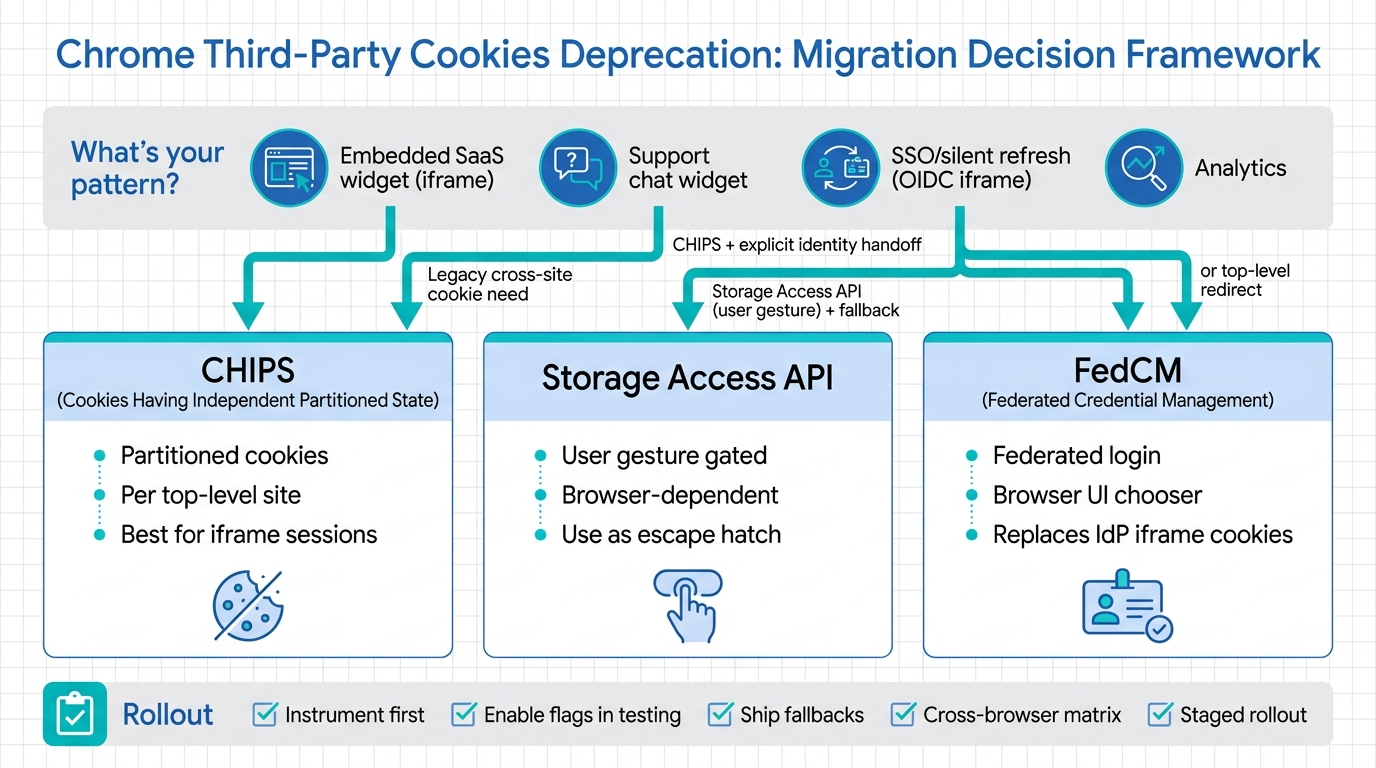
Chrome is deprecating third-party cookies. If your app depends on cookies set in an embedded iframe (SSO, widgets, chat, analytics), expect breakage: silent auth refresh fails, “remember me” disappears, and embedded experiences start prompting users at the worst possible time.
This guide is a migration decision framework for the three main replacements you’ll actually ship: CHIPS for partitioned embedded state, Storage Access API for gated unpartitioned cookie access (where allowed), and FedCM for federated login flows that previously relied on third-party cookies. You’ll get a rollout checklist, React/TypeScript snippets, and a production debugging playbook.
Contents
- What’s changing in Chrome (and what breaks)
- Decision framework: map your app pattern to CHIPS vs Storage Access API vs FedCM
- Implementation recipes (React/TypeScript): embedded auth, silent refresh, iframe messaging
- Testing + rollout checklist (flags, origin trials, fallbacks)
- Production debugging playbook (incidents you’ll hit)
- Bottom Line
What’s changing in Chrome (and what breaks)
Third-party cookies are cookies set in a different site context than the top-level page. The classic example: widget.vendor.com running inside an iframe on app.customer.com tries to read/write vendor.com cookies. With third-party cookie deprecation, that cookie access is blocked by default.
Symptoms you’ll see in real apps:
- SSO inside iframes: silent SSO checks fail; your iframe falls back to a full-page redirect or prompts users repeatedly.
- Embedded SaaS widgets (billing portal, dashboard embed): user sessions don’t persist across customers’ sites.
- Customer support chat: “logged-in user context” is lost; chat opens as anonymous unless you pass identity explicitly.
- Analytics/ad attribution: third-party identity and cross-site correlation breaks (often intentionally).
Chrome’s replacements are not “one API to rule them all.” They’re three different tools for three different problems:
- CHIPS (Cookies Having Independent Partitioned State): keep cookies in iframes, but partition them per top-level site.
- Storage Access API: request access to unpartitioned cookies/storage in a third-party context (user-mediated, browser-controlled).
- FedCM (Federated Credential Management): for sign-in with an external Identity Provider (IdP) without third-party cookies.
Primary references:
- Chrome third-party cookie phaseout (Privacy Sandbox)
- CHIPS documentation
- Storage Access API (MDN)
- FedCM documentation
If you’re tracking timelines and browser behavior changes release-by-release, keep a running watchlist. ReleaseRun’s hub page is a good place to anchor that process: Chrome releases.
Decision framework: map your app pattern to CHIPS vs Storage Access API vs FedCM
Start with one question: Do you need cross-site identity, or just embedded state?
| App pattern | What you were doing with 3P cookies | What breaks | Use this | Why |
|---|---|---|---|---|
| SSO / auth checks in a hidden iframe (OIDC “silent refresh”) | IdP relies on its cookies in third-party context | Silent refresh fails; infinite login loops | FedCM (preferred) or top-level redirect fallback | FedCM replaces the “IdP in an iframe using cookies” pattern |
| Embedded SaaS widget on customer domain (your iframe) | Your session cookie on your domain inside iframe | Session cookie blocked in iframe | CHIPS | Partitioned cookies preserve embed sessions per top-level site |
| Customer support chat widget (iframe) needing user identity | Chat vendor cookie identifies user across sites | Anonymous chat; lost continuity | CHIPS + explicit identity handoff (JWT / signed payload) from host page | Cross-site tracking is going away; pass identity intentionally |
| Embedded content that truly needs access to its unpartitioned cookies (rare) | Third-party cookie continuity across top-level sites | Continuity gone by default | Storage Access API (user gesture gates) + CHIPS fallback | Browsers may allow access after user interaction; don’t bet your UX on it |
| Analytics (3P cookies) | Cross-site identifiers | Identifiers blocked | Re-architect: 1P analytics, server-side events, Privacy Sandbox APIs (case-by-case) | CHIPS/Storage Access/FedCM aren’t analytics replacements |
CHIPS: pick this for embedded widgets that need a session
CHIPS lets a third-party set a cookie that is partitioned by top-level site. That means your iframe on customerA.com gets a different cookie jar than your iframe on customerB.com. For embedded SaaS widgets, that’s usually correct: you want a stable session within each customer’s embedding site, not cross-site tracking.
CHIPS requires setting cookies with Partitioned and also Secure (and typically SameSite=None for third-party contexts). Example:
Set-Cookie: embed_session=...; Path=/; Secure; HttpOnly; SameSite=None; PartitionedTrade-off: CHIPS doesn’t give you cross-site continuity. If your widget relied on a user being logged into your service across all embedding sites, you need a different design (usually explicit auth handoff, or top-level auth).
Storage Access API: use it only when you can tolerate a prompt/gesture flow
Storage Access API is the “ask the browser for permission to access storage” mechanism. It’s inherently a user-mediated flow (often requiring a gesture), and behavior varies across browsers. Treat it as an escape hatch for legacy flows, not as a foundation for a critical path.
Operator view: if your embed must silently authenticate, Storage Access API will disappoint you. If your embed can show a “Continue” button and users will click it, it can work.
FedCM: use it for sign-in with an Identity Provider that used third-party cookies
If you ran an IdP (or used one) that did session checks inside iframes using cookies, FedCM is the direction Chrome is pushing for federated identity. It moves the UX into a browser-mediated account chooser and reduces the dependence on third-party cookies.
FedCM is not “general embedded auth.” It’s for federated login: RP (relying party) + IdP relationship, with well-defined endpoints and flows.
If you’re updating a React app’s auth and rendering model at the same time (SPA vs SSR vs RSC), do it intentionally. Reference: React Server Components vs SSR vs SPA (2026 guide).
Implementation recipes (React/TypeScript): embedded auth, silent refresh, iframe messaging
Recipe A: Embedded SaaS widget session with CHIPS
Goal: your widget runs at https://widget.vendor.com inside an iframe on https://app.customer.com. You need a session cookie for your widget backend.
1) Set a partitioned session cookie from your widget origin:
// Express-style example
import type { Request, Response } from "express";

export function setEmbedSession(req: Request, res: Response) {
  // After you authenticate/establish a session
  const value = "session-token-or-id";

  res.setHeader(
    "Set-Cookie",
    `embed_session=${value}; Path=/; HttpOnly; Secure; SameSite=None; Partitioned`
  );
  res.status(204).end();
}
2) In the iframe app, call your session bootstrap endpoint on load:
import { useEffect, useState } from "react";

export function WidgetApp() {
  const [ready, setReady] = useState(false);

  useEffect(() => {
    (async () => {
      // Ensures cookie is set (partitioned) before API calls that require it
      await fetch("/api/embed/session/bootstrap", {
        method: "POST",
        credentials: "include",
      });
      setReady(true);
    })();
  }, []);

  if (!ready) return null;
  return <MainWidget />;
}
3) Explicit identity handoff (recommended): If you need the host page to tell the iframe who the current user is (instead of relying on third-party cookies), use postMessage with a signed payload.
Host page (customer domain) sends a signed token:
// On https://app.customer.com
const iframe = document.getElementById("vendor-widget") as HTMLIFrameElement;

function sendIdentity() {
  const payload = {
    type: "VENDOR_WIDGET_IDENTITY_V1",
    // JWT minted by customer's backend or by vendor via a backchannel
    token: window.__VENDOR_WIDGET_JWT__,
  };
  iframe.contentWindow?.postMessage(payload, "https://widget.vendor.com");
}

window.addEventListener("load", sendIdentity);
Iframe receives and exchanges token for a session:
// On https://widget.vendor.com
window.addEventListener("message", async (event) => {
  if (event.origin !== "https://app.customer.com") return;
  if (event.data?.type !== "VENDOR_WIDGET_IDENTITY_V1") return;

  const token = String(event.data.token);
  const resp = await fetch("/api/embed/identity/exchange", {
    method: "POST",
    headers: { "Content-Type": "application/json" },
    credentials: "include",
    body: JSON.stringify({ token }),
  });

  if (!resp.ok) {
    // Show a recoverable error UI; don’t infinite-loop
    console.error("Identity exchange failed", await resp.text());
  }
});
This pattern survives third-party cookie deprecation because the iframe’s session is partitioned (CHIPS), and identity comes from an explicit message rather than ambient cross-site cookies.
Recipe B: Replacing iframe-based “silent refresh” with top-level refresh + postMessage
Many OIDC SPA setups do silent refresh by loading the IdP authorize endpoint in a hidden iframe and relying on IdP cookies. That breaks.
Pragmatic replacement that works everywhere: do refresh in a top-level window (or popup) and pass the result back to the app via postMessage. Yes, it’s more UX surface area—but it’s predictable.
Open a popup for refresh:
// In your SPA
export async function refreshWithPopup(): Promise<{ accessToken: string }> {
  const url = "/auth/refresh"; // your route that performs OAuth and then postMessage back
  const w = window.open(url, "auth_refresh", "width=500,height=700");
  if (!w) throw new Error("Popup blocked");

  return await new Promise((resolve, reject) => {
    const timeout = setTimeout(() => {
      cleanup();
      reject(new Error("Auth refresh timed out"));
    }, 60_000);

    function onMessage(e: MessageEvent) {
      if (e.origin !== window.location.origin) return;
      if (e.data?.type !== "AUTH_REFRESH_RESULT") return;
      cleanup();
      resolve({ accessToken: e.data.accessToken });
      w.close();
    }

    function cleanup() {
      clearTimeout(timeout);
      window.removeEventListener("message", onMessage);
    }

    window.addEventListener("message", onMessage);
  });
}
Your /auth/refresh handler completes OAuth (server-side recommended) and returns a page that posts to the opener:
<script>
  // After your server sets first-party cookies / returns tokens
  window.opener.postMessage(
    { type: "AUTH_REFRESH_RESULT", accessToken: "..." },
    window.location.origin
  );
</script>
Recipe C: Storage Access API gated flow (with a real UX)
If you’re trying to preserve legacy behavior where an embed needs unpartitioned cookie access, implement a clear user action: “Continue” → request storage access → proceed.
import { useState } from "react";

export function StorageAccessGate() {
  const [status, setStatus] = useState<"idle" | "granted" | "denied" | "unsupported">("idle");

  async function requestAccess() {
    const docAny = document as any;
    if (!docAny.hasStorageAccess || !docAny.requestStorageAccess) {
      setStatus("unsupported");
      return;
    }

    // Some browsers require a user gesture for requestStorageAccess()
    const has = await docAny.hasStorageAccess();
    if (has) {
      setStatus("granted");
      return;
    }

    try {
      await docAny.requestStorageAccess();
      setStatus("granted");
    } catch {
      setStatus("denied");
    }
  }

  if (status === "granted") return <MainWidget />;

  return (
    <div>
      <p>To continue, this embedded experience needs access to storage.</p>
      <button onClick={requestAccess}>Continue</button>
      {status === "denied" && <p>Access was denied. Use the full-page version instead.</p>}
      {status === "unsupported" && <p>Not supported here. Use the full-page version instead.</p>}
    </div>
  );
}
Fallback strategy: if Storage Access is denied/unsupported, provide a top-level navigation to your domain to complete login and then return (or run the feature as a full-page flow).
Recipe D: FedCM integration (skeleton)
FedCM requires IdP configuration and well-known endpoints; the integration details depend on your IdP. On the RP side, the shape is generally:
// RP side (high-level skeleton)
async function fedcmSignIn() {
  // Chrome exposes navigator.credentials.get with identity options
  const cred = (await (navigator as any).credentials.get({
    identity: {
      providers: [
        {
          configURL: "https://idp.example/.well-known/openid-federation", // example; depends on IdP
          clientId: "YOUR_RP_CLIENT_ID",
        },
      ],
    },
  })) as any;

  // cred contains an assertion/token to send to your backend
  const resp = await fetch("/api/auth/fedcm/verify", {
    method: "POST",
    headers: { "Content-Type": "application/json" },
    body: JSON.stringify({ assertion: cred?.token || cred }),
  });

  if (!resp.ok) throw new Error("FedCM verify failed");
  return await resp.json();
}
Operator guidance: implement FedCM only if you control (or can influence) the IdP setup. If you can’t, the reliable fallback remains top-level OAuth redirects.
If your migration coincides with infra upgrades (Node, TypeScript, linting), avoid mixing unknowns. If you do need to upgrade TS while shipping this, keep it tight and staged: TypeScript 6.0 upgrade guide (production).
Testing + rollout checklist (flags, origin trials, fallbacks)
1) Inventory where third-party cookies are used
- Search for
SameSite=Nonecookies being set. - List every iframe embed and what it needs: session, identity, preferences, analytics.
- Identify OIDC flows that use hidden iframes (
prompt=nonepatterns).
2) Turn on breakage in test environments
Use Chrome flags and enterprise policies in dedicated test profiles to simulate third-party cookie restrictions. Keep this as a repeatable CI-ish manual runbook: same Chrome version, same profile state, same steps. Chrome’s controls and names change over time, so treat this as “verify current release settings” and anchor it to a specific Chrome version in your test plan.
Track changes and deadlines against stable releases (not blog posts). Keep a rolling update cadence: Chrome third-party cookies deprecation (2026 migration playbook).
3) Implement the replacement with explicit fallbacks
- CHIPS: set
Partitionedcookies; verify they’re actually used inside iframes; ensure HTTPS everywhere. - Storage Access API: add a visible user action; provide a full-page fallback path when denied.
- FedCM: implement behind a feature flag; keep top-level OAuth redirect as fallback.
4) Cross-browser behavior
You’re not shipping only to Chrome. Plan a matrix:
| Browser | CHIPS | Storage Access API | FedCM | Recommended fallback |
|---|---|---|---|---|
| Chrome | Yes (Chrome-led) | Yes | Yes (Chrome-led) | Top-level auth + explicit messaging |
| Safari | Varies / not equivalent | Yes (ITP-driven use cases) | No / limited | User-gesture storage access + full-page auth |
| Firefox | Varies | Yes | Limited | Full-page auth + 1P storage |
The point of this table isn’t perfection; it’s forcing you to ship a working baseline when the shiny API isn’t available. Baseline = top-level navigation for auth + explicit token handoff.
5) Rollout sequencing (how operators avoid fire drills)
- Ship instrumentation first (see next section).
- Enable CHIPS for low-risk embeds (internal customers, staging tenants).
- Roll out Storage Access gating only for legacy embeds that can tolerate a click.
- Roll out FedCM behind flags per IdP + per browser; keep fallback.
If you want a more stepwise playbook tied to Chrome’s moving timeline, use: Chrome third-party cookies deprecation migration guide.
Production debugging playbook (incidents you’ll hit)
Incident 1: “Users are randomly logged out in embedded widget”
Typical root causes:
- Cookie missing
Partitionedso it’s blocked in third-party context. - Cookie missing
Secureor incorrectSameSite. - Backend sets multiple cookies; only some updated with CHIPS attributes.
How to debug:
- Chrome DevTools → Application → Cookies. Check the iframe origin cookie jar while embedded.
- Network tab: confirm
Set-CookieincludesPartitionedon the response that establishes session. - Server logs: correlate session creation with subsequent requests missing cookies.
Incident 2: “Silent refresh loop / infinite redirects”
Typical root causes:
- OIDC library still attempting iframe
prompt=noneagainst IdP. - Your app treats “no session” as “retry silently,” causing a loop.
Fix:
- Disable iframe silent refresh in your auth client for Chrome profiles with 3P cookies blocked.
- Switch to top-level refresh (popup or redirect) and cap retries.
- Add circuit breakers: after 1 silent failure, require explicit user action.
Incident 3: “Storage Access API works on Safari but not Chrome (or vice versa)”
Why: user gesture requirements, per-browser heuristics, and differing definitions of “access.”
Fix:
- Call
requestStorageAccess()only directly inside a click handler. - If denied, route users to a full-page experience on your domain.
- Log outcomes: supported/unsupported/granted/denied, browser version, embedding origin.
Incident 4: “Embed loads, but API calls 401 in production only”
Typical root causes:
- CDN or edge strips
Set-Cookieattributes or collapses duplicate headers. - Different domains in prod (
widget.vendor.comvswidget.prod.vendor.com) causing cookie scope mismatch. - Mixed HTTP/HTTPS in some embed contexts (CHIPS requires Secure).
Fix:
- Capture raw response headers at the edge (not only origin).
- Audit cookie domain/path attributes; prefer host-only cookies unless you must share across subdomains.
- Enforce HTTPS on embed URLs; fail closed if embedded over HTTP.
Instrumentation you should add before rollout
- Client event:
third_party_cookie_blocked_detected(heuristic: auth iframe failure, missing session cookie after bootstrap, etc.). - Client event: Storage Access API status (unsupported/granted/denied).
- Server metric: ratio of requests missing expected session cookie per embedding origin.
- Correlate by: browser family/version, top-level origin, iframe origin, feature flag state.
Bottom Line
Use CHIPS for embedded widgets that need a session inside an iframe. Use FedCM when you’re replacing federated login flows that depended on third-party cookies at an IdP. Use Storage Access API only when you can tolerate a user-gesture permission flow—and always ship a full-page fallback.
The migration that survives 2026 is the one that stops relying on ambient cross-site identity. Partition what needs partitioning (CHIPS), make identity explicit (signed messages/token exchange), and keep a predictable top-level auth path for every browser.
🛠️ Try These Free Tools
Plan your upgrade path with breaking change warnings and step-by-step guidance.
Paste your Terraform lock file to check provider versions.
Compare EKS, GKE, and AKS monthly costs side by side.
Track These Releases